Please REGISTER or RENEW your account on RAPiDGATOR.net and support us by doing through all RAPiDGATOR working download links on main posts...
AlDente allows you to limit your MacBook from charging above a certain percentage. This will not only decrease Battery wear but also increase longevity of your Battery.
Features:
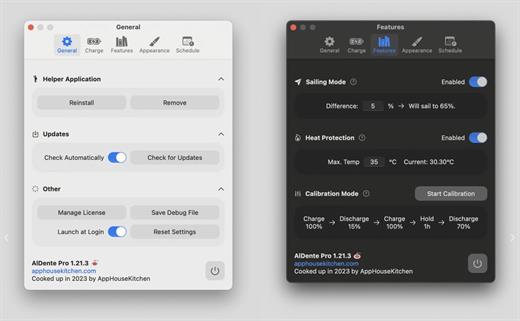
- Charge Limiter allows you to set your maximum charging percentage between 20 and 100 percent. You can either set it by using the slide bar or by typing in the desired percentage in the field above and pressing enter afterwards.
- Discharge – This feature allows your MacBook to run completely on Battery even if it is plugged in. Therefore, you can actively discharge your MacBook to a more healthy percentage. Unfortunately, while Discharge is activated, clamshell mode is not supported due to technical limitations.
What’s New All
- Added the Swedish language.
- Added the Arabic language.
- Improved support for the M5 MacBook Pro.
- Improved the Helper install and uninstall process.
- Fixed the Apple notifications appearing over the popover on macOS 26.
- Many more fixes and stability improvements.
Pro
- Added a new Status widget for the popover.
- Added graph widgets to the popover.
- Added notifications in the popover.
- Added a notification for when the external monitor charging error happens.
- Added a notification when the MacBook was overcharged on app launch.
- Added the "Lock Screen when lid closed" setting to the Sleep Behavior.
- Improved the Sleep Behavior settings, providing more clarity.
- Improved the license activation process.
- Improved the Energy Mode widget to make it more intuitive.
- Improved the change email address process.
- Moved some Sleep settings to "Show Advanced Settings" section.
- Fixed invalid email error during activation when the email was inserted with a new line.
- Fixed menubar items "jumping" when values change.
- Fixed the interruption of the Calibration Mode when the charging state was changed through the menubar right click.
- Fixed the freezing bug after frequently changing the charge limit.
- Fixed a bug when Calibration "Hold for" didn't show the time correctly.
- Fixed a bug where Energy Mode Apple Shortcuts were not automatically completed.
- Fixed the charge limit resetting back to normal after the Calibration Mode finishes.
- Fixed the Calibration time resetting back to normal after the Calibration Mode finishes.
- Fixed some Tahoe design issues.
- Fixed resetting the charge limit after the helper was reinstalled.
- Fixed menu bar icon issues when the helper is uninstalled.
- Fixed the missing power plug icon in some areas of AlDente for Intel MacBooks.
Compatibility macOS 11 or later
Apple Silicon or Intel Core processor
Release Name: AlDente Pro 1.37 fix
Size: 10.3 MB
Links: HOMEPAGE – NFO – Torrent Search
Download: RAPiDGATOR
AlDente allows you to limit your MacBook from charging above a certain percentage. This will not only decrease Battery wear but also increase longevity of your Battery.
Features:
- Charge Limiter allows you to set your maximum charging percentage between 20 and 100 percent. You can either set it by using the slide bar or by typing in the desired percentage in the field above and pressing enter afterwards.
- Discharge – This feature allows your MacBook to run completely on Battery even if it is plugged in. Therefore, you can actively discharge your MacBook to a more healthy percentage. Unfortunately, while Discharge is activated, clamshell mode is not supported due to technical limitations.
What’s New All
- Added the Swedish language.
- Added the Arabic language.
- Improved support for the M5 MacBook Pro.
- Improved the Helper install and uninstall process.
- Fixed the Apple notifications appearing over the popover on macOS 26.
- Many more fixes and stability improvements.
Pro
- Added a new Status widget for the popover.
- Added graph widgets to the popover.
- Added notifications in the popover.
- Added a notification for when the external monitor charging error happens.
- Added a notification when the MacBook was overcharged on app launch.
- Added the "Lock Screen when lid closed" setting to the Sleep Behavior.
- Improved the Sleep Behavior settings, providing more clarity.
- Improved the license activation process.
- Improved the Energy Mode widget to make it more intuitive.
- Improved the change email address process.
- Moved some Sleep settings to "Show Advanced Settings" section.
- Fixed invalid email error during activation when the email was inserted with a new line.
- Fixed menubar items "jumping" when values change.
- Fixed the interruption of the Calibration Mode when the charging state was changed through the menubar right click.
- Fixed the freezing bug after frequently changing the charge limit.
- Fixed a bug when Calibration "Hold for" didn't show the time correctly.
- Fixed a bug where Energy Mode Apple Shortcuts were not automatically completed.
- Fixed the charge limit resetting back to normal after the Calibration Mode finishes.
- Fixed the Calibration time resetting back to normal after the Calibration Mode finishes.
- Fixed some Tahoe design issues.
- Fixed resetting the charge limit after the helper was reinstalled.
- Fixed menu bar icon issues when the helper is uninstalled.
- Fixed the missing power plug icon in some areas of AlDente for Intel MacBooks.
Compatibility macOS 11 or later
Apple Silicon or Intel Core processor
Release Name: AlDente Pro 1.37
Size: 12.8 MB
Links: HOMEPAGE – NFO – Torrent Search
Download: RAPiDGATOR
AlDente allows you to limit your MacBook from charging above a certain percentage. This will not only decrease Battery wear but also increase longevity of your Battery.
Features:
- Charge Limiter allows you to set your maximum charging percentage between 20 and 100 percent. You can either set it by using the slide bar or by typing in the desired percentage in the field above and pressing enter afterwards.
- Discharge – This feature allows your MacBook to run completely on Battery even if it is plugged in. Therefore, you can actively discharge your MacBook to a more healthy percentage. Unfortunately, while Discharge is activated, clamshell mode is not supported due to technical limitations.
What’s New Version 1.35:
All
- Full redesign of the settings layout.
- Battery Health Stats and the Battery Cycles graph are now also available for all users using the free version of AlDente. Check them out in the AlDente Dashboard.
- Major stability and memory consumption improvements, especially when AlDente has been running fo a long time.
- Fixed brief spike artifacts in Dashboard graphs by smoothing short-interval outliers for a steadier view.
- Many more fixes and improvements.
Pro
- We’ve added a Power Consumption graph to the Dashboard. You can toggle between Instant usage and Average usage over the last 5, 15, or 30 minutes. There’s also a new Time Remaining estimate that updates in real time, calculated from the selected consumption window and your current charge.
- The charge limit slider is now disabled during Calibration Mode.
- Improved the license activation timeout.
- Added the modification of the charge limit through settings.
- Added an overview of available Apple shortcuts for AlDente.
- Implemented a setting to pause background updates when the AlDente Dashboard window is not in focus.
- Implemented a setting to choose which apps are displayed in the "Apps Using Significant Energy" list, depending on their energy consumption.
- Added a lower limit for the Heat Protection feature to avoid stopping the charging process below 20%.
- The Charge Limit over time is now also included in the Battery Level graph.
Compatibility macOS 11 or later
Apple Silicon or Intel Core processor
Release Name: AlDente Pro 1.35
Size: 12.1 MB
Links: HOMEPAGE – NFO – Torrent Search
Download: UPLOADGiG – RAPiDGATOR
AlDente allows you to limit your MacBook from charging above a certain percentage. This will not only decrease Battery wear but also increase longevity of your Battery.
Features:
- Charge Limiter allows you to set your maximum charging percentage between 20 and 100 percent. You can either set it by using the slide bar or by typing in the desired percentage in the field above and pressing enter afterwards.
- Discharge – This feature allows your MacBook to run completely on Battery even if it is plugged in. Therefore, you can actively discharge your MacBook to a more healthy percentage. Unfortunately, while Discharge is activated, clamshell mode is not supported due to technical limitations.
What’s New Version 1.31.1:
All
- Fixed a bug that caused the app to crash in the new setup process for users with macOS 12 or lower.
- Introducing a new and improved setup process featuring a quiz to help you find your optimal AlDente settings.
- Fixed a crash when invoking the popover in VoiceOver mode.
- Reduced AlDente's disk usage.
Pro
- When Sleep is disabled by AlDente, the screensaver now works as expected.
- Added an iOS Native style to the Menubar icon options.
Compatibility macOS 11 or later
Apple Silicon or Intel Core processor
Release Name: AlDente Pro 1.31.1
Size: 13.9 MB
Links: HOMEPAGE – NFO – Torrent Search
Download: FiKPER – NiTROFLARE – RAPiDGATOR

AlDente allows you to limit your MacBook from charging above a certain percentage. This will not only decrease Battery wear but also increase longevity of your Battery.
Features:
- Charge Limiter allows you to set your maximum charging percentage between 20 and 100 percent. You can either set it by using the slide bar or by typing in the desired percentage in the field above and pressing enter afterwards.
- Discharge – This feature allows your MacBook to run completely on Battery even if it is plugged in. Therefore, you can actively discharge your MacBook to a more healthy percentage. Unfortunately, while Discharge is activated, clamshell mode is not supported due to technical limitations.
Note:– No extra license file needed
What’s New
Version 1.27.3:
- Release notes were unavailable when this listing was updated.
Compatibility macOS 11 or later
Apple Silicon or Intel Core processor
Release Name: AlDente Pro 1.27.3
Size: 4.7 MB
Links: HOMEPAGE – NFO – Torrent Search
Download: FiKPER – NiTROFLARE – RAPiDGATOR
AlDente allows you to limit your MacBook from charging above a certain percentage. This will not only decrease Battery wear but also increase longevity of your Battery.
Features:
- Charge Limiter allows you to set your maximum charging percentage between 20 and 100 percent. You can either set it by using the slide bar or by typing in the desired percentage in the field above and pressing enter afterwards.
- Discharge – This feature allows your MacBook to run completely on Battery even if it is plugged in. Therefore, you can actively discharge your MacBook to a more healthy percentage. Unfortunately, while Discharge is activated, clamshell mode is not supported due to technical limitations.
Note:
- Firewall not needed, but updating the app will invalidate the patch
- App crashes if your Mac is a non-battery device
- If your app is not licensed, re-run License.pkg
What’s New Version 1.24:
- Release notes were unavailable when this listing was updated.
Compatibility macOS 11 or later
Apple Silicon or Intel Core processor
Release Name: AlDente Pro 1.24
Size: 5.1 MB
Links: HOMEPAGE – NFO – Torrent Search
Download: FiKPER – UPLOADGiG – NiTROFLARE – RAPiDGATOR

AlDente allows you to limit your MacBook from charging above a certain percentage. This will not only decrease Battery wear but also increase longevity of your Battery.
Features:
- Charge Limiter allows you to set your maximum charging percentage between 20 and 100 percent. You can either set it by using the slide bar or by typing in the desired percentage in the field above and pressing enter afterwards.
- Discharge – This feature allows your MacBook to run completely on Battery even if it is plugged in. Therefore, you can actively discharge your MacBook to a more healthy percentage. Unfortunately, while Discharge is activated, clamshell mode is not supported due to technical limitations.
What’s New Version 1.21.4:
- Fixed an issue that caused the helper installation prompt to appear on most restarts for some users.
- Fixed an issue that caused the "Launch at Login" setting to behave inconsistently with the macOS "Login Items" setting for some users.
- Fixed an issue that caused a scheduled task that is set to "Repeat Never" to be triggered every 10 minutes under some circumstances.
- Added Japanese translation.
- Updated the translations of many other languages.
Compatibility macOS 11 or later
Apple Silicon or Intel Core processor
Release Name: AlDente Pro 1.21.4
Size: 13 MB
Links: HOMEPAGE – NFO – Torrent Search
Download: FiKPER – UPLOADGiG – NiTROFLARE – RAPiDGATOR



