Please REGISTER or RENEW your account on RAPiDGATOR.net and support us by doing through all RAPiDGATOR working download links on main posts...
Dec 10

DxO PhotoLab 7.19.0

DxO PhotoLab (was DxO Optics Pro) provides a complete set of smart assisted corrections that you can manually fine-tune at any time. Take control on every aspect of your photos: effectively remove noise, get rid of light constraints, recover color details, apply sophisticated optical corrections, and enhance details.

Features:


  • DxO Smart Lighting – Optimizes the dynamic range of your image and brings out the details from both under- and overexposed areas.
  • DxO ClearView – Intelligently boosts local contrast and effectively removes distant haze.
  • DxO PRIME – Automatically denoises high ISO RAW images and recovers accurate details and colors based on our exclusive algorithms.
  • Optical Corrections – Leverage your gear with tailored automatic corrections based on DxO’s renowned scientific expertise in measurement and calibration.
  • Introducing U Point – Give your photos your own artistic touch by manually applying selective corrections to specific areas of your image, using exclusive DxO Local Adjustment Tools that include: Control points (U Point technology), graduated filters, manual and automatic brushes, automatic repair tool, etc.
  • Intelligent algorithms adapt settings to your gear as well as to image content
  • Copy and paste settings from one image to another
  • 30 built-in presets, fully customizable to give your photos the look you like
  • Multiple exports in one click

    • Export to multiple formats for web, printing, or backup
    • Export directly to social networks such as Facebook, Flickr, or to other photo editors
  • File management that works with your computer (no import step required)
  • Direct access to images
  • Seamless integration with Lightroom via plugin
  • Customizable workspace to adapt to your needs – Dual-screen friendly
What’s New

Version 7.19.0:


  • Release notes were unavailable when this listing was updated.
Compatibility

macOS 12.6 or later


Release Name: DxO PhotoLab 7.19.0
Size: 780.2 MB
Links: HOMEPAGE – NFO – Torrent Search

Download: RAPiDGATOR

11 Comments
Dec 10

DxO PhotoLab 8.11.0

DxO PhotoLab provides a complete set of smart assisted corrections that you can manually fine-tune at any time. Take control on every aspect of your photos: effectively remove noise, get rid of light constraints, recover color details, apply sophisticated optical corrections, and enhance details.

Reducing digital noise in RAW images is an ongoing challenge for most photo-editing software. But with DxO DeepPRIME we are breaking new ground. The first artificial intelligence-based (AI) technology of its kind, DeepPRIME enables you to demosaic and denoise images simultaneously. Try it out – the results speak for themselves.

What’s New

Version 8.11.0:


  • Release notes were unavailable when this listing was updated.
Compatibility

macOS 13.6 or later


Release Name: DxO PhotoLab 8.11.0
Size: 822.2 MB
Links: HOMEPAGE – NFO – Torrent Search

Download: RAPiDGATOR

12 Comments
Sept 17

DxO PhotoLab 9.0.2.68 Elite

Description: DxO PhotoLab 9 is the world’s most advanced, end-to-end photo editing software, featuring groundbreaking DeepPRIME noise reduction powered by machine learning, DxO Modules for unmatched image quality, and brand-new DxO AI Masks that complement intuitive local adjustment tools.

Discover the power of DxO PhotoLab 9
Outstanding noise reduction built on advanced machine learning
Exclusive lens softness compensation for superior sharpness
Intuitive local adjustments powered by AI
Advanced color science and powerful creative tools
Laboratory-grade corrections for unmatched image quality
Robust file management for effortless organization

Unbelievable image quality built on next-generation machine learning
DxO PhotoLab 9 features DeepPRIME pioneering technology that will transform your RAW files beyond what you thought possible. Get noise-free results, vibrant colors, and spectacular detail.
Use DeepPRIME XD2s for your most challenging files, and DeepPRIME XD3 X‑Trans for Fujifilm RAW images. The intensive processing eliminates noise and recovers details from extremely high-ISO RAW files captured in low-light conditions like never before, giving you the true potential of your camera.

Exclusive Lens Sharpness Optimization thanks to pioneering DxO Modules
DxO PhotoLab 9 optimizes lens sharpness with industry-leading precision, using data from thousands of scientifically analyzed camera-lens combinations. The software uses DxO Modules to apply tailored corrections, eliminating softness and maximizing sharpness exactly where it is needed.
Whether you’re shooting wide open or stopped down, DxO PhotoLab 9 intelligently enhances detail without introducing artifacts, ensuring every pixel is rendered with crisp clarity, and delivering the true potential of your equipment.

Make precise selections in seconds — and refine them with total freedom
Powerful new DxO AI Masks give you instant, intelligent selections for subjects such as skies, people, backgrounds, animals, and more. Need to copy and paste local adjustments between different images? That’s easy with quick-select Subject Types, intelligently synchronizing your edits in an instant.
DxO PhotoLab’s innovative U Point™ technology has long set the standard for precise selections — and now, combined with cutting-edge DxO AI Masks, it unlocks a new realm of sophisticated edits and fine-tuned control.

From calibration to creative tools and everything in between
DxO PhotoLab 9 gives you complete command over color, from faithful calibration to bold creative expression.
Start with accurate color rendering based on your camera’s profile, fine-tune with powerful tools like White Balance, HSL, and Tone Curve, and push boundaries with LUTs and DxO ColorWheel. Whether you’re perfecting skin tones or crafting a distinctive style, DxO PhotoLab 9 offers a full suite of precise, professional-grade tools to make every color in your image sing.

Discover how DxO’s unique science 
gets the best from your equipment.
DxO PhotoLab 9 harnesses the power of exclusive 
DxO Modules — the result of thousands of lab-based measurements across real camera and lens combinations. These precision profiles automatically correct optical flaws like distortion, vignetting, chromatic aberration, and softness, tailored to your exact equipment. The result is sharper, cleaner images with truer geometry and richer detail, all without lifting a finger. It’s how DxO PhotoLab 9 gets the very best from your gear, shot after shot.

Release Name: DxO PhotoLab 9.0.2.68 Elite
Size: 343.9 MB
Links: HOMEPAGE – NFO – Torrent Search

Download: RAPiDGATOR

7 Comments
Sept 15

DxO PhotoLab 9.0.1.55 Elite

Description: DxO PhotoLab 9 is the world’s most advanced, end-to-end photo editing software, featuring groundbreaking DeepPRIME noise reduction powered by machine learning, DxO Modules for unmatched image quality, and brand-new DxO AI Masks that complement intuitive local adjustment tools.

Discover the power of DxO PhotoLab 9
Outstanding noise reduction built on advanced machine learning
Exclusive lens softness compensation for superior sharpness
Intuitive local adjustments powered by AI
Advanced color science and powerful creative tools
Laboratory-grade corrections for unmatched image quality
Robust file management for effortless organization

Unbelievable image quality built on next-generation machine learning
DxO PhotoLab 9 features DeepPRIME pioneering technology that will transform your RAW files beyond what you thought possible. Get noise-free results, vibrant colors, and spectacular detail.
Use DeepPRIME XD2s for your most challenging files, and DeepPRIME XD3 X‑Trans for Fujifilm RAW images. The intensive processing eliminates noise and recovers details from extremely high-ISO RAW files captured in low-light conditions like never before, giving you the true potential of your camera.

Exclusive Lens Sharpness Optimization thanks to pioneering DxO Modules
DxO PhotoLab 9 optimizes lens sharpness with industry-leading precision, using data from thousands of scientifically analyzed camera-lens combinations. The software uses DxO Modules to apply tailored corrections, eliminating softness and maximizing sharpness exactly where it is needed.
Whether you’re shooting wide open or stopped down, DxO PhotoLab 9 intelligently enhances detail without introducing artifacts, ensuring every pixel is rendered with crisp clarity, and delivering the true potential of your equipment.

Make precise selections in seconds — and refine them with total freedom
Powerful new DxO AI Masks give you instant, intelligent selections for subjects such as skies, people, backgrounds, animals, and more. Need to copy and paste local adjustments between different images? That’s easy with quick-select Subject Types, intelligently synchronizing your edits in an instant.
DxO PhotoLab’s innovative U Point™ technology has long set the standard for precise selections — and now, combined with cutting-edge DxO AI Masks, it unlocks a new realm of sophisticated edits and fine-tuned control.

From calibration to creative tools and everything in between
DxO PhotoLab 9 gives you complete command over color, from faithful calibration to bold creative expression.
Start with accurate color rendering based on your camera’s profile, fine-tune with powerful tools like White Balance, HSL, and Tone Curve, and push boundaries with LUTs and DxO ColorWheel. Whether you’re perfecting skin tones or crafting a distinctive style, DxO PhotoLab 9 offers a full suite of precise, professional-grade tools to make every color in your image sing.

Discover how DxO’s unique science 
gets the best from your equipment.
DxO PhotoLab 9 harnesses the power of exclusive 
DxO Modules — the result of thousands of lab-based measurements across real camera and lens combinations. These precision profiles automatically correct optical flaws like distortion, vignetting, chromatic aberration, and softness, tailored to your exact equipment. The result is sharper, cleaner images with truer geometry and richer detail, all without lifting a finger. It’s how DxO PhotoLab 9 gets the very best from your gear, shot after shot.

Release Name: DxO PhotoLab 9.0.1.55 Elite
Size: 343.9 MB
Links: HOMEPAGE – NFO – Torrent Search

Download: RAPiDGATOR

8 Comments
Sept 3

DxO PhotoLab 8.7.1.663 Elite

Description: DxO PhotoLab 8 - RAW photo editing at its finest. The complete workflow for passionate photographers.

Unbeatable noise reduction and detail extraction
Cleaner and more detailed images than you ever thought possible.
Our DeepPRIME XD2s technology is at the cutting edge of machine learning. Get unbelievable image quality that's real, and make even previous generation cameras look amazing.

The answer to lens softness
Superior science for sharper images
Don’t settle for second best. Use lab-grade lens profiles that sharpen images exactly where needed, now with an improved algorithm for even less fringing and artifacts.

Effortless local adjustments
Fast, intelligent, precise: Exclusive U Point™ technology.
Local adjustments shouldn't be complicated. U PointTM keeps it simple with tools that give instant, intuitive results with absolute control.

Breathtaking color at every step
From calibration to creative tools and everything in between.
Embrace colors with total accuracy. Enjoy tools that will unleash your creativity.

What’s new DxO PhotoLab 8:
Enjoy a host of upgrades including new tools and an improved workflow.

Image correction & enhancement
DxO's pioneering Optics Modules are renowned for giving photographers the best possible performance from their gear, and are applied automatically depending on metadata. Lens softness adjustments are tailored according to the idiosyncrasies of individual lenses. They don't simply sharpen uniformly across the entire image like in other software.

Groundbreaking denoising technologies
Noise reduction powered by machine learning. DeepPRIME, DeepPRIME XD, and DeepPRIME XD2s eliminate noise, recover detail, and improve color reproduction. Two legacy technologies — PRIME and High Quality — are included when speed is crucial. Choose the automatic settings or dial them in manually. Use the new large live preview magnifier to see the impact of denoising — plus all of your other edits.

Color rendering and fidelity
Extra-wide gamut working color space (DxO Wide Gamut) ensures accurate rendering throughout the workflow. Soft Proofing mode ensures accurate colors when preparing files for print or display. Simulate ink and paper via ICC profiles. Create calibrated color profiles using industry-standard color charts to ensure precision.

Control exposure, contrast, color & tonality
Use ColorWheel to manipulate colors and customize color channels. Adjust Exposure compensation, edit the Tone Curve (enhanced in v8), tweak Contrast and Microcontrast. Plus White Balance with color picker, Color Accentuation to set saturation/vibrancy, Black-and-white palette with channel mixer, and Selective Tone for greater control over tonal ranges.

Color rendering
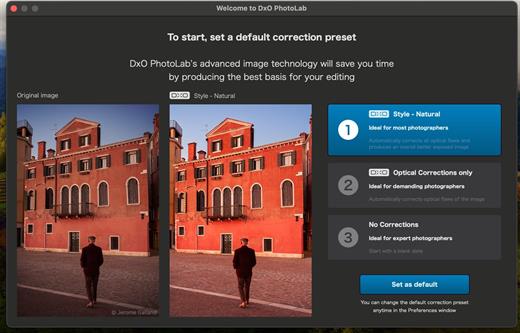
As well as DxO's camera-calibrated profiles and classic film renderings, import and apply DCP profiles, or apply color rendering from your camera. Start your editing process with DxO Styles to open up new creative possibilities.

Smart, automated tools
DxO PhotoLab contains two innovative tools to speed up your editing: DxO Smart Lighting quickly balances brightness levels between shadows and highlights. DxO Clearview Plus reduces atmospheric haze and enhances local contrast.

LUTs
Import and apply LUTs to open up endless creative color options. Choose from 32 pre-installed LUTs and set intensity.

Presets and toning
Create and share presets. Duplicate, rename, import/export presets, and organize into folders. Edit existing presets and create partial presets. Use the Style / Toning palette to apply Simple Toning (e.g., Sepia) and access Split Toning by installing DxO FilmPack.

ReTouch tool
More than just a cloning/healing tool, rotate, scale, and mirror the source area for absolute control. Edit the shape of the area to be retouched using a brush/eraser. Switch between Clone/Repair modes. Remove unwanted elements with automatic source selection (or set manually).

Crop, horizon & perspective tools
Adjust the horizon and crop images using a common or custom ratio — all automatically or manually. Adjust perspective distortion with dedicated tools: force parallels, rectangle, or 8-point guides.

Local Adjustment tools
U Point™ technology features Control Points and Control Lines for intelligent masks without the need for complex layers. Use Brush, Gradient, Eraser, and Auto Mask tools. Create complex adjustments using Hue Masks (new in v8). Toggle visibility and set opacity of masks, and duplicate/invert mask content. Set Control Point/Control Line sensitivity according to Luminance or Chrominance.

Available corrections
The corrections available as local adjustments include

- Exposure, Contrast, Microcontrast
- Highlights, Midtones, Shadows, Blacks
- Hue, Saturation, Luminance (via ColorWheel)
- Vibrancy, Saturation, Hue, Sharpness, Blur
- White Balance and Tint (RAW only)

Advanced History & Quick Compare
Advanced History palette provides a full editing history including specific values and changes. Grouped corrections can be expanded when applying presets in order to track individual changes. Quick Compare Mode puts your edit alongside the original image with a vertical or horizontal split. You can compare your current image with output versions and virtual copies, or choose a reference image (new in v8).

Virtual Copies
Create Virtual Copies for multiple variations of an image without copying the RAW file. Compare quickly with the original image, and selectively copy/paste settings between images.

Customizable workspaces
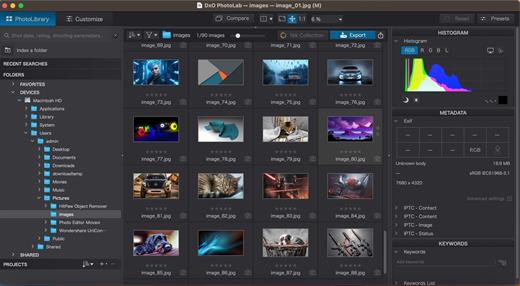
Highly customizable workspace: reposition/hide panels, collapse/expand palettes, and use a search field to quickly find tools. Add your most-used tools to a favorites palette, or create custom palettes. Filter displayed corrections by category. Display only the tools actively making changes to an image. Use multiple monitors and palettes. Place the grid view navigator on a second display.

Histogram
Display RGB, individual colors, and luminosity channels. Indicate where highlights and/or shadows have been clipped. Display the RGB value of an individual pixel.

Powerful functionality, catalog-free
Don't import images; simply browse your disk and edit your images on the fly. Select/search/filter photos with ease. Apply star ratings, color tags, pick/reject images, and choose from a range of criteria when searching, including color tags. For faster searching, simply direct PhotoLab to index specific folders.

Metadata management
Add and manage keywords, create keyword hierarchies, drag/drop keywords to organize them in a tree view list. Import and manage Exif and IPTC metadata, and selectively copy/paste metadata from one image to multiple others. Synchronize metadata changes with third-party applications.

Projects & other organizational tools
Create Projects to gather selections of images, independent of their folder. Create groups of Projects and drag/drop to organize virtual collections. Batch rename files, adjust capture time, drag files to folders to copy/move them, and sort/select files according to flexible options.

Customizable export settings
Choose the size/location of files, set up custom export presets, create multiple parallel exports, and apply original or custom ICC profile, sRGB, or Adobe RGB profiles. Right-click to export to a specific application. Send images directly to other applications. With Nik Collection installed, you have direct access to all plugins.

Watermarks
Create your own watermarks. Use both text and images together, adjust the size, opacity, blend modes, and save as presets.

Recommended system configuration:
Intel® Core™ processor or AMD Ryzen™ with 8 cores
16 GB RAM
4 GB available disk space
1920 x 1080 display
Microsoft® Windows® 10 version 22H2 or 11 version 22H2 (64-bit)
For DeepPRIME, DeepPRIME XD and DeepPRIME XD2s
NVIDIA RTX™ 2080, AMD Radeon™ RX 6700 with latest drivers with 8GB of VRAM

Release Name: DxO PhotoLab 8.7.1.663 Elite
Size: 1.4 GB
Links: HOMEPAGE – NFO – Torrent Search

Download: UPLOADGiGRAPiDGATOR

6 Comments
Sept 2

DxO PhotoLab 8.8.0.649 Elite

Description: DxO PhotoLab 8 - RAW photo editing at its finest. The complete workflow for passionate photographers.
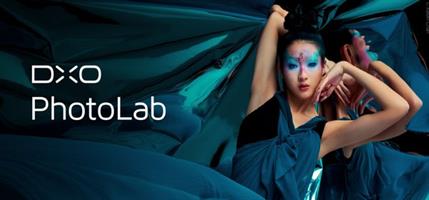
Unbeatable noise reduction and detail extraction
Cleaner and more detailed images than you ever thought possible.
Our DeepPRIME XD2s technology is at the cutting edge of machine learning. Get unbelievable image quality that's real, and make even previous generation cameras look amazing.

The answer to lens softness
Superior science for sharper images
Don’t settle for second best. Use lab-grade lens profiles that sharpen images exactly where needed, now with an improved algorithm for even less fringing and artifacts.

Effortless local adjustments
Fast, intelligent, precise: Exclusive U Point™ technology.
Local adjustments shouldn't be complicated. U PointTM keeps it simple with tools that give instant, intuitive results with absolute control.

Breathtaking color at every step
From calibration to creative tools and everything in between.
Embrace colors with total accuracy. Enjoy tools that will unleash your creativity.

What’s new DxO PhotoLab 8:
Enjoy a host of upgrades including new tools and an improved workflow.

Image correction & enhancement
DxO's pioneering Optics Modules are renowned for giving photographers the best possible performance from their gear, and are applied automatically depending on metadata. Lens softness adjustments are tailored according to the idiosyncrasies of individual lenses. They don't simply sharpen uniformly across the entire image like in other software.

Groundbreaking denoising technologies
Noise reduction powered by machine learning. DeepPRIME, DeepPRIME XD, and DeepPRIME XD2s eliminate noise, recover detail, and improve color reproduction. Two legacy technologies — PRIME and High Quality — are included when speed is crucial. Choose the automatic settings or dial them in manually. Use the new large live preview magnifier to see the impact of denoising — plus all of your other edits.

Color rendering and fidelity
Extra-wide gamut working color space (DxO Wide Gamut) ensures accurate rendering throughout the workflow. Soft Proofing mode ensures accurate colors when preparing files for print or display. Simulate ink and paper via ICC profiles. Create calibrated color profiles using industry-standard color charts to ensure precision.

Control exposure, contrast, color & tonality
Use ColorWheel to manipulate colors and customize color channels. Adjust Exposure compensation, edit the Tone Curve (enhanced in v8), tweak Contrast and Microcontrast. Plus White Balance with color picker, Color Accentuation to set saturation/vibrancy, Black-and-white palette with channel mixer, and Selective Tone for greater control over tonal ranges.

Color rendering
As well as DxO's camera-calibrated profiles and classic film renderings, import and apply DCP profiles, or apply color rendering from your camera. Start your editing process with DxO Styles to open up new creative possibilities.

Smart, automated tools
DxO PhotoLab contains two innovative tools to speed up your editing: DxO Smart Lighting quickly balances brightness levels between shadows and highlights. DxO Clearview Plus reduces atmospheric haze and enhances local contrast.

LUTs
Import and apply LUTs to open up endless creative color options. Choose from 32 pre-installed LUTs and set intensity.

Presets and toning
Create and share presets. Duplicate, rename, import/export presets, and organize into folders. Edit existing presets and create partial presets. Use the Style / Toning palette to apply Simple Toning (e.g., Sepia) and access Split Toning by installing DxO FilmPack.

ReTouch tool
More than just a cloning/healing tool, rotate, scale, and mirror the source area for absolute control. Edit the shape of the area to be retouched using a brush/eraser. Switch between Clone/Repair modes. Remove unwanted elements with automatic source selection (or set manually).

Crop, horizon & perspective tools
Adjust the horizon and crop images using a common or custom ratio — all automatically or manually. Adjust perspective distortion with dedicated tools: force parallels, rectangle, or 8-point guides.

Local Adjustment tools
U Point™ technology features Control Points and Control Lines for intelligent masks without the need for complex layers. Use Brush, Gradient, Eraser, and Auto Mask tools. Create complex adjustments using Hue Masks (new in v8). Toggle visibility and set opacity of masks, and duplicate/invert mask content. Set Control Point/Control Line sensitivity according to Luminance or Chrominance.

Available corrections
The corrections available as local adjustments include

- Exposure, Contrast, Microcontrast
- Highlights, Midtones, Shadows, Blacks
- Hue, Saturation, Luminance (via ColorWheel)
- Vibrancy, Saturation, Hue, Sharpness, Blur
- White Balance and Tint (RAW only)

Advanced History & Quick Compare
Advanced History palette provides a full editing history including specific values and changes. Grouped corrections can be expanded when applying presets in order to track individual changes. Quick Compare Mode puts your edit alongside the original image with a vertical or horizontal split. You can compare your current image with output versions and virtual copies, or choose a reference image (new in v8).

Virtual Copies
Create Virtual Copies for multiple variations of an image without copying the RAW file. Compare quickly with the original image, and selectively copy/paste settings between images.

Customizable workspaces
Highly customizable workspace: reposition/hide panels, collapse/expand palettes, and use a search field to quickly find tools. Add your most-used tools to a favorites palette, or create custom palettes. Filter displayed corrections by category. Display only the tools actively making changes to an image. Use multiple monitors and palettes. Place the grid view navigator on a second display.

Histogram
Display RGB, individual colors, and luminosity channels. Indicate where highlights and/or shadows have been clipped. Display the RGB value of an individual pixel.

Powerful functionality, catalog-free
Don't import images; simply browse your disk and edit your images on the fly. Select/search/filter photos with ease. Apply star ratings, color tags, pick/reject images, and choose from a range of criteria when searching, including color tags. For faster searching, simply direct PhotoLab to index specific folders.

Metadata management
Add and manage keywords, create keyword hierarchies, drag/drop keywords to organize them in a tree view list. Import and manage Exif and IPTC metadata, and selectively copy/paste metadata from one image to multiple others. Synchronize metadata changes with third-party applications.

Projects & other organizational tools
Create Projects to gather selections of images, independent of their folder. Create groups of Projects and drag/drop to organize virtual collections. Batch rename files, adjust capture time, drag files to folders to copy/move them, and sort/select files according to flexible options.

Customizable export settings
Choose the size/location of files, set up custom export presets, create multiple parallel exports, and apply original or custom ICC profile, sRGB, or Adobe RGB profiles. Right-click to export to a specific application. Send images directly to other applications. With Nik Collection installed, you have direct access to all plugins.

Watermarks
Create your own watermarks. Use both text and images together, adjust the size, opacity, blend modes, and save as presets.

Recommended system configuration:
Intel® Core™ processor or AMD Ryzen™ with 8 cores
16 GB RAM
4 GB available disk space
1920 x 1080 display
Microsoft® Windows® 10 version 22H2 or 11 version 22H2 (64-bit)
For DeepPRIME, DeepPRIME XD and DeepPRIME XD2s
NVIDIA RTX™ 2080, AMD Radeon™ RX 6700 with latest drivers with 8GB of VRAM

Release Name: DxO PhotoLab 8.8.0.649 Elite
Size: 340.4 MB
Links: HOMEPAGE – NFO – Torrent Search

Download: UPLOADGiGRAPiDGATOR

7 Comments