Please REGISTER or RENEW your account on RAPiDGATOR.net and support us by doing through all RAPiDGATOR working download links on main posts...
Apr 8

EasyCut Pro 5.123

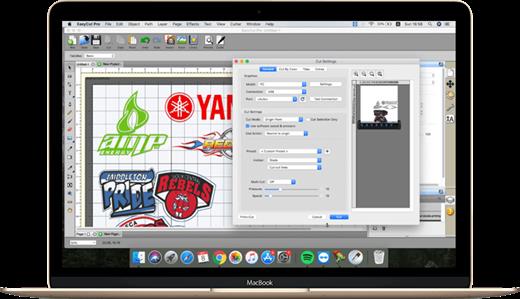
EasyCut Pro is the world’s most advanced sign making and cutting plotter program for making signs, lettering, logos and decals using your vinyl cutter/plotter. It comes with a variety of features and tools to increase productivity of your cutting job. The smart vectorizing ability and the image trace features make it possible to work with almost any and every image, so you can cut them with your cutting plotter. The software lets you import AI, EPS, SVG, PLT, DXF, PDF, GSD and WPC files. You can use fonts that are already on your macOS.

EasyCut Pro comes with further features like Welding, Tiling, Rhinestone creation, Cut by color, Duplicate cutting, 3D extrude effect, Cut Order, Nesting, Contour cutting and do many other amazing features.

EasyCut Pro is fully compatible with a wide range of vinyl cutting plotters from manufacturers like Roland, Graphtec, GCC, Vevor, Siser, LOKLiK, Mimaki, Summa, Saga, Mutoh, USCutter, Liyu, Redsail, Foison, Jinka,Silhouette, SignKey, Vinyl Express, PowerCut, Rabbit, Teneth, Mycut, Ecut, Ioline, Creation PCut, KNK, MUSE, Yinghe, SignMax, Secabo, Refine, PixMax, Ramtin, HP Latex, Vevor Smart1, ProCut and more others.

What’s New

version 5.123:


  • Added support for Vevor Smart1 cutter;
  • Updated Secabo settings;
  • Fully compatible with macOS 26.3 Tahoe.
Compatibility

macOS 12 or later


Release Name: EasyCut Pro 5.123
Size: 59.4 MB
Links: HOMEPAGE – NFO – Torrent Search

Download: RAPiDGATOR

6 Comments
Apr 7

EasyCut Pro 5.123

Description: The complete solution for designing, printing, cutting and print+cut. It gives you the ability to cut any TrueType font, OpenType font, graphics, SVG, PDF, as well as your own original designs with your cutting plotter. This awesome vinyl cutting software even supports vectorize your images and built-in shape library includes hundreds of vectorial designs ready for cutting. With the intuitive user interface, Now anyone can cut designs like a pro! Professional sign cutting software for your vinyl cutter.

Image Tracing & Vectorizing
Unmatched image vectorization, Simply use the powerful tracing tool to create cuttable outlines from any imported raster graphics (including PNG, JPG, GIF, PSD, PDF, BMP, TGA, TIFF, etc.) or scanned images. Easily create accurate vector paths ready for cutting or make further editing.

Draw your own designs
Drawing and Designing couldn’t get any easier! This powerful vinyl cutting software comes with a suite of various shape drawing and editing tools to draw and edit any shape directly on the mat. Easily draw unique shapes, modify signs, create logos, edit images, customize text with fonts on your computer plus special effects. Easy Cut Studio will make your design and cut your shapes easier than with any other sign-making software in the market today. It is a little design powerhouse for vinyl cutting.

Import/Export most file formats
Import various file formats, including PNG, SVG, EPS, PDF, AI, GSD, SCUT, WPC and other popular vector formats as editable objects. giving you the power to cut any shape and custom artworks. You can also export your design to SVG, PDF, PNG, FCM, TIFF, JPG, and BMP format.

Print and Cut (Contour Cut)
Print to Cut made easy, fast and accurate. Automatic creation of registration marks for print and cut applications. Easily print your artwork and then cut out around the printed image using your cutting plotter, which is perfect to create decals and stickers. User control over registration size, thickness and offset will help the cutter find the contour cut marks easily.

Working With Layers
Easily create complex designs using multiple layers, grouping to organize the display order of objects. Using Layers can help you more control over how you organize, edit and cut objects with Easy Cut Studio. The Shadow Layer option will create cuttable shadows from any shape.

Weld Text and Shapes Together
Welding is an advanced option allows you to make overlapping text and shapes to become a single shape, by joining shapes together wherever an overlap occurs. There are two ways to combine shapes/letters together: welding and joining.

Design and Cut Rhinestone Templates
Easily convert designs into rhinestone templates and make your own custom rhinestone designs with typeable rhinestone ready fonts. Specify stone size and spacing to make a rhinestone template and lattice shapes. Just select an object on the screen mat, and then choose "Rhinestones" from under the "Effects" menu to bring up the Rhinestone window shown below.

Features
- Works with your installed TrueType and OpenType fonts on your computer
- Works with Black Cat Cougar/Lynx™ , Bosskut Gazelle™, Craftwell eCraft™, CraftROBO/Graphtec™,
- GCC™, Foison™, Liyu™, Pazzles Inspiration/Pro™, Ramtin™, Roland™, Seki™, Silhouette
- SD/CAMEO/Portrait™, Silver Bullet™, USCutter™, Vinyl Express™, Wishblade™, & more
- Works with thousands of free TrueType, OpenType and Dingbat/Wingding fonts
- Import various file formats, including SVG, PDF, EPS, WPC
- Drawing tools to draw and edit shapes
- Auto tracing feature to automatically convert images (including jpg, bmp, gif, png) for cutting
- Create rhinestone templates and lattice shapes
- Weld overlapping letters and shapes together
- Select styles, including Shadow and Blackout, to change the look of your letters and shapes
- WYSIWYG Interface - What you see is what you cut
- Text on arch tool and text on path tool.
- Place text or objects on bezier paths.
- Convert text to outlines/paths.
- Creating multiple copies of the same object.
- Node editing tool.
- Creating the registration marks.
- Layout and special effects for your text and shapes.
- Cut font files already installed on your Mac or Windows.
- Create shadowed mat effects.
- Stencil function for bridging interior shapes.
- Unlimited undo/redo

Release Name: EasyCut Pro 5.123
Size: 14.7 MB
Links: HOMEPAGE – NFO – Torrent Search

Download: RAPiDGATOR

9 Comments
May 14

EASYCUT PRO V5.109 (X64) MULTILINGUAL PORTABLE

Description: The complete solution for designing, printing, cutting and print+cut. It gives you the ability to cut any TrueType font, OpenType font, graphics, SVG, PDF, as well as your own original designs with your cutting plotter. This awesome vinyl cutting software even supports vectorize your images and built-in shape library includes hundreds of vectorial designs ready for cutting. With the intuitive user interface, Now anyone can cut designs like a pro! Professional sign cutting software for your vinyl cutter. Both Windows and Mac versions available now.

Image Tracing & Vectorizing
Unmatched image vectorization, Simply use the powerful tracing tool to create cuttable outlines from any imported raster graphics (including PNG, JPG, GIF, PSD, PDF, BMP, TGA, TIFF, etc.) or scanned images. Easily create accurate vector paths ready for cutting or make further editing.

Draw your own designs
Drawing and Designing couldn’t get any easier! This powerful vinyl cutting software comes with a suite of various shape drawing and editing tools to draw and edit any shape directly on the mat. Easily draw unique shapes, modify signs, create logos, edit images, customize text with fonts on your computer plus special effects. Easy Cut Studio will make your design and cut your shapes easier than with any other sign-making software in the market today. It is a little design powerhouse for vinyl cutting.

Import/Export most file formats
Import various file formats, including PNG, SVG, EPS, PDF, AI, GSD, SCUT, WPC and other popular vector formats as editable objects. giving you the power to cut any shape and custom artworks. You can also export your design to SVG, PDF, PNG, FCM, TIFF, JPG, and BMP format.

Print and Cut (Contour Cut)
Print to Cut made easy, fast and accurate. Automatic creation of registration marks for print and cut applications. Easily print your artwork and then cut out around the printed image using your cutting plotter, which is perfect to create decals and stickers. User control over registration size, thickness and offset will help the cutter find the contour cut marks easily.

Working With Layers
Easily create complex designs using multiple layers, grouping to organize the display order of objects. Using Layers can help you more control over how you organize, edit and cut objects with Easy Cut Studio. The Shadow Layer option will create cuttable shadows from any shape.

Weld Text and Shapes Together
Welding is an advanced option allows you to make overlapping text and shapes to become a single shape, by joining shapes together wherever an overlap occurs. There are two ways to combine shapes/letters together: welding and joining.

Design and Cut Rhinestone Templates
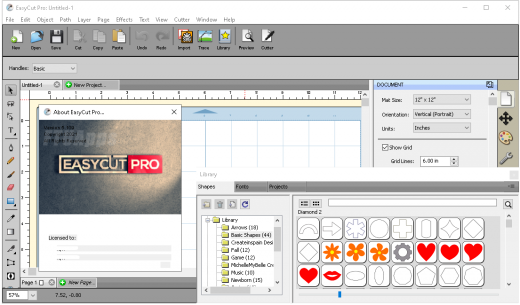
Easily convert designs into rhinestone templates and make your own custom rhinestone designs with typeable rhinestone ready fonts. Specify stone size and spacing to make a rhinestone template and lattice shapes. Just select an object on the screen mat, and then choose “Rhinestones” from under the “Effects” menu to bring up the Rhinestone window shown below.

Features:

-Works with your installed TrueType and OpenType fonts on your computer
-Works with Black Cat Cougar/Lynx™ , Bosskut Gazelle™, Craftwell eCraft™, CraftROBO/Graphtec™,
-GCC™, Foison™, Liyu™, Pazzles Inspiration/Pro™, Ramtin™, Roland™, Seki™, Silhouette
-SD/CAMEO/Portrait™, Silver Bullet™, USCutter™, Vinyl Express™, Wishblade™, & more
-Works with thousands of free TrueType, OpenType and Dingbat/Wingding fonts
-Import various file formats, including SVG, PDF, EPS, WPC
-Drawing tools to draw and edit shapes
-Auto tracing feature to automatically convert images (including jpg, bmp, gif, png) for cutting
-Create rhinestone templates and lattice shapes
-Weld overlapping letters and shapes together
-Select styles, including Shadow and Blackout, to change the look of your letters and shapes
-WYSIWYG Interface – What you see is what you cut
-Text on arch tool and text on path tool.
-Place text or objects on bezier paths.
-Convert text to outlines/paths.
-Creating multiple copies of the same object.
-Node editing tool.
-Creating the registration marks.
-Layout and special effects for your text and shapes.
-Cut font files already installed on your Mac or Windows.
-Create shadowed mat effects.
-Stencil function for bridging interior shapes.
-Unlimited undo/redo

What’s New:
– Official site does not provide any info about changes in this version yet.

System Requirements:
– Windows XP/Vista/7/8/10/11/Server 2019/2022 (64bit-only)

Release Name: EASYCUT PRO V5.109 (X64) MULTILINGUAL PORTABLE
Size: 52.2 MB
Links: HOMEPAGE – NFO – Torrent Search

Download: UPLOADGiG – NiTROFLARE – RAPiDGATOR

5 Comments