
Please REGISTER or RENEW your account on RAPiDGATOR.net and support us by doing through all RAPiDGATOR working download links on main posts...
Mar 27

MouseBoost Pro 4.2.0

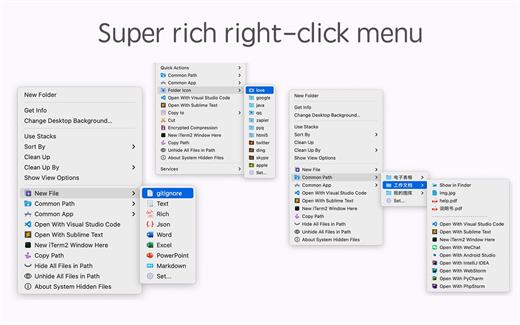
*** Main Features ***
– All menus support custom sorting.
– Quickly create all kinds of commonly used files, and supports custom creation of various file types you want.
– Quickly open your terminal, iTerm2, and go to the directory you want.
– Quickly open VSCode, Sublime Text and Emacs, and customize the various apps you want to open.
– Quickly copy the current path power.
– Complete files deletion is supported.
– Supports files moving, copying and cutting.
– Supports files encrypted compression.
– Quickly open your favorite directory.
– Quickly get file MD5,SHA1,SHA256 and other information.
– Supports hiding and displaying of specified files.
– Supports modify folder icon.
What’s New

Version 4.2.0:


  • Release notes were unavailable when this listing was updated.
Compatibility

macOS 10.11 or later


Release Name: MouseBoost Pro 4.2.0
Size: 17.8 MB
Links: HOMEPAGE – NFO – Torrent Search

Download: RAPiDGATOR

7 Comments
Mar 21

MouseBoost Pro 4.1.5

*** Main Features ***
– All menus support custom sorting.
– Quickly create all kinds of commonly used files, and supports custom creation of various file types you want.
– Quickly open your terminal, iTerm2, and go to the directory you want.
– Quickly open VSCode, Sublime Text and Emacs, and customize the various apps you want to open.
– Quickly copy the current path power.
– Complete files deletion is supported.
– Supports files moving, copying and cutting.
– Supports files encrypted compression.
– Quickly open your favorite directory.
– Quickly get file MD5,SHA1,SHA256 and other information.
– Supports hiding and displaying of specified files.
– Supports modify folder icon.

What’s New

Version 4.1.5:


  • Release notes were unavailable when this listing was updated.
Compatibility

macOS 10.11 or later


Release Name: MouseBoost Pro 4.1.5
Size: 17.7 MB
Links: HOMEPAGE – NFO – Torrent Search

Download: RAPiDGATOR

8 Comments
Mar 15

MouseBoost Pro 4.1.4

*** Main Features ***
– All menus support custom sorting.
– Quickly create all kinds of commonly used files, and supports custom creation of various file types you want.
– Quickly open your terminal, iTerm2, and go to the directory you want.
– Quickly open VSCode, Sublime Text and Emacs, and customize the various apps you want to open.
– Quickly copy the current path power.
– Complete files deletion is supported.
– Supports files moving, copying and cutting.
– Supports files encrypted compression.
– Quickly open your favorite directory.
– Quickly get file MD5,SHA1,SHA256 and other information.
– Supports hiding and displaying of specified files.
– Supports modify folder icon.

What’s New

Version 4.1.4:


  • Release notes were unavailable when this listing was updated.
Compatibility

macOS 10.11 or later


Release Name: MouseBoost Pro 4.1.4
Size: 17.7 MB
Links: HOMEPAGE – NFO – Torrent Search

Download: RAPiDGATOR

4 Comments
Mar 11

MouseBoost Pro 4.1.3

*** Main Features ***
– All menus support custom sorting.
– Quickly create all kinds of commonly used files, and supports custom creation of various file types you want.
– Quickly open your terminal, iTerm2, and go to the directory you want.
– Quickly open VSCode, Sublime Text and Emacs, and customize the various apps you want to open.
– Quickly copy the current path power.
– Complete files deletion is supported.
– Supports files moving, copying and cutting.
– Supports files encrypted compression.
– Quickly open your favorite directory.
– Quickly get file MD5,SHA1,SHA256 and other information.
– Supports hiding and displaying of specified files.
– Supports modify folder icon.

What’s New

Version 4.1.3:


  • Release notes were unavailable when this listing was updated.
Compatibility

macOS 10.11 or later


Release Name: MouseBoost Pro 4.1.3
Size: 17.7 MB
Links: HOMEPAGE – NFO – Torrent Search

Download: RAPiDGATOR

6 Comments
Feb 8

MouseBoost Pro 4.1.2

*** Main Features ***
– All menus support custom sorting.
– Quickly create all kinds of commonly used files, and supports custom creation of various file types you want.
– Quickly open your terminal, iTerm2, and go to the directory you want.
– Quickly open VSCode, Sublime Text and Emacs, and customize the various apps you want to open.
– Quickly copy the current path power.
– Complete files deletion is supported.
– Supports files moving, copying and cutting.
– Supports files encrypted compression.
– Quickly open your favorite directory.
– Quickly get file MD5,SHA1,SHA256 and other information.
– Supports hiding and displaying of specified files.
– Supports modify folder icon.

What’s New

Version 4.1.2:


  • Release notes were unavailable when this listing was updated.
Compatibility

macOS 10.11 or later


Release Name: MouseBoost Pro 4.1.2
Size: 17.5 MB
Links: HOMEPAGE – NFO – Torrent Search

Download: RAPiDGATOR

8 Comments
Jan 31

MouseBoost Pro 4.1.1

*** Main Features ***
– All menus support custom sorting.
– Quickly create all kinds of commonly used files, and supports custom creation of various file types you want.
– Quickly open your terminal, iTerm2, and go to the directory you want.
– Quickly open VSCode, Sublime Text and Emacs, and customize the various apps you want to open.
– Quickly copy the current path power.
– Complete files deletion is supported.
– Supports files moving, copying and cutting.
– Supports files encrypted compression.
– Quickly open your favorite directory.
– Quickly get file MD5,SHA1,SHA256 and other information.
– Supports hiding and displaying of specified files.
– Supports modify folder icon.

What’s New

Version 4.1.1:


  • Release notes were unavailable when this listing was updated.
Compatibility

macOS 10.11 or later


Release Name: MouseBoost Pro 4.1.1
Size: 17.2 MB
Links: HOMEPAGE – NFO – Torrent Search

Download: RAPiDGATOR

8 Comments
Jan 12

MouseBoost Pro 4.1.0

*** Main Features ***
– All menus support custom sorting.
– Quickly create all kinds of commonly used files, and supports custom creation of various file types you want.
– Quickly open your terminal, iTerm2, and go to the directory you want.
– Quickly open VSCode, Sublime Text and Emacs, and customize the various apps you want to open.
– Quickly copy the current path power.
– Complete files deletion is supported.
– Supports files moving, copying and cutting.
– Supports files encrypted compression.
– Quickly open your favorite directory.
– Quickly get file MD5,SHA1,SHA256 and other information.
– Supports hiding and displaying of specified files.
– Supports modify folder icon.

What’s New

Version 4.1.0:


  • Release notes were unavailable when this listing was updated.
Compatibility

macOS 10.11 or later


Release Name: MouseBoost Pro 4.1.0
Size: 17.5 MB
Links: HOMEPAGE – NFO – Torrent Search

Download: RAPiDGATOR

6 Comments
Dec 30

MouseBoost Pro 4.0.3

*** Main Features ***
– All menus support custom sorting.
– Quickly create all kinds of commonly used files, and supports custom creation of various file types you want.
– Quickly open your terminal, iTerm2, and go to the directory you want.
– Quickly open VSCode, Sublime Text and Emacs, and customize the various apps you want to open.
– Quickly copy the current path power.
– Complete files deletion is supported.
– Supports files moving, copying and cutting.
– Supports files encrypted compression.
– Quickly open your favorite directory.
– Quickly get file MD5,SHA1,SHA256 and other information.
– Supports hiding and displaying of specified files.
– Supports modify folder icon.

What’s New

Version 4.0.3:


  • Release notes were unavailable when this listing was updated.
Compatibility

macOS 10.11 or later


Release Name: MouseBoost Pro 4.0.3
Size: 17.4 MB
Links: HOMEPAGE – NFO – Torrent Search

Download: RAPiDGATOR

9 Comments
Dec 9

MouseBoost Pro 4.0.2

*** Main Features ***
– All menus support custom sorting.
– Quickly create all kinds of commonly used files, and supports custom creation of various file types you want.
– Quickly open your terminal, iTerm2, and go to the directory you want.
– Quickly open VSCode, Sublime Text and Emacs, and customize the various apps you want to open.
– Quickly copy the current path power.
– Complete files deletion is supported.
– Supports files moving, copying and cutting.
– Supports files encrypted compression.
– Quickly open your favorite directory.
– Quickly get file MD5,SHA1,SHA256 and other information.
– Supports hiding and displaying of specified files.
– Supports modify folder icon.

What’s New

Version 4.0.2:


  • Release notes were unavailable when this listing was updated.
Compatibility

macOS 10.11 or later


Release Name: MouseBoost Pro 4.0.2
Size: 17.4 MB
Links: HOMEPAGE – NFO – Torrent Search

Download: RAPiDGATOR

6 Comments
Dec 4

MouseBoost Pro 4.0.0

MouseBoost Pro integrates more than 30 kinds of small tools, and the operation way is very simple, as long as you click the right mouse button, you can activate all kinds of functions you want, so that your work efficiency is greatly improved.

You can create any file type you want, open any APP you want, self-sorting, fully customized!

*** Main Features ***
– All menus support custom sorting.
– Quickly create all kinds of commonly used files, and supports custom creation of various file types you want.
– Quickly open your terminal, iTerm2, and go to the directory you want.
– Quickly open VSCode, Sublime Text and Emacs, and customize the various apps you want to open.
– Quickly copy the current path power.
– Complete files deletion is supported.
– Supports files moving, copying and cutting.
– Supports files encrypted compression.
– Quickly open your favorite directory.
– Quickly get file MD5,SHA1,SHA256 and other information.
– Supports hiding and displaying of specified files.
– Supports modify folder icon.

What’s New

Version 3.9.2:


  • Release notes were unavailable when this listing was updated.
Compatibility


macOS 10.11 or later


Release Name: MouseBoost Pro 4.0.0
Size: 16.8 MB
Links: HOMEPAGE – NFO – Torrent Search

Download: RAPiDGATOR

8 Comments