
Please REGISTER or RENEW your account on RAPiDGATOR.net and support us by doing through all RAPiDGATOR working download links on main posts...
Mar 31

StartAllBack 3.9.22.5362

Introducing StartAllBack: Windows 11 from better timeline, Embrace, enhance, unsweep classic UI from under the rug.
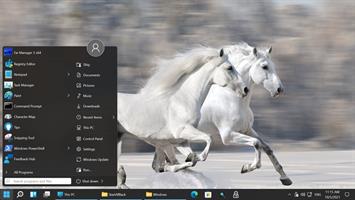
Restore and improve taskbar
Show labels on task icons
Adjust icon size and margins
Move taskbar to top, left or right edges
Drag and drop stuff onto taskbar
Center task icons but keep Start button on the left
Split into segments, use dynamic translucency
Separate corner icons with Windows 7/10 UI

Restore and improve File Explorer UI
Ribbon and Command Bar revamped with translucent effects
Details pane on bottom
Old search box (the one which works)
Dark mode support for more dialogs

Restore and improve context menus
All new look with rounded acrylic menus
Fast and responsive taskbar menus
New fonts, better touch support

Restore and improve start menu
Launch apps and go to system places in one click
Navigate dropdown menus like a boss
Enjoy fast and reliable search

Finally, lightweight styling and UI consistency
Enjoy Windows 7, Windows 10 and third-party taskbar and start menu styles
Fix UI inconsistencies in Win32 apps
Don't be blue: recolor UI in all windows apps
Negative resource usage: fewer RAM used, fewer processes started

Release Name: StartAllBack 3.9.22.5362
Size: 2.1 MB
Links: HOMEPAGE – NFO – Torrent Search

Download: RAPiDGATOR

6 Comments
Feb 21

StartAllBack 3.9.21.5360

Introducing StartAllBack: Windows 11 from better timeline, Embrace, enhance, unsweep classic UI from under the rug.

Restore and improve taskbar
Show labels on task icons
Adjust icon size and margins
Move taskbar to top, left or right edges
Drag and drop stuff onto taskbar
Center task icons but keep Start button on the left
Split into segments, use dynamic translucency
Separate corner icons with Windows 7/10 UI

Restore and improve File Explorer UI
Ribbon and Command Bar revamped with translucent effects
Details pane on bottom
Old search box (the one which works)
Dark mode support for more dialogs

Restore and improve context menus
All new look with rounded acrylic menus
Fast and responsive taskbar menus
New fonts, better touch support

Restore and improve start menu
Launch apps and go to system places in one click
Navigate dropdown menus like a boss
Enjoy fast and reliable search

Finally, lightweight styling and UI consistency
Enjoy Windows 7, Windows 10 and third-party taskbar and start menu styles
Fix UI inconsistencies in Win32 apps
Don't be blue: recolor UI in all windows apps
Negative resource usage: fewer RAM used, fewer processes started

Release Name: StartAllBack 3.9.21.5360
Size: 2.1 MB
Links: HOMEPAGE – NFO – Torrent Search

Download: RAPiDGATOR

6 Comments
Jan 28

StartAllBack 3.9.21.5352

Introducing StartAllBack: Windows 11 from better timeline, Embrace, enhance, unsweep classic UI from under the rug.

Restore and improve taskbar
Show labels on task icons
Adjust icon size and margins
Move taskbar to top, left or right edges
Drag and drop stuff onto taskbar
Center task icons but keep Start button on the left
Split into segments, use dynamic translucency
Separate corner icons with Windows 7/10 UI

Restore and improve File Explorer UI
Ribbon and Command Bar revamped with translucent effects
Details pane on bottom
Old search box (the one which works)
Dark mode support for more dialogs

Restore and improve context menus
All new look with rounded acrylic menus
Fast and responsive taskbar menus
New fonts, better touch support

Restore and improve start menu
Launch apps and go to system places in one click
Navigate dropdown menus like a boss
Enjoy fast and reliable search

Finally, lightweight styling and UI consistency
Enjoy Windows 7, Windows 10 and third-party taskbar and start menu styles
Fix UI inconsistencies in Win32 apps
Don't be blue: recolor UI in all windows apps
Negative resource usage: fewer RAM used, fewer processes started

Release Name: StartAllBack 3.9.21.5352
Size: 2.1 MB
Links: HOMEPAGE – NFO – Torrent Search

Download: RAPiDGATOR

8 Comments
Dec 9

StartAllBack 3.9.20.5345

Introducing StartAllBack: Windows 11 from better timeline, Embrace, enhance, unsweep classic UI from under the rug.

Restore and improve taskbar
Show labels on task icons
Adjust icon size and margins
Move taskbar to top, left or right edges
Drag and drop stuff onto taskbar
Center task icons but keep Start button on the left
Split into segments, use dynamic translucency
Separate corner icons with Windows 7/10 UI

Restore and improve File Explorer UI
Ribbon and Command Bar revamped with translucent effects
Details pane on bottom
Old search box (the one which works)
Dark mode support for more dialogs

Restore and improve context menus
All new look with rounded acrylic menus
Fast and responsive taskbar menus
New fonts, better touch support

Restore and improve start menu
Launch apps and go to system places in one click
Navigate dropdown menus like a boss
Enjoy fast and reliable search

Finally, lightweight styling and UI consistency
Enjoy Windows 7, Windows 10 and third-party taskbar and start menu styles
Fix UI inconsistencies in Win32 apps
Don't be blue: recolor UI in all windows apps
Negative resource usage: fewer RAM used, fewer processes started

Release Name: StartAllBack 3.9.20.5345
Size: 2.1 MB
Links: HOMEPAGE – NFO – Torrent Search

Download: RAPiDGATOR

6 Comments
Nov 8

StartAllBack 3.9.16.5330

Introducing StartAllBack: Windows 11 from better timeline, Embrace, enhance, unsweep classic UI from under the rug.

Restore and improve taskbar
Show labels on task icons
Adjust icon size and margins
Move taskbar to top, left or right edges
Drag and drop stuff onto taskbar
Center task icons but keep Start button on the left
Split into segments, use dynamic translucency
Separate corner icons with Windows 7/10 UI

Restore and improve File Explorer UI
Ribbon and Command Bar revamped with translucent effects
Details pane on bottom
Old search box (the one which works)
Dark mode support for more dialogs

Restore and improve context menus
All new look with rounded acrylic menus
Fast and responsive taskbar menus
New fonts, better touch support

Restore and improve start menu
Launch apps and go to system places in one click
Navigate dropdown menus like a boss
Enjoy fast and reliable search

Finally, lightweight styling and UI consistency
Enjoy Windows 7, Windows 10 and third-party taskbar and start menu styles
Fix UI inconsistencies in Win32 apps
Don't be blue: recolor UI in all windows apps
Negative resource usage: fewer RAM used, fewer processes started

Release Name: StartAllBack 3.9.16.5330
Size: 2.1 MB
Links: HOMEPAGE – NFO – Torrent Search

Download: RAPiDGATOR

5 Comments
Oct 7

StartAllBack 3.9.16.5322

Introducing StartAllBack: Windows 11 from better timeline, Embrace, enhance, unsweep classic UI from under the rug.

Restore and improve taskbar
Show labels on task icons
Adjust icon size and margins
Move taskbar to top, left or right edges
Drag and drop stuff onto taskbar
Center task icons but keep Start button on the left
Split into segments, use dynamic translucency
Separate corner icons with Windows 7/10 UI

Restore and improve File Explorer UI
Ribbon and Command Bar revamped with translucent effects
Details pane on bottom
Old search box (the one which works)
Dark mode support for more dialogs

Restore and improve context menus
All new look with rounded acrylic menus
Fast and responsive taskbar menus
New fonts, better touch support

Restore and improve start menu
Launch apps and go to system places in one click
Navigate dropdown menus like a boss
Enjoy fast and reliable search

Finally, lightweight styling and UI consistency
Enjoy Windows 7, Windows 10 and third-party taskbar and start menu styles
Fix UI inconsistencies in Win32 apps
Don't be blue: recolor UI in all windows apps
Negative resource usage: fewer RAM used, fewer processes started

Release Name: StartAllBack 3.9.16.5322
Size: 2.1 MB
Links: HOMEPAGE – NFO – Torrent Search

Download: RAPiDGATOR

6 Comments
Oct 6

StartAllBack 3.9.16.5320

Introducing StartAllBack: Windows 11 from better timeline, Embrace, enhance, unsweep classic UI from under the rug.

Restore and improve taskbar
Show labels on task icons
Adjust icon size and margins
Move taskbar to top, left or right edges
Drag and drop stuff onto taskbar
Center task icons but keep Start button on the left
Split into segments, use dynamic translucency
Separate corner icons with Windows 7/10 UI

Restore and improve File Explorer UI
Ribbon and Command Bar revamped with translucent effects
Details pane on bottom
Old search box (the one which works)
Dark mode support for more dialogs

Restore and improve context menus
All new look with rounded acrylic menus
Fast and responsive taskbar menus
New fonts, better touch support

Restore and improve start menu
Launch apps and go to system places in one click
Navigate dropdown menus like a boss
Enjoy fast and reliable search

Finally, lightweight styling and UI consistency
Enjoy Windows 7, Windows 10 and third-party taskbar and start menu styles
Fix UI inconsistencies in Win32 apps
Don't be blue: recolor UI in all windows apps
Negative resource usage: fewer RAM used, fewer processes started

Release Name: StartAllBack 3.9.16.5320
Size: 2.1 MB
Links: HOMEPAGE – NFO – Torrent Search

Download: RAPiDGATOR

8 Comments
Sept 22

StartAllBack 3.9.16.5314

Introducing StartAllBack: Windows 11 from better timeline, Embrace, enhance, unsweep classic UI from under the rug.

Restore and improve taskbar
Show labels on task icons
Adjust icon size and margins
Move taskbar to top, left or right edges
Drag and drop stuff onto taskbar
Center task icons but keep Start button on the left
Split into segments, use dynamic translucency
Separate corner icons with Windows 7/10 UI

Restore and improve File Explorer UI
Ribbon and Command Bar revamped with translucent effects
Details pane on bottom
Old search box (the one which works)
Dark mode support for more dialogs

Restore and improve context menus
All new look with rounded acrylic menus
Fast and responsive taskbar menus
New fonts, better touch support

Restore and improve start menu
Launch apps and go to system places in one click
Navigate dropdown menus like a boss
Enjoy fast and reliable search

Finally, lightweight styling and UI consistency
Enjoy Windows 7, Windows 10 and third-party taskbar and start menu styles
Fix UI inconsistencies in Win32 apps
Don't be blue: recolor UI in all windows apps
Negative resource usage: fewer RAM used, fewer processes started

Release Name: StartAllBack 3.9.16.5314
Size: 2.1 MB
Links: HOMEPAGE – NFO – Torrent Search

Download: RAPiDGATOR

5 Comments
Sept 6

StartAllBack 3.9.15.5310

Introducing StartAllBack: Windows 11 from better timeline, Embrace, enhance, unsweep classic UI from under the rug.

Restore and improve taskbar
Show labels on task icons
Adjust icon size and margins
Move taskbar to top, left or right edges
Drag and drop stuff onto taskbar
Center task icons but keep Start button on the left
Split into segments, use dynamic translucency
Separate corner icons with Windows 7/10 UI

Restore and improve File Explorer UI
Ribbon and Command Bar revamped with translucent effects
Details pane on bottom
Old search box (the one which works)
Dark mode support for more dialogs

Restore and improve context menus
All new look with rounded acrylic menus
Fast and responsive taskbar menus
New fonts, better touch support

Restore and improve start menu
Launch apps and go to system places in one click
Navigate dropdown menus like a boss
Enjoy fast and reliable search

Finally, lightweight styling and UI consistency
Enjoy Windows 7, Windows 10 and third-party taskbar and start menu styles
Fix UI inconsistencies in Win32 apps
Don't be blue: recolor UI in all windows apps
Negative resource usage: fewer RAM used, fewer processes started

Release Name: StartAllBack 3.9.15.5310
Size: 2.1 MB
Links: HOMEPAGE – NFO – Torrent Search

Download: UPLOADGiGRAPiDGATOR

6 Comments
Aug 28

StartAllBack 3.9.14.5302

Introducing StartAllBack: Windows 11 from better timeline, Embrace, enhance, unsweep classic UI from under the rug.

Restore and improve taskbar
Show labels on task icons
Adjust icon size and margins
Move taskbar to top, left or right edges
Drag and drop stuff onto taskbar
Center task icons but keep Start button on the left
Split into segments, use dynamic translucency
Separate corner icons with Windows 7/10 UI

Restore and improve File Explorer UI
Ribbon and Command Bar revamped with translucent effects
Details pane on bottom
Old search box (the one which works)
Dark mode support for more dialogs

Restore and improve context menus
All new look with rounded acrylic menus
Fast and responsive taskbar menus
New fonts, better touch support

Restore and improve start menu
Launch apps and go to system places in one click
Navigate dropdown menus like a boss
Enjoy fast and reliable search

Finally, lightweight styling and UI consistency
Enjoy Windows 7, Windows 10 and third-party taskbar and start menu styles
Fix UI inconsistencies in Win32 apps
Don't be blue: recolor UI in all windows apps
Negative resource usage: fewer RAM used, fewer processes started

Release Name: StartAllBack 3.9.14.5302
Size: 2.1 MB
Links: HOMEPAGE – NFO – Torrent Search

Download: UPLOADGiGRAPiDGATOR

5 Comments