Please REGISTER or RENEW your account on RAPiDGATOR.net and support us by doing through all RAPiDGATOR working download links on main posts...
Mar 20

AnyTrans for iOS 8.9.14.20260226

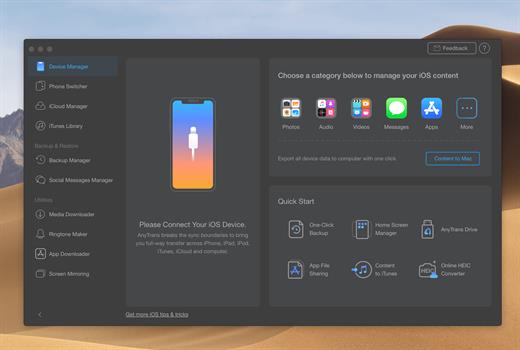
AnyTrans is the iPhone manager that breaks the sync boundary and consolidates every access to all your content in one place, including music, videos, photos, messages, books, Safari history, voice memo, etc.
Features


  • Flash-Sync Makes the fastest data transfer in market – By largely improving the data loading and transferring speed, AnyTrans gives you lightning-fast experience.
  • Two-way Transfer between iOS devices, iTunes, iCloud and computer – Whether you want to transfer contacts from iPhone to Mac, messages from old iPhone to new iPhone 7, music and playlists from iPhone back to iTunes library, or videos from PC to iPad, AnyTrans gets anything transferred freely between your iPhone, iPad, iPod touch, iTunes, iCloud and computer.
  • Easily manage all your contents on iPhone, iPad, and iPod touch – Browse, edit and export important contacts, messages, notes, and more personal data from iPhone; well organize your photos and music in iPhone and iPad by building up your own collections and playlists – you get full control over all your iOS data and files with ultra ease.
  • Migrate everything to your new iPhone 7 within one click clone – Upon just one simple click, everything from your old iPhone, even from iPad – will be cloned to your new iPhone 7. The game-level you just conquered, the photos you took yesterday, the note you plan for shopping and the music you favors will all be there waiting for you.
  • Navigate your iTunes and iCloud backup contents with even more ease – Instead of making a guess on whether your iTunes/iCloud backup contains the notes, messages, contacts, voice memos, or Safari bookmarks you need, AnyTrans lets you peek right into your backups, and grab any piece of data you need freely without a full restore.
What’s New

Version 8.9.14:


  • Release notes were unavailable when this listing was updated.
Compatibility

macOS 10.10 or later


Release Name: AnyTrans for iOS 8.9.14.20260226
Size: 419.2 MB
Links: HOMEPAGE – NFO – Torrent Search

Download: RAPiDGATOR

9 Comments
Mar 20

Ghost Buster Pro 5.0.1

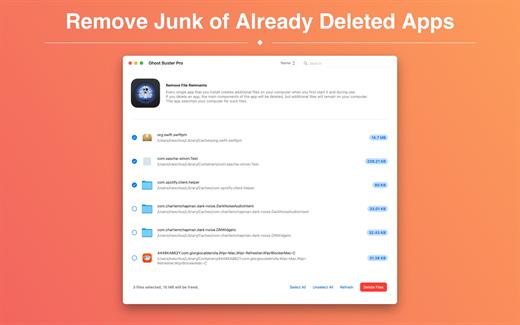
Ghost Buster Pro finds and deletes files from apps you’ve already uninstalled. The app is lightning fast and frees memory in no time.

Many apps are installed on a computer, but they usually only stay on your computer for a short time. Each app creates files, but deleting the app does not remove them.
This leads to a large number of files accumulating over time, which take up valuable storage space.
Ghost Buster Pro searches your computer for exactly such files and can also delete them directly if you wish.

Ghost Buster Pro offers the following features:

Fast Search

Ghost Buster Pro quickly scans your computer for data from previously deleted apps. You can have them deleted with one click.

Extremely easy handling

Ghost Buster Pro couldn’t be simpler. The search is started immediately after the app is started. You can now delete files with just one click.

No automatic deletion

Ghost Buster Pro does not delete any data without your consent. Choose for yourself which data is deleted and which you want to keep.

What’s New

Version 5.0.1:


  • Release notes were unavailable when this listing was updated.
Compatibility

macOS 11.5 or later
Apple Silicon or Intel Core processor


Release Name: Ghost Buster Pro 5.0.1
Size: 7.8 MB
Links: HOMEPAGE – NFO – Torrent Search

Download: RAPiDGATOR
8 Comments
Mar 20

Visual Studio Code 1.112.0

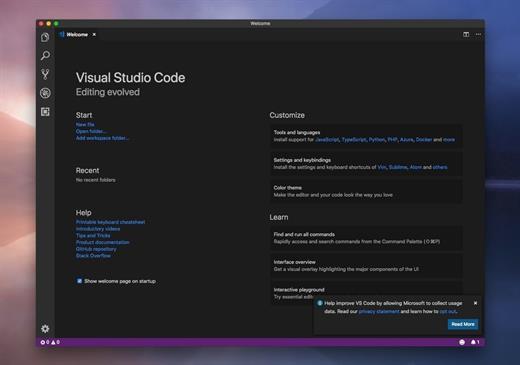
Visual Studio Code provides developers with a new choice of developer tool that combines the simplicity and streamlined experience of a code editor with the best of what developers need for their core code-edit-debug cycle. Visual Studio Code is the first code editor, and first cross-platform development tool – supporting OSX, Linux, and Windows – in the Visual Studio family.

At its heart, Visual Studio Code features a powerful, fast code editor great for day-to-day use. The Preview release of Code already has many of the features developers need in a code and text editor, including navigation, keyboard support with customizable bindings, syntax highlighting, bracket matching, auto indentation, and snippets, with support for dozens of languages.

For serious coding, developers often need to work with code as more than just text. Visual Studio Code includes built-in support for always-on IntelliSense code completion, richer semantic code understanding and navigation, and code refactoring. In the Preview, Code includes enriched built-in support for ASP.NET 5 development with C#, and Node.js development with TypeScript and JavaScript, powered by the same underlying technologies that drive Visual Studio. Code includes great tooling for web technologies such as HTML, CSS, LESS, SASS, and JSON. Code also integrates with package managers and repositories, and builds and other common tasks to make everyday workflows faster. And Code understands Git, and delivers great Git workflows and source diffs integrated with the editor.

What’s New

Version 1.112.0:


  • Release notes were unavailable when this listing was updated.
Compatibility

macOS 10.11 or later
Apple Silicon or Intel Core processor


Release Name: Visual Studio Code 1.112.0
Size: 296.3 MB
Links: HOMEPAGE – NFO – Torrent Search

Download: RAPiDGATOR

8 Comments
Mar 20

Microsoft Office 2024 v16.107.1

Note: If it doesn’t work, uninstall the old version of Office completely and reinstall it. For uninstallation method, please use Google search.

What’s New

Version 16.107.1:


  • Release notes were unavailable when this listing was updated.
Compatibility

macOS 12.0 or later


Release Name: Microsoft Office 2024 v16.107.1
Size: 2.6 GB
Links: HOMEPAGE – NFO – Torrent Search

Download: RAPiDGATOR
7 Comments
Mar 20

Sensei 2.0.2

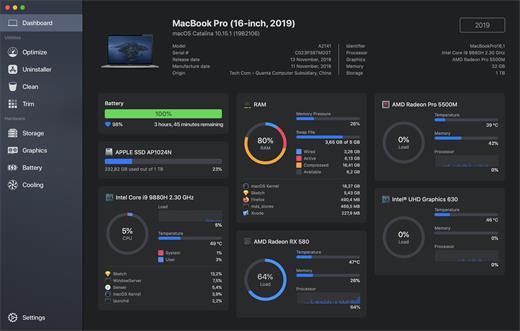
Sensei is an application for any Mac running macOS Catalina or later. Designed to help you optimize, monitor and clean your Mac in order to maximize its performance. Sensei offers several features related to Hardware and Software, such as a super-easy-to-use App Uninstaller, blazing fast Disk Cleaner, Health info for your battery and storage drives, and much more.

The Next Generation Mac performance tool


  • Performance Dashboard
  • Detailed Battery Reporter
  • Disk Cleaner
  • Thermal Dashboard
  • Theme Support
  • App Uninstaller
  • Detailed Hardware Information
  • Temperature Monitor
  • GPU Monitor
  • Performance Optimized
  • CPU Monitor
  • Bespoke Design
  • RAM Monitor
  • Detailed Display Reporter
  • HDD/SSD S.M.A.R.T Reporter
  • 100% Native Code
  • Fan Control
  • Detailed GPU/eGPU Reporter
  • SSD Trim Enabler
  • Accent Color Support
  • Disk Health Analyzer
  • Disk Benchmark
  • Battery Health Analyzer
  • Multiple Localizations
  • Disk Monitor
  • Dark Mode
  • Startup Speed Optimizer
  • Partition Map Explorer
What’s New

Version 2.0.2:


  • Release notes were unavailable when this listing was updated.
Compatibility

macOS 10.15.0 or later
Apple Silicon or Intel Core processor


Release Name: Sensei 2.0.2
Size: 29.8 MB
Links: HOMEPAGE – NFO – Torrent Search

Download: RAPiDGATOR

7 Comments
Mar 20

Proxyman 6.7.0

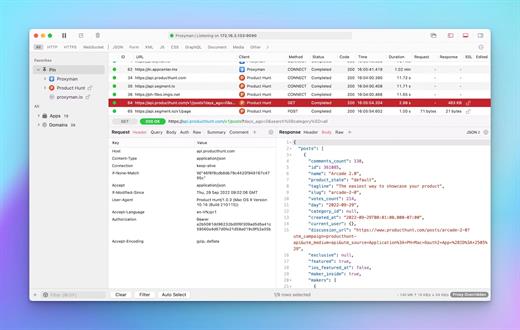
Proxyman is a high-performance macOS app, which enables developers to view HTTP/HTTPS requests from apps and domains.

Features


  • ? Native macOS app. Written by Swift, Objective-C. Powered by Apple SwiftNIO for the high-performance network application.
  • ? Fully support Apple Chip (e.g M1, M2, M1 Pro/Max).
  • ? Built for macOS Monterey & Ventura.
  • ✅ Hassle-free Intercept HTTP/HTTPS requests/response and WebSocket from Web Browsers, iOS, and Android devices.
  • ✅ Modern and intuitive UI
  • ? Multiple filters
  • Comprehensive Guideline to set up with iOS simulator and iOS and Android devices.
  • Basic debugging tools: Compose, Repeat, Wildcard/Regex Filter, Multiple Filters, Customize Columns, Toolbar…
  • Advanced Tools: Breakpoint, Map Local, Map Remote, Backlist, External Proxying, No Caching, Protobuf, Clear Cache, Custom Certificates, Scripting, Network Conditions, Reverse Proxy, Diff, Access Control etc
  • Automatic Setup for Backend Development: Auto capture HTTP(s) traffic from NodeJS, Ruby and Python.
  • macOS 10.15+
What’s New

Version 6.7.0:


  • Release notes were unavailable when this listing was updated.
Compatibility

macOS 10.15 or later


Release Name: Proxyman 6.7.0
Size: 34.6 MB
Links: HOMEPAGE – NFO – Torrent Search

Download: RAPiDGATOR
8 Comments
Mar 20

Ulysses 39.6

Ulysses lets you focus when you need to concentrate. It keeps all your texts neatly stuffed in its intuitive library. With a few clicks, Ulysses can create beautiful documents from your manuscripts: PDFs, web pages, even iBooks-ready ePubs. With its simple, clutter-free interface, it will turn work hours into fun time. And mere thoughts into powerful stories. If you love to write, and write a lot, Ulysses is made for you.

What’s New

Version 39.6:


  • Release notes were unavailable when this listing was updated.
Compatibility

macOS 14.0 or later.


Release Name: Ulysses 39.6
Size: 61.7 MB
Links: HOMEPAGE – NFO – Torrent Search

Download: RAPiDGATOR

6 Comments
Mar 20

TG Pro (Temperature Gauge Pro) 2.103

TG Pro (Temperature Gauge Pro) is a must-have utility for every Mac user with five awesome features:


  • Check up on your Mac by viewing the current and maximum recorded temperatures for every sensor. Choose between Celsius or Fahrenheit.
  • Tune the fan speeds so that your Mac can run cooler with the manual fan control. Or have the fans spin at maximum speed with Auto Boost when a specific temperature is hit.
  • Use the status icon to quickly check all temperatures, fans and even control the speeds directly from the menu.
  • Discover faulty fans and temperature sensors with the built-in diagnostics.
  • Remotely monitor servers by having emails sent instead of local notifications.

Temperature Gauge Pro will also show a notification through the Notification Center or Growl when a temperature is hit or Auto Boost is enabled. Also, log all information to a CSV for graphing in an external app.

Supports all Macs, including the new Mac Pro 2013 model as well as all MacBook Pros (including Retina), iMacs, TG Pro natively supports both Intel and Apple silicon Macs, from 2008 all the way up to the latest models. This includes MacBook Pro (13, 14, 15 and 16 inch), iMac (21.5, 24 and 27 inch), iMac Pro, Mac Pro, MacBook, MacBook Air, and Mac mini.

What’s New

Version 2.103:


  • Release notes were unavailable when this listing was updated.
Compatibility

macOS 11.0.0 or later
Apple Silicon or Intel Core processor


Release Name: TG Pro (Temperature Gauge Pro) 2.103
Size: 15.1 MB
Links: HOMEPAGE – NFO – Torrent Search

Download: RAPiDGATOR
9 Comments
Mar 20

Alcove 1.6.14

Alcove brings the elegant Dynamic Island experience to your Mac, transforming how you interact with notifications, live activities, and system events. Designed to feel native, it’s a polished way to stay informed without being interrupted.

Key Features


  • Fluid Transitions — Smooth animations and transitions that make alerts and interactions feel natural and integrated.
  • Instant Notifications — Alerts appear quickly and gracefully so you never miss important updates.
  • Live Activities Support — Keep track of ongoing tasks directly from the Dynamic Island interface.
  • Swipe Gestures — Use intuitive gestures to clear, interact with, or dismiss alerts.
  • Customizable HUDs — Tailor the look and feel of the heads-up displays to fit your style or workflow.
  • Lock Screen Presence — Alcove can show notifications or status even when your Mac is locked, ensuring you stay informed at a glance.
  • Lightweight, Native App — Built to run smoothly, Alcove is fast and performs well without draining resources.
What’s New

Version 1.6.14:


  • Release notes were unavailable when this listing was updated.
Compatibility

macOS 12.0 or later


Release Name: Alcove 1.6.14
Size: 13.3 MB
Links: HOMEPAGE – NFO – Torrent Search

Download: RAPiDGATOR

9 Comments
Mar 20

Morpholder 1.0.5

Tired of manually converting images and videos? Let Morpholder do the heavy lifting. Just drop your folders, rename the extensions, and watch the magic happen!

Morpholder is the ultimate native macOS utility for seamless, automatic file conversion. Designed for designers, developers, and power users, Morpholder runs quietly in your Menu Bar, monitoring your selected folders for any file extension changes.

HOW IT WORKS
Instead of opening clunky export menus or terminal scripts, simply rename a file’s extension right in Finder (for example, change image.jpg to image.png or video.mp4 to video.mov). Morpholder instantly intercepts this change and automatically transcodes the file into the new format in the background. It’s like magic!

KEY FEATURES


  • Instant Conversion via Rename: Just rename a file’s extension in Finder to trigger a high-quality format conversion.
  • Batch Folder Monitoring: Drop unlimited folders into the app. Morpholder will keep an eye on all of them simultaneously.
  • Broad Format Support: Convert between popular image formats (PNG, JPG, HEIC, TIFF, ICO, and more) and video formats (MP4, MOV, and more) instantly.
  • Native macOS Experience: Built exclusively for Mac, offering a beautiful, translucent Menu Bar interface with drag-and-drop support.
  • AI Background Removal, text extracts, compression, GIFs and more
  • Privacy First: All conversions happen locally on your Mac using Apple’s powerful CoreGraphics and AVFoundation engines. No internet connection is required, and your files never leave your computer.
  • Unobtrusive & Lightweight: Sits quietly in your Menu Bar, consuming minimal system resources. You can completely hide the window and just let it work in the background.
What’s New

Version 1.0.5:


  • New: Added support for converting SVG to any raster format
  • New: Added support for vectorization (converting any raster format to SVG)
  • New: Added support for archive conversion (.zip, .dmg, .7z, .tar, .gz, .bz2, .xz)
  • New: Added support for creating .dmg installers from any archives (not supported in MAS version)
  • Fix: Fixed WebP conversion
  • Improved: Video conversion speed increased by more than 4x
Compatibility

macOS 13.5 or later.


Release Name: Morpholder 1.0.5
Size: 45.4 MB
Links: HOMEPAGE – NFO – Torrent Search

Download: RAPiDGATOR
7 Comments