Please REGISTER or RENEW your account on RAPiDGATOR.net and support us by doing through all RAPiDGATOR working download links on main posts...
Mar 19

Imagiro Piano 2.2.311

Description: Virtual piano instrument packed with lofi character. combine soft, intimate piano recordings with creative processing.
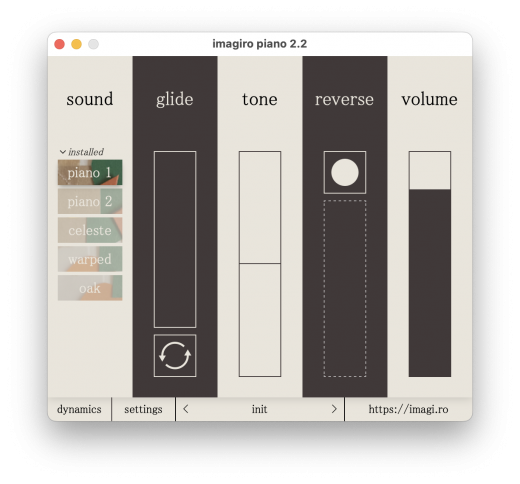
characterful sounds
recorded in bedrooms and sourced from deep pockets of the internet, imagiro's piano brings piano sounds with beautiful imperfections.

creative processing
use loop and reverse to create lush frozen piano sustains, or use the ADSR controls to transform a celeste into an EDM pluck.

make it yours
buy custom sound packs that integrate directly into the plugin, so you only buy the sounds you need.

soundsets

the original
recorded with two rode M5 microphones and a thick blanket between the strings, piano 1 gives an immersive, intimate sound. perfect for cozy, lo-fi chords. included in base plugin

the monopiano
a linen tablecloth dampens the strings with a more balanced and ever-so-slightly brighter tone. one vintage tube microphone and a much more intricate sample mapping creates a soft dignity.

the angel
made from samples recovered from internet vaults, the celeste is playful but gentle, wholesome but not lacking depth. an imagiro favourite.

the rainmachine
after detuning from a humid winter, this piano was re-tuned in software. the subtle chorusing from the detuned strings and the soft attack from a thin blanket on top of them give a homely feel.

Release Name: Imagiro Piano 2.2.311
Size: 55.3 MB
Links: HOMEPAGE – NFO – Torrent Search

Download: RAPiDGATOR
9 Comments
Mar 19

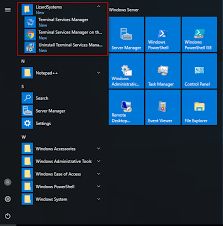
LizardSystems Terminal Services Manager 26.03.18

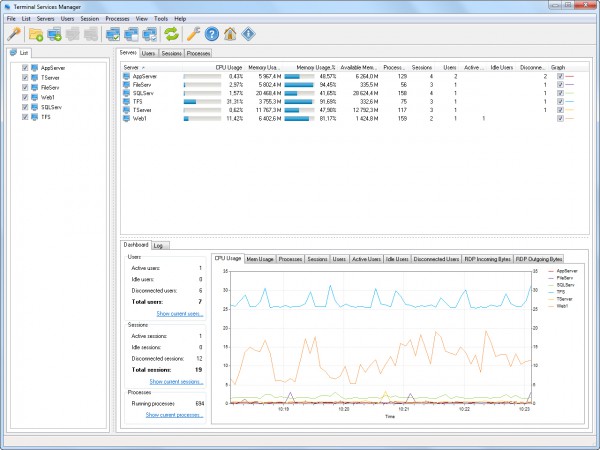
Description: Terminal Services Manager connects to one or more RDS servers and shows all sessions, users, and processes in one place. You get CPU, memory, and 11 additional server metrics on interactive charts with zoom, pan, and measurement. The legend shows min, max, average, and current values in real time.

Per-user columns display round-trip time, bandwidth, frame rate, and frame quality for each active session. A 4-bar icon shows connection health for each session, and server-level columns show the average and worst quality across all users. Diagnostic counters (packet loss, retransmission, frames skipped, encoding time) help you spot troubled sessions quickly.

You can audit user activity, monitor failed logon attempts, manage user profiles remotely, and enable or disable Remote Desktop on remote computers. Log off or disconnect idle users in bulk, send messages, and shadow user sessions.

The interface has Dark Mode with automatic switching based on your Windows theme, high-DPI support, and works on Windows 11.

Key features
View users, sessions, and processes across multiple RDS servers with live CPU, memory, and resource usage
Per-user RDP connection quality: round-trip time, bandwidth, frame rate, frame quality, and diagnostic counters
11 server performance metrics (available memory, pagefile, disk I/O, disk free space, network throughput, uptime) with interactive charts
Multi-condition filtering with AND/OR logic, text and numeric comparisons, quick search, and 19 built-in presets on all tabs
130+ administrative commands in 12 categories (Network Diagnostics, PowerShell Remote, Sysinternals Suite, and more). You can add your own commands and categories
User activity audit: track logon, logoff, disconnect, and reconnect events per user
Failed logon attempts monitoring with details on who, when, and from which address
Manage user profiles on remote computers: view, delete, and free up disk space
Enable or disable Remote Desktop on remote computers
Log off or disconnect idle and disconnected users in bulk
Shadow (remote control) user sessions
Send messages to selected users with message presets and variables (%computer_name%, %user_name%)
Discover computers from 7 sources: Network, Active Directory, IP Range, Hyper-V, RDS Connection Broker, SCCM/MECM, WSUS
Bulk operations: remove inactive or duplicate computers, normalize names, group by subnet or domain
RDS Licensing dialog with license server info, grace period, and pack details
Dark Mode with automatic Windows theme switching, high-DPI support, Windows 11 compatible
Available in 16 languages

Release Name: LizardSystems Terminal Services Manager 26.03.18
Size: 21.9 MB
Links: HOMEPAGE – NFO – Torrent Search

Download: RAPiDGATOR
11 Comments
Mar 19

Firetrust MailWasher Pro 8.0.101

Description: Receiving spam is like those telemarketers who call at dinner time, completely annoying and you didn't ask for it. Luckily you can stop this now! Now with free Android, iPhone and iPad version! Install MailWasher today to screen all your email accounts in one place and allow only the email you want in your inbox.

Install MailWasher today to screen all your email accounts in one place and allow only the email you want in your inbox. MailWasher lets you preview all your email before it gets to your computer or mobile device, enabling you to read all your email securely, and instantly delete any unwanted or suspicious email. Your remaining good email is downloaded to your PC or mobile device, so you avoid any spam or email viruses in your PC.

When you use mailwasher, the benefits become obvious.
Zero spam in your computer or mobile device.
Inspect any email before it gets to your computer or mobile device.
Never lose an email because you can’t afford to.
Intelligent spam tools ensure spam is caught and good email is not.

With over 8 million users, 22 languages and featured on both BBC World and CNN you can be confident that using MailWasher is one of the easiest ways to get rid of spam.

Receive only the email you want.
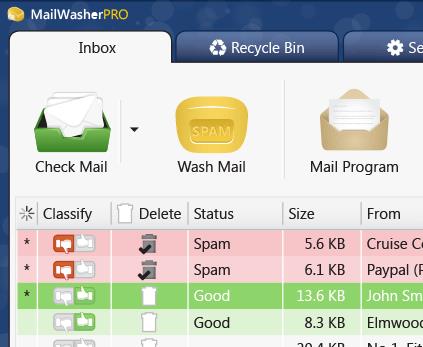
Check your email with MailWasher first. You’ll be safer knowing what’s waiting for you on the server, allowing you to quickly inspect and read your email and remove any unwanted messages quickly and easily.

Inspect all email before it gets to your computer.
View everything about your messages before they get to your computer so you can determine if they’re really spams, scams or good email. This means you can delete unwanted messages at the server so you only get the email you want.
MailWasher lets you view the email safely in plain text, but you can also inspect who it’s really from, who owns the company who sent it (WHOIS report) and all the hidden links.
Given that you can’t afford to lose any legitimate email, MailWasher lets you have the final say on it before letting you ‘Wash’ the spam away.

Intelligent spam tools.
Advanced spam detection technology and tools do all the hard work for you by automatically marking spam emails.
From simple friend's list, blacklists and learning filters to advanced custom filters, MailWasher has you covered.

Release Name: Firetrust MailWasher Pro 8.0.101
Size: 28.6 MB
Links: HOMEPAGE – NFO – Torrent Search

Download: RAPiDGATOR

10 Comments
Mar 19

BandiView Pro 7.26

Description: BandiView is the succeeding image viewer to Honeyview, that inherits everything cool of its predecessor and also gets improved even further. Fast and easy to view images in a variety of formats, from the most common ones to the most professional ones.

For the most graphic details - HDR support
BandiView supports an image output using HDR (High Dynamic Range) to express a widened range of brightness and color.
Do not miss the full experience of what HDR can really do with BandiView.

Webtoon view mode
BandiView can show multiple images as one vertical flow. Useful when working on a webtoon; arrange images to grasp the overall story.

Multiple format support
Not to mention images in many popular formats, BandiView provides support for RAW files taken by your camera, professional graphics like Clip Studio Paint, and even HEIC files from your iPhone.

Convert images faster and easier
BandiView can convert the format or size of multiple images simultaneously, at 10x faster processing speed than other converters do. Only thing it needs is a few click of your mouse.

Release Name: BandiView Pro 7.26
Size: 23.2 MB
Links: HOMEPAGE – NFO – Torrent Search

Download: RAPiDGATOR
9 Comments
Mar 19

Directory Opus 13.22

Description: Are you frustrated by the limitations of Windows Explorer? Directory Opus is a complete replacement for Explorer, with far more functionality than any other file manager available today.

You're in control.
Not just a simple file manager; Directory Opus lets you make your computer yours.
With a flexible user interface and unbelievable configurability, you can tailor Opus to streamline your workflow.
Dual panes, dual trees, multiple tabs.
Filter, sort, group your folders. Label and rate your files.
Queued file copies. Powerful batch renaming. Full archive support.
Find your files. Locate duplicates. Synchronize backups.
Assign tags and descriptions. Convert images. Edit metadata.
Fully multi-threaded, native 64 bit high performance code.
Whatever you want to do - Opus can probably do it. And if it's not built-in, you can take advantage of the unrivalled configurability to extend Opus using external tools.

What makes Opus unique?

Built for speed
Opus is written in native C++ multi-threaded code; compiled for the latest 64 bit CPUs, with high performance our number one design principle.

Fully configurable
Change the colors. Change the fonts. Change the toolbars and menus. Set up hotkeys. Opus adapts to how you want to use it.

Makes file management a breeze
Powerful searching, sorting, grouping, labelling and tagging features let you take control of your files like never before.

Endlessly extensible
Work with third-party tools as easily as with the built-in features. A full scripting interface, including scriptable dialogs, means your imagination is really the only limit.

Replace Windows Explorer and don't look back
Our unique Explorer Replacement mode provides a full replacement for Windows Explorer.
Single or dual pane file display and folder trees
Tabbed interface let you keep multiple folders open and switch quickly between them
Integrated viewer, metadata editor and utility panel
Built-in tools including synchronize and duplicate file finder
Leverage indexed search engines like Windows Search and Everything

High performance file management features
Copy, move, rename, duplicate, archive, view, backup and delete your files with ease
Queue multiple file copies for improved performance
Batch renaming including easy-to-use keyboard macros
Support for FTP and archive formats like Zip, 7Zip and RAR
Quickly filter, sort, group and search your folders
Color-code your files, assign status icons, star ratings, tags and descriptions
View images, documents and more. Image marking lets you sort your photos quickly and easily
Calculate folder sizes and print or export folder listings

Unrivalled configurability
Why let the programmers decide for you? You can tailor Opus to look how you want it to look, and to work how you want it to work.
Choose from light mode, dark mode, or design your own theme
Over 600 configurable colors and fonts
All toolbars and menus can be edited, plus you can add your own
Floating toolbars can act as program launchers
Configure your own hotkeys that work everywhere or just in Opus
Full scripting interface lets you design your own dialogs and add your own commands

Release Name: Directory Opus 13.22
Size: 28 MB
Links: HOMEPAGE – NFO – Torrent Search

Download: RAPiDGATOR

10 Comments
Mar 19

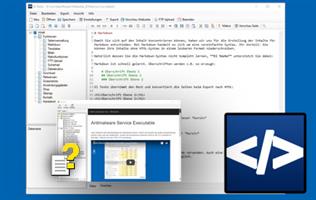
DA-HelpCreator 2.8.4

Description: DA-HelpCreator – Easily create online help. What is DA-HelpCreator? DA-HelpCreator is a user-friendly, powerful help authoring tool for creating online help in Windows CHM format, web pages, documentation, FAQ pages and knowledge management.

DA-HelpCreator allows easy and fast creation of content, which can then be converted into different export formats: HTML website, Windows-CHM help files or as a stand-alone Windows program.

Editors and design
Two editors are available for entering the content. The WYSIWYG HTML editor, here you work like with a word processor, and the Markdown editor for the fast input of contents.

Exports
Create documentation and online help in no time at all. Export the project as HTML Web pages, Windows Help (CHM) file, or as a .exe Runtime Web page.

Macros
Macro functions automatically create tables of contents and navigation elements, which automatically take care of linking and updating.

Customizeable templates
Select the design of the project from various responsive HTML templates. All templates can be customized. The CSS and HTML templates can be edited for each project.

FTP upload for HTML export
Download the export as a website with one click on your webspace, with the integrated FTP upload and synchronization function. Only changed files are transferred on request.

Open project structure
Each project is stored in an open data structure on the hard disk. The contents are managed in text files. This allows a problem-free administration with external programs, like a text editor, Subversion or GIT.

Security with static content
The export as web page creates static web pages. This means no security holes in your project.

PDF export of articles
Export individual articles directly into PDF format. The PDF export is configurable with its own headers and footers. Ideal for passing on information.

Release Name: DA-HelpCreator 2.8.4
Size: 26.8 MB
Links: HOMEPAGE – NFO – Torrent Search

Download: RAPiDGATOR

8 Comments
Mar 19

QILING Disk Master 8.7.6 Build 20260311 + WinPE

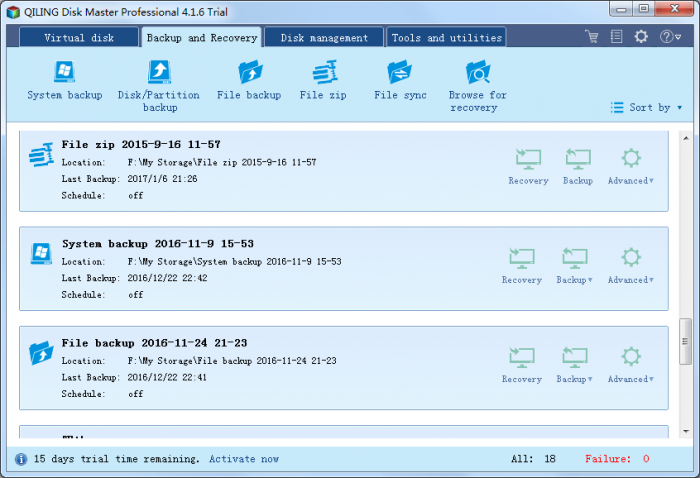
Description: The biggest nightmare for a computer user is data loss and system crash, once happened, reliable and up-to-date backups are extremely necessary and important. QILING Disk Master covers all the needs to recover your lost data and restore crashed systems in minutes. It's advanced and reliable data backup & system disaster recovery software for home office and business desktops and laptops. It enables users to perform self-service backup operation with comprehensive full/differential/incremental backup.

System backup
Easy system drive backup of all contents, including Windows operating system and system settings without interrupting your work.

Disk/partition backup Disk/partition backup
Block-level disk imaging quickly and efficiently backs up the entire disk or volumes.

File backup File backup
File-level backup allows you to selectively back up specific files, folders or file types, including network shared files.

File zip File zip
Compress selectively files, folders or file types, including network shared files to a zip file.

Schedule backup Schedule backup
Flexible backup scheduler allows backups to run based on daily, weekly, monthly or event.

Backup management Backup management
Easily manage backup job and automatically delete the out-of-date backup images, saving storage space.

Unattended backup Unattended backup
Runs as a Windows service - ideal for unattended Servers. Backs up even when system logged out, slept or hibernated.

Incremental & Differential Incremental & Differential
Based on a full backup, the software enables only backup changed or new data in order to save time and disk space for you.

Incremental & Differential Hot backup
Back up specific files and volumes without interrupting any current operations, especially for open files backup.

Release Name: QILING Disk Master 8.7.6 Build 20260311 + WinPE
Size: 589.7 MB
Links: HOMEPAGE – NFO – Torrent Search

Download: RAPiDGATOR

10 Comments
Mar 19

Canvas X Draw 26.0.0

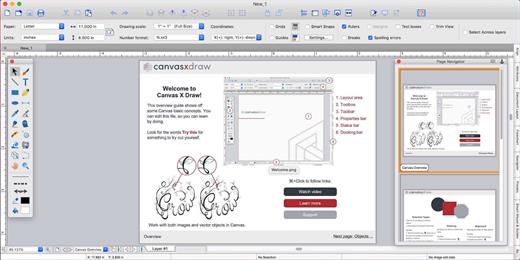
Canvas X Draw is a powerful software specifically designed to make it possible for small business owners, designers, illustrators, and professionals to advertise and communicate with confidence.

When your audience depends on pinpoint accuracy, minute detail, and high-impact data visualization, you need a special kind of illustration software.

With Canvas you can drive high impact visual communication right across your organization, putting powerful data in the hands of the people who need it.


  • Work with both raster and vector files
  • Import and visualize huge volumes of geospatial data
  • Manipulate and display intricate 3D models
What’s New

Version 26.0.0:


  • Release notes were unavailable when this listing was updated.
Compatibility

macOS 11.0 or later


Release Name: Canvas X Draw 26.0.0
Size: 273.9 MB
Links: HOMEPAGE – NFO – Torrent Search

Download: RAPiDGATOR

9 Comments
Mar 19

2Do 2.9.76

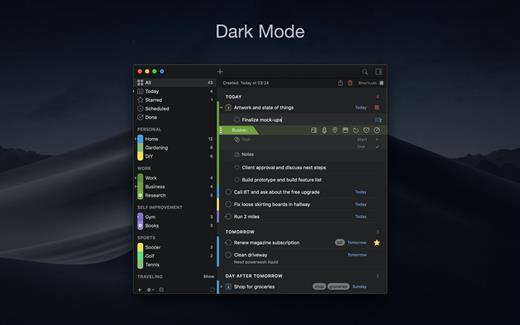
2Do lets you take a completely different approach to managing your tasks. With its extremely simple-to-use interface and a comprehensive and flexible set of powerful features, it lets you focus on what’s most important to you: your life. There is no wrong way of using 2Do, and unlike other to-do apps, it won’t force you to use a particular task management methodology. 2Do will simply amaze you, from start to finish.

Features:


  • Simple tasks, checklists, and projects
  • Lists and smart lists
  • Tags
  • Sync
  • Quick Look
  • Quick entry
  • Alarms and notifications
  • Password protection
  • Themes
  • Automatic backups
What’s New

Version 2.9.76:


  • Release notes were unavailable when this listing was updated.
Compatibility

macOS 10.12 or later.
Apple Silicon or Intel Core processor


Release Name: 2Do 2.9.76
Size: 62.4 MB
Links: HOMEPAGE – NFO – Torrent Search

Download: RAPiDGATOR
9 Comments
Mar 19

PullTube 1.8.6.27

Sharing videos via online hosting services, such as YouTube or Vimeo is a common practice, yet streaming the content might not work as expected if you have a slow internet connection.

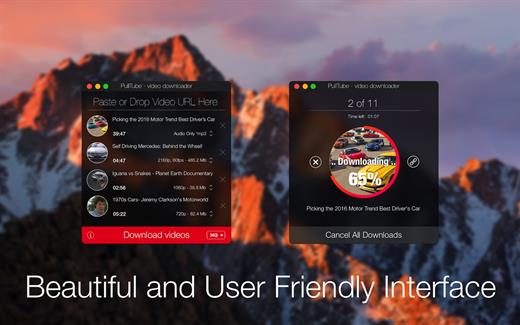
PullTube offers you the possibility to download videos from both sources (YouTube and Vimeo), while other platforms might be added at a later time. The app can handle playlists, allows you to select the output quality, and can even extract only the audio.

Video downloader that can import links with drag and drop and can detect playlists

The PullTube user interface is represented by a small window where you get to quickly paste the video URL. Note that you can also add a video by dropping the link on top of the PullTube window.

Worth mentioning is that, if PullTube detects that the video is part of a playlist, will offer to download the entire collection: will fetch the data for each entry and handle the downloads consecutively.

Download videos hosted on YouTube or Vimeo to different output sizes and formats

PullTube will start fetching the video data right away so you can see the video name, duration, and a small thumbnail. When configuring a download, you get to select the output quality (highest, 4K, HD or regular with different resolutions) or choose to export only the audio to an M4A or MP3 file.

Via the PullTube Settings panel, you can change the default download location and the default MP3 bitrate (320Kbps, 256Kbps, 128Kbps, 64Kbps). You can also add the quality info to the video’s name and choose to quit the app when all downloads are completed.

Get offline access to videos hosted online in just a few steps

PullTube proposes a streamlined workflow for quickly downloading videos from YouTube or Vimeo, provides control over the output quality, and enables you to extract the audio to MP3 or M4A files.

However, during our tests, we have noticed that PullTube has trouble completing the download when handling videos that are longer that 2 minutes. The process stops without any explanation, and you can eventually complete the task, but you need to add the link to download tool multiple times.

What’s New

Version 1.8.6.27:


  • Release notes were unavailable when this listing was updated.
Compatibility

macOS 10.12 or later


Release Name: PullTube 1.8.6.27
Size: 232.1 MB
Links: HOMEPAGE – NFO – Torrent Search

Download: RAPiDGATOR

10 Comments