Please REGISTER or RENEW your account on RAPiDGATOR.net and support us by doing through all RAPiDGATOR working download links on main posts...
Mar 17

Swinsian 3.0.8

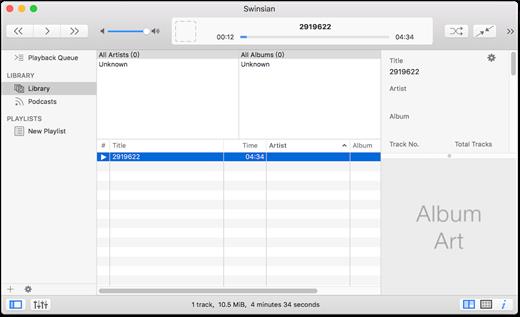
Swinsian is a music manager and player for macOS.

Features


  • Supports FLAC/Ogg Vorbis as well as MP3, AAC, WAV, APE, AC3, WavPack, WMA, and cue files
  • Copies tracks from iPods and iPhones
  • Watches folders for new files
  • Fetches album art
  • Quick control window
  • Imports iTunes libraries
  • Playback over AirTunes
  • Duplicate finding
  • Bulk tag editing with regex support
What’s New

Version 3.0.8:


  • Release notes were unavailable when this listing was updated.
Compatibility

macOS 10.11 or later


Release Name: Swinsian 3.0.8
Size: 24.7 MB
Links: HOMEPAGE – NFO – Torrent Search

Download: RAPiDGATOR

6 Comments
Mar 17

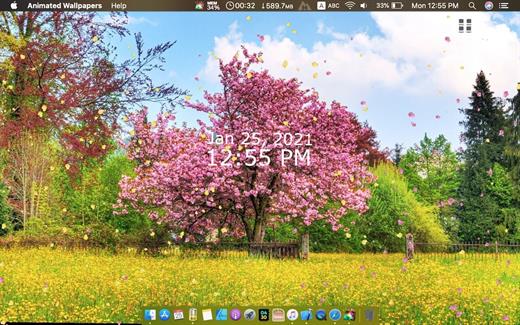
Animated Wallpapers 1.0.24

Feel the breeze of your desktop, your desktop is not boring anymore!


  • Select from 14 themes: Nature, Space and more.
  • Show/Hide Desktop Icons : it can be used as a curtain to hide desktop icons, Just in case you are having a work presentation and you want to hide all the mess on the desktop.
  • Big desktop clock.
What’s New

Version 1.0.24:


  • New Wallpapers
Compatibility

macOS 10.11 or later.


Release Name: Animated Wallpapers 1.0.24
Size: 606.9 MB
Links: HOMEPAGE – NFO – Torrent Search

Download: RAPiDGATOR

10 Comments
Mar 17

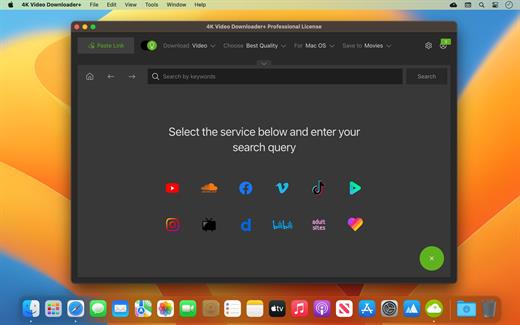
4K Video Downloader Plus Pro 26.0.8

Easy Downloads Management


  • Sort and filter downloads by type, name and date. Import and export all files as a single JSON file. Easily track and control the progress of both individual downloads and entire groups of downloading files.

What’s New

Version 26.0.8:


  • Release notes were unavailable when this listing was updated.
Compatibility

macOS 10.13 or later


Release Name: 4K Video Downloader Plus Pro 26.0.8
Size: 435.6 MB
Links: HOMEPAGE – NFO – Torrent Search

Download: RAPiDGATOR

5 Comments
Mar 17

Downie 4.12

A simple download manager that offers you the possibility to quickly save videos from different websites to your own disk drive.

If you are using a poor internet connection, trying to visualize videos streamlined online might not work properly since the content is loaded too slowly. Downie is a simple Mac app that can help you download those videos to your computer, and then watch them by using your default media player.

User friendly video downloader featuring support for drag and drop actions

Working with Downie is extremely straightforward: simply drop the video URL on top of the app’s main window or on the Dock icon. Downie adds the video to your downloads list, so all you have to do next is start the process by pressing the appropriate button. Of course, you can also remove items from the list.

By default, Downie downloads MP4 files and places them in your default Downloads folder, but you can easily change this via the Preferences window. The same area allows you to setup notifications, or post processing actions (convert to MP4 if necessary, or extract audio only).

Effortlessly download videos from a wide collection of hosting websites

Downie provides support for more than 400 different websites that host video content, among which there are the most popular choices, such as YouTube, Apple, LiveLeak, Vimeo, BBC, and so on. If a certain website is not included, within the app you can send a request email to the Downie developers.
Moreover, Downie also provides matching extensions for various popular web browsers, such as Firefox, Safari, Google Chrome or Chromium. The add-ons are not installed by default: open the Preferences window and install only the ones you plan to use.

Straightforward solution for downloading video content hosted online

Downie is a great tool for saving videos posted on various websites to your Mac for offline playback. The application is extremely useful especially if you have a slow internet connection.

What’s New

Downie 4.12:


  • New: Support for Permute 4 beta.
  • Improved: arte.tv, bilibili.com, x.com, youtube.com.
Compatibility

macOS 10.12 or later
Apple Silicon or Intel Core processor


Release Name: Downie 4.12
Size: 42.2 MB
Links: HOMEPAGE – NFO – Torrent Search

Download: RAPiDGATOR

6 Comments
Mar 17

4K YouTube to MP3 Pro 26.0.8

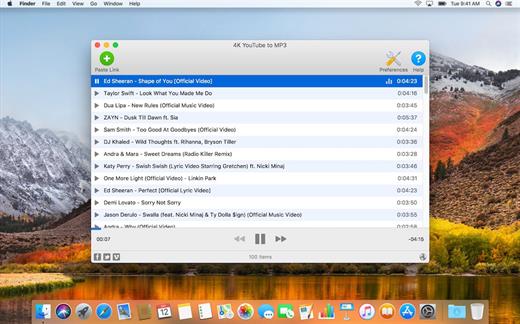
4K YouTube to MP3 was specifically created to extract audio from YouTube, Vimeo or Facebook and save it in MP3, M4A, OGG. No annoying and complicated settings to deal with, just a clean, friendly and functional interface. Downloading is simple and straightforward: just copy the link from your browser and click ‘Paste Url’. Done!

Features


  • Extract audio from YouTube videos and save it in MP3, M4A or OGG in high quality.
  • Download full YouTube playlists or channels and generate m3u files.
  • Transfer downloaded tracks automatically into iTunes and upload them on your iPhone or iPod.
  • Listen music via native built-in music player.
  • Download and extract audio tracks from SoundCloud, Vimeo, Flickr and DailyMotion videos.
  • Download audio books from YouTube.
  • Extract audio tracks even from embedded in HTML page videos.
  • Use 4K YouTube to MP3 on your PC, Mac or Linux, doesn’t matter what OS you prefer.
What’s New

Version 26.0.8:


  • Release notes were unavailable when this listing was updated.
Compatibility

macOS 10.10 or later


Release Name: 4K YouTube to MP3 Pro 26.0.8
Size: 406.4 MB
Links: HOMEPAGE – NFO – Torrent Search

Download: RAPiDGATOR

7 Comments
Mar 16

4K Video Downloader Plus 26.0.8

Description: Download videos from all popular websites including YouTube, Vimeo, TikTok, SoundCloud, Facebook, Twitch, Bilibili and more in high-quality.

Meet the next generation of 4K Video Downloader
4K Video Downloader is a cross-platform app that lets you save high-quality videos from YouTube and other websites in seconds. It works faster than any free online video downloader — just a click, and you can enjoy content anytime, anywhere.

Download YouTube Playlists, Channels, and Search Results in One Click
Save playlists, channels, and search results from YouTube in high quality and various video or audio formats. Download YouTube Watch Later, Liked videos and private YouTube playlists.

Dubbed YouTube Audio Download
Effortlessly save both YouTube videos and accompanying audio tracks in multiple languages. Download dubbed audio in your preferred languages as separate files.

Extract YouTube Subtitles
Download annotations and subtitles along with YouTube videos. Save them in SRT format, select from over 50 languages. Get subtitles not just for one video, but for an entire YouTube playlist or even a channel.

Get Videos in 4K and 8K Quality for Free
Download videos in HD 720p, HD 1080p, 4K, and 8K resolution. Enjoy them in high definition on your HD TV, iPad, iPhone, Samsung and other devices.

Proxy Connection for Unrestricted Access
Bypass restrictions set by your Internet service provider and get around your school or workplace firewall. Connect through an in-app proxy to access and download from YouTube and other sites.

All Popular Sites Support
Save video and audio from YouTube, Vimeo, TikTok, SoundCloud, Bilibili, Niconico, Flickr, Facebook, DailyMotion, Naver TV, Likee and Tumblr. Download recorded streams from Twitch and YouTube Gaming.

New YouTube Video Auto-Download
Subscribe to the download of your favorite YouTube playlists and creators. Save whole channels and playlists in one go. Get new videos downloaded automatically as soon as they are uploaded to YouTube.

3D Video Download
Get a one of a kind experience by watching stereoscopic 3D videos on your computer or TV. Download 3D Youtube videos in MP4, MKV, FLV, 3GP and other formats

360° Video Download
Feel the action all around you with virtual reality videos. Download 360° videos to relive the mind-blowing VR experience as many times as you want.

Easy Downloads Management
Sort and filter downloads by type, name and date. Import and export all files as a single JSON file. Easily track and control the progress of both individual downloads and entire groups of downloading files.

Release Name: 4K Video Downloader Plus 26.0.8
Size: 260 MB
Links: HOMEPAGE – NFO – Torrent Search

Download: RAPiDGATOR

6 Comments
Mar 16

Wondershare Recoverit 14.0.13.4

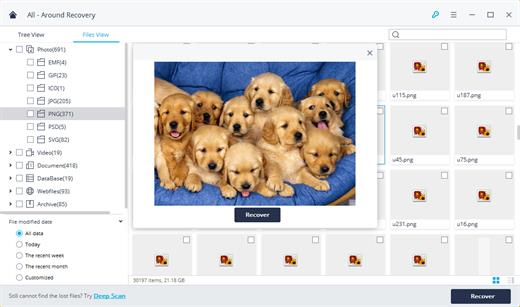
Wondershare Recoverit is a comprehensive data recovery suite to recover Mac data lost due to accidental deleting, formatting, virus infection, improper operation, unexpected power failure, and other unknown reasons.

It can recover Mac data from lost, deleted, logical corrupted and formatted Mac hard drive, iPod, USB drive, SD card, digital camera, mobile phone, MP3, and MP4 player. Compatible with HFS+, FAT16/32, and NTFS file system volumes, this non-destructive Mac file recovery software ensures safe Mac file recovery without modifying the original data saved on your Mac machine or any other storage media. Versatile preview lets you enjoy Mac data recovery in advance.

Features


  • Safety First:

    • Read-only and risk-free Mac data recovery program. No any writing operation to your original data.
  • Versatile Preview Ability:

    • For images, real-time and direct scan results is displayed during the scan process to let users stop scanning once the target images are found.
    • For other Mac files such as videos, audio files, archives and documents, they are displayed as a text in a Hex mode for preview to let users enjoy file recovery on Mac in advance.
  • Precise File Recovery for Mac:

    • Before data recovery on Mac, you can choose the target file types to scan, which saves you much time especially when there are tons of files on your Mac machine.
    • Restore deleted files for Mac with original file names, shooting date, and storage paths.
    • Support file names search for scanning results to provide you precise Mac file recovery.
  • Easy-to-use and Clean Interface:

    • Complete wizard and easy-to-use interface let you perform Mac data recovery in a breeze.
What’s New

Version 14.0.13.4:


  • Release notes were unavailable when this listing was updated.
Compatibility

macOS 10.10 or later


Release Name: Wondershare Recoverit 14.0.13.4
Size: 212 MB
Links: HOMEPAGE – NFO – Torrent Search

Download: RAPiDGATOR

5 Comments
Mar 16

RenameMe 2.3

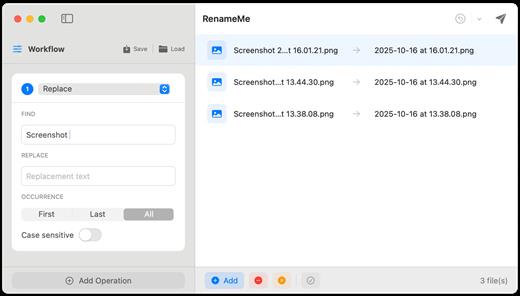
RenameMe is a lightweight Mac app designed to help you rename dozens or even hundreds of files at once—quickly, safely, and without the usual hassle. It lets you stack multiple renaming actions into a single workflow, preview results live before applying changes, and save your favorite workflows for repeat use—making bulk renaming feel effortless.

Key features


  • Stackable operations: Chain multiple actions (e.g., replace text → change case → add prefix/suffix → trim characters) in one run.
  • Live preview: View original and new names side-by-side and spot conflicts or issues before committing.
  • Saved workflows: Save custom workflows for repetitive tasks, and use built-in presets such as Photo Organization and Web‑Safe Names.
  • Smart sequencing: Add sequential numbering with custom padding and positioning—ideal for organizing photos, documents, and collections.
  • Powerful operations (incl. regex): Perform text replacement, case changes, trimming, regex-based patterns, and more across multiple operation types.
  • Full undo support: Instantly undo renames and restore previous states using the app’s undo history.
What’s New

Version 2.3:


  • Release notes were unavailable when this listing was updated.
Compatibility

macOS 13.0 or later


Release Name: RenameMe 2.3
Size: 3.9 MB
Links: HOMEPAGE – NFO – Torrent Search

Download: RAPiDGATOR

6 Comments
Mar 16

All to MP3 Audio Converter 3.4.1

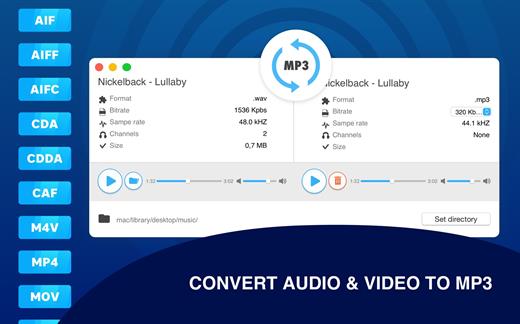
Any audio files to MP3 format in one click! Universally applicable audio utility – All To MP3 Audio Converter. Plenty of formats, bitrate setup and high-quality MP3 files as a result!

INPUT AUDIO FORMATS
AIF, AIFF, AIFC, CDA, CDDA, CAF, M4V, MP4, M4A, MOV, QT, WAV, WAVE, BWF, AMR, AC3 and more.

All To MP3 Audio Converter FUNCTIONALITY


  • Pre-listen uploaded (and converted) audio files
  • Output files bit rate setup (320, 256, 192, 128 kbps)
  • Playback on any devices after conversion
  • Audio channels and sample rate information
High-quality music in your favorite format with All To MP3 Audio Converter utility.

What’s New

Version 3.4.1:


  • Release notes were unavailable when this listing was updated.
Compatibility

macOS 10.12 or later


Release Name: All to MP3 Audio Converter 3.4.1
Size: 83.5 MB
Links: HOMEPAGE – NFO – Torrent Search

Download: RAPiDGATOR
7 Comments