Please REGISTER or RENEW your account on RAPiDGATOR.net and support us by doing through all RAPiDGATOR working download links on main posts...
Mar 16

WindowTop Pro 5.30.2
Description: Optimize your productivity by making windows Always-On-Top. By switching windows super fast using Anchors. By using & watching multiple windows at the same time using Picture-In-Picture (PiP) mode and enabling night mode (dark-mode) for any window.
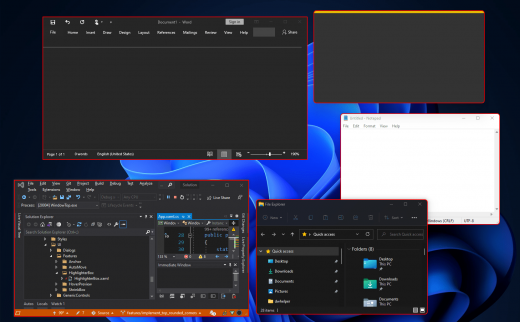
WindowTop is far more than just a one-feature app. It is an advanced utility app with one goal - to make you much more productive during your work!

Always on Top
Easily set window on top and even highlight top-most window with a red frame! You can configure this behavior in settings (frame color, etc).

Anchors
The reason why you may put a window on top is to get back to it faster. If this is your case, then Anchors is for you! Instead of using Always-on-Top, just use Anchors! They will help you to access the window with a single click! Faster than ALT+TAB, great for touch screens! And don't worry, the anchors will not disturb you because they automatically move away from any text/image.

PiP & Crop any window!
Want to watch some videos while working? No problem! Enable Picture in Picture mode for it! It will enable PiP mode. In addition, you can even interact with the window while it is in PiP mode and even crop a region.

PiP Auto-Move!
PiP also come with auto-move option! It will stay away from text/images for you!

Opacity
Working on something like building a website and want to see your work behind? No problem! Use opacity.

Opacity + Click Through
Opacity also includes a feature that allows you to click through a transparent window. This can be useful for designers and graphic artists.

Dark Mode
Working at night? Tired of all the light coming out of the screen and unfortunately, the software does not support dark mode? No problem now! Note: Unstable in Windows 10 (Stable in Windows 11)

Glass Mode
Smart transparency mode enables you to take opacity to the next level! Unlike regular transparency, you can set different opacity levels for the background around the text/controls and the images. And you can even set the blur level. Note that this may work slowly on 4K and will work better for NVIDIA GPUs (make use of CUDA feature)

Release Name: WindowTop Pro 5.30.2
Size: 52.9 MB
Links: HOMEPAGE – NFO – Torrent Search

Download: RAPiDGATOR
6 Comments
Mar 16

MiniMeters 1.0.28.233

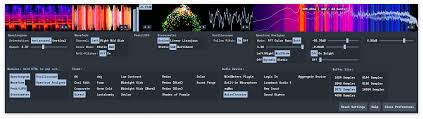
Description: MiniMeters is a simple audio metering Application & Plug-In suite for Windows, macOS, and Linux. In the Standalone app, monitor any stereo Input, Output*, or use the included Audio Server plug-in to send audio into the MiniMeters app. New in v1.0: MiniMeters now includes plug-in versions of each meter and the new Quad Layout. Customize the layout of meters in a Horizontal bar, pop out meters to create a custom layout, or swap to the new Quad Layout for a simple display to cover most needs.

Features
7 modules to choose from to build your perfect metering setup: Spectrogram, Waveform, Loudness, Stereometer, Oscilloscope, VU, and Spectrum.
Arrange each module in any order in a Horizontal bar, pop them out to separate windows to create a custom layout.
Capture your default audio device on Windows, macOS 14.2+, or Linux.
Use the Audio Server plug-in to send audio to MiniMeters directly from your DAW or plug-in host.
Clip the last 10 or 60 seconds of audio received by MiniMeters or start a recording and capture audio from your whole system.
Dive deep and create your own color scheme to set the mood.
No copy protection, just download and install.

Includes VST3 / Audio Unit / CLAP Plug-Ins:
MiniMeters: Standalone
Audio Server (Formally MiniMetersServer) Plug-In: For sending audio from a DAW or host to the MiniMeters Standalone Application
Oscilloscope Plug-In
Spectrogram Plug-In
Spectrum Plug-In
Stereometer Plug-In
VU Plug-In
Waveform Plug-In

Modules
Spectrogram:
Analyze the frequency content of your audio over time.
Choose between Horizontal or Vertical display.
Waveform *Available In Demo*:
Analyze the Volume of your audio over time.
Select "Multi-Band" to see a DJ-style colored Waveform.
Adjust the speed of the Waveform.
Compare the volume of the Low, Mid, and High frequencies using the "History" setting.
Peak/LUFS *Available In Demo*:
View the immediate Peak and LUFS volume in this simple Module.
Stereometer:
Analyze the stereo width and balance with 3 modes:
"Scaled" zooms in on the lower volume audio to show detail you might be missing.
"Linear" shows a unipolar view of your audio.
"Lissajous" shows an unadulterated Lissajous function.
Switch the color to "RGB" or "Multi-band" to see stereo width and frequency content at the same time.
Oscilloscope:
See a detailed waveform view of your audio immediately. With "Pitch Tracking" mode you can easily see the shape of your waveform.
Spectrum Analyzer:
View the frequency content of your audio in "Left/Right" or "Mid/Side" mode.
"Frequency Readout" shows the loudest frequency in your audio. Great for finding that note or tricking your friends into thinking you have perfect pitch.
Adjust the "Slope" to create a flat target to reference your mix against.
…and more

System Requirements:
Windows 10+
x64 (Intel or AMD) processor required
macOS 10.15 or newer
Intel & Apple Silicon Macs supported
Linux Kernel 5.4.0-174 or newer
x86_64 or arm64 processor required
Tested to work on Ubuntu 20.04+
Built on Ubuntu 22.04 using glibc v2.31
Stick Mode:
wlr-layer-shell is required on Wayland.
_NET_WM_WINDOW_TYPE_DOCK is required on X11.

Release Name: MiniMeters 1.0.28.233
Size: 230 MB
Links: HOMEPAGE – NFO – Torrent Search

Download: RAPiDGATOR
8 Comments
Mar 16

Pattaizer 4.1.1.6

Description: Pattaizer creates patterns. It features 24 different pattern approaches which can be tuned and varied by the user. It includes brick and Ministeck® patterns can be made (mosaics) and lissajous patterns can be created with Harmonograph and Pantograph geometries. Each pattern has several control parameters to create that unique effect that you are looking for. You could try to learn how to use Photoshop (days?), but Pattaizer does it for you. In seconds.

Pattaizer is a stand-alone application that works under windows or under a windows environment in OS-X (mac). After installation you can immediately create a pattern. In the first period of use the application is unrestricted and fully functional. When these grace days have expired a few professional features will be limited or locked.

Amazing patterns
Pattaizer is a software painting tool. It does not replace the skill of many people to draw, paintbrush, sketch and paint. It is a tool for people who like to do it different, and create their own colourful painting. When your personal piece of art has amazed your family and friends when they ask 'is it real?' then you are satisfied. That's all it takes: amaze and be inspired by the possibilities of this simple application.

Automated and manual
Pattaizer offers both fully automated pattern creation and manual creation. Try automation first, and then switch to manual pattern creation, like to spirograph or free drawing. You don't need to be educated in art. You need a good tool that does it for you. Is it real? We believe it does: you made your own piece of art with love and intensity. That's all it takes to be a proud owner of a true painting.

Pattern Art
When the right combination of source picture colours, pattern type, settings and a bit of luck your piece of art would match those in museums. Why not. You can either spend hours of creativity with a brush and paint, or use the perfect tool to amaze people. A lot of professional artists would turn away from such a fake approach. But you know better. It looks great and you made it yourself.

Mechanical art
There are two tools available to simulate mechanical pattern generators: the harmonograph and the pantograph. Both are cabable to create stunning effects. You can make your own harmonograph from wood and steel (great fun) but you can also use Pattaizer to test the possibilities. And then build one yourself after all. The pantograph is also based on a mechanical contraption, translated into mathematical formulae. Seems dull, but it amazes every time you create a new pattern.

Release Name: Pattaizer 4.1.1.6
Size: 83.1 MB
Links: HOMEPAGE – NFO – Torrent Search

Download: RAPiDGATOR

6 Comments
Mar 16

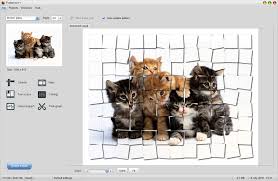
FX Math Tools Manifest 26.03.16

Description: Efofex's mathematical publication toolkit relies on three main pillars: FX Draw - our flagship mathematical drawing tool, FX Equation - our high speed equation editor, and FX Manifest, which makes managing assessments and using our regeneratable question technology as simple as possible.

Create Assessments - FX Manifest
FX ManifestFX Manifest is designed to make the creation and management of assessments as simple, fast and as powerful as possible. There is nothing else quite like it!

Draw Mathematics - FX Draw
FX DrawFX Draw is the ultimate tool for drawing mathematics. Just about any graphic that a mathematics teacher will ever need can be drawn using FX Draw's highly specialized tools. FX Draw is incredibly efficient and versatile. Best of all, it is supported by people who have been in the classroom and know exactly what you need.

Type Mathematics - FX Equation
FX EquationNo one uses equation editors more than mathematics teachers. What they need is high efficiency but most equation editors provide every conceivable feature in an incredibly slow package. FX Equation is different. You just type and FX Equation does all the hard work. No other equation editor comes close to the speed of FX Equation.

Release Name: FX Math Tools Manifest 26.03.16
Size: 93.9 MB
Links: HOMEPAGE – NFO – Torrent Search

Download: RAPiDGATOR
9 Comments
Mar 16

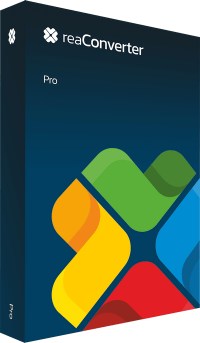
reaConverter Pro 8.0.205

Description: Easily process full batches of files and folders. reaConverter combines powerful automation with intuitive tools to streamline image conversion and eliminate repetitive editing.

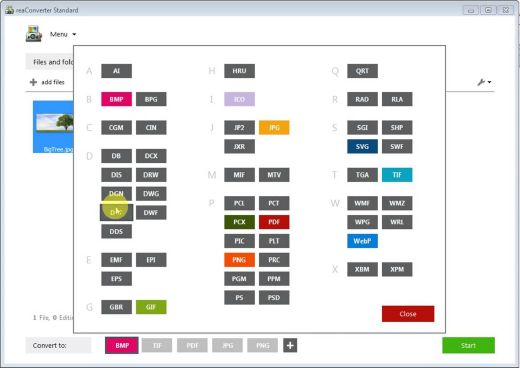
700+ File Formats
reaConverter delivers high-efficiency batch conversion for an extensive range of file formats.

Efficient Conversion
A powerful file conversion toolkit with advanced processing features — giving you precise, granular control over every output.

Image Editing
reaConverter simplifies batch image editing — apply touch-ups, transformations, and effects to unlimited images simultaneously.

Automation
Professional-grade automation features for high-volume file conversion and batch processing.

Development
Integrate reaConverter's functionality into scripts, applications, or websites using its command-line tool or DLL.

Release Name: reaConverter Pro 8.0.205
Size: 397.2 MB
Links: HOMEPAGE – NFO – Torrent Search

Download: RAPiDGATOR

7 Comments
Mar 16

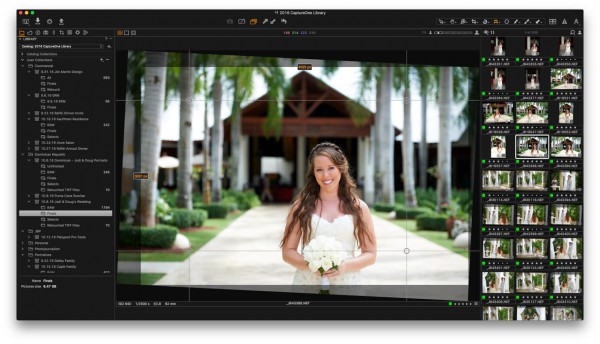
Capture One 16.7.6.3417

Description: Mind-blowing colors and quality. Get true-to-life colors and superb image quality right from the start of your photo process. Fine-tuned by our in-house experts, our RAW converter is customized for nearly 600 camera profiles and over 700 lenses. With true-to-life color processing, you can spend less time editing and reach your final look even faster.

Shoot tethered. Fast.
Connect your camera and shoot tethered into Capture One. Organize shots, make changes on the spot, auto-apply edits to incoming shots, and get the perfect image every time. See what your camera sees with Live View, and don’t miss out on some of our smart features like ReTether and Save to Card, which will make sure you stay flexible and never lose a shot.

Work together with anyone, anywhere
Collaborating with teams and clients – whether in the same room or on different continents – is made easy with Capture One Live. Share, view, comment, rate, tag, and get feedback. All in one place. No uploading, exporting, or downloading a single photo ever again.

Edit intelligently. Easily.
With assisted editing, you can start and finish your projects with just a few clicks.

With a single click, you can instantly match the style or edits of a reference image. Whether from a previous project, a film still, or a mood board, it automatically transfers the look to your current photo(s), giving you a strong starting point for editing and color grading.

Mask skin, hair, eyes, facial features, subjects, and backgrounds with extreme precision. Save time by creating complex masks quickly for multiple images. You can even combine them with other adjustments and save them as a Style.

You can now set your crop reference to a single image and apply it to a batch of photos or incoming shots. Capture One will detect whether to focus on a face or a subject and automatically make consistent crops for all your shots.

Finish most of your edits in seconds with Smart Adjustments by automatically adjusting Exposure and White Balance. Unlike copy and apply, Smart Adjustments makes our photos consistent, even under different lighting conditions.

Experience the speed as Capture One intelligently zooms and pans to the nearest eye in each shot, allowing you to quickly check for sharpness without manually zooming in.

A quick and easy way to take care of annoying dust spots in multiple photos and dramatically speed up your editing.

Release Name: Capture One 16.7.6.3417
Size: 1.2 GB
Links: HOMEPAGE – NFO – Torrent Search

Download: RAPiDGATOR
8 Comments
Mar 16

ZD Soft Stealth Screen Recorder 2.0.4

Description: Stealth Screen Recorder is background-ready Windows screen recording software for lawful, authorized monitoring, compliance review, incident investigation, and long-session operational capture with minimal workflow disruption.

What Is Stealth Screen Recorder?
Stealth Screen Recorder is background-ready Windows screen recording software for long-session, authorized monitoring and compliance-oriented workflows. It focuses on stable unattended recording, efficient output, and controlled deployment in lawful operational environments.

Designed for authorized operational monitoring
This product is intended for lawful, disclosed, and policy-governed monitoring scenarios such as compliance evidence, approved workstation review, and incident reconstruction in controlled environments.

Useful when long-session continuity matters
It is optimized for extended unattended recording where stable retention, efficient output, and low workflow disruption are more important than presenter-facing features.

Different from creator-oriented recorders
ZD Screen Recorder is for tutorials and content creation. Stealth Screen Recorder is for authorized background capture, audit trails, and operational review where discreet long-session recording is the requirement.

Hidden Background Recording
Capture ongoing screen activity discreetly so authorized users can review workflows without adding friction to day-to-day operations.

24/7 Session Reliability
Supports continuous long-session recording for operational monitoring, audit readiness, and incident traceability.

Clear Visual Evidence
Preserves usable screen records for compliance reviews, performance analysis, and post-incident investigation.

Efficient Output Control
Balances quality and storage cost with practical encoding and output settings for scalable deployment.

Release Name: ZD Soft Stealth Screen Recorder 2.0.4
Size: 7.3 MB
Links: HOMEPAGE – NFO – Torrent Search

Download: RAPiDGATOR
6 Comments
Mar 16

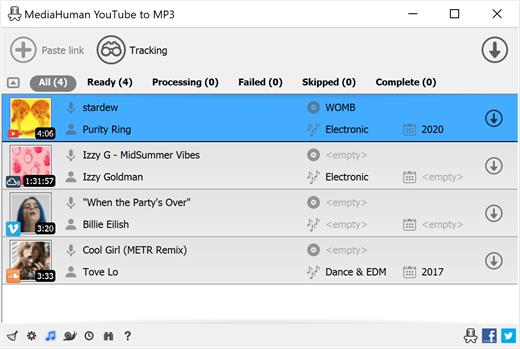
MediaHuman YouTube To MP3 Converter 3.9.19 (1503)

Description: You like to listen to music on YouTube, SoundCloud or Bandcamp and want to save it for offline playing. Or you want to download the soundtrack of a new movie. Then we recommend you to try out this software developed specifically for this purpose.

Downloads all music from a playlist or channel
Tracks playlist/channel updates and downloads only new videos
Downloads highest available quality up to 320 kbps
Supports YouTube, Vimeo, SoundCloud, Mixcloud, etc.
Downloads simultaneously several tracks
Includes simple tag editor with cover art image support
Works on all modern platforms (macOS, Windows, Ubuntu)
Exports downloaded files to iTunes/Music.app

Main Features:
Playlists and channels
The software supports downloading all videos in a playlist or channel. There is also an option to subscribe and download only newly uploaded tracks.

iTunes/Music.app support
In the app preferences, you can select the option to automatically add the downloaded tracks to your iTunes/Music.app library. You can also specify the playlist to which the converted tracks will be added.

Saves your time & traffic
The app detects audio track in YouTube video clip and downloads it, skipping the video part. As a result download speed increases dramatically, especially on HD-quality content and higher.

Simple tag editor
Application automatically detects artist name and track title of the video and saves it in the downloaded file. But at the same time, you can easily change tags to whatever you want. You can even change a cover art image.

Original format, no conversions
You can save audio tracks in original quality without any conversion. It means that there will be no loss of quality and it greatly reduces the downloading time.

Free music
There is a great amount of music on YouTube. And our app will help you to convert YouTube videos to MP3 or save it on your computer in original M4A/AAC format. Just find the track you like and download it in the quality you need.

Not only YouTube
Vevo.com, Vimeo, DailyMotion, Soundcloud, Bandcamp, HypeMachine, MixCloud, MixUpload, Audiomack, UOL, Hearthis.at, Play.fm, Naver, BitChute, Brandnewtube, Brighteon, Rumble and many other sites are also supported. So you can download music just as easily as you can from YouTube.

Clipboard tracking
The program tracks the content of the system clipboard. It means that you can easily add a video clip to the download list without switching from your favorite browser. Just copy an URL into the clipboard and it will be added to the download queue.

Multilingual interface
Localized to: Arabic, Armenian, Azerbaijani, Bulgarian, Catalan, Chinese (Hong Kong SAR China), Chinese (Simplified), Chinese (Taiwan), Croatian, Czech, Danish, Dutch, English, Esperanto, French, German, Greek, Hebrew (Israel), Hungarian, Indonesian, Italian, Japanese, Korean, Latvian, Lithuanian, Malay, Norwegian Bokmål, Polish, Portuguese, Portuguese (Brazil), Romanian, Russian, Serbian, Slovenian, Spanish, Swedish, Turkish, Vietnamese

Release Name: MediaHuman YouTube To MP3 Converter 3.9.19 (1503)
Size: 80.7 MB
Links: HOMEPAGE – NFO – Torrent Search

Download: RAPiDGATOR

8 Comments
Mar 16

Wipe Professional 2026.03

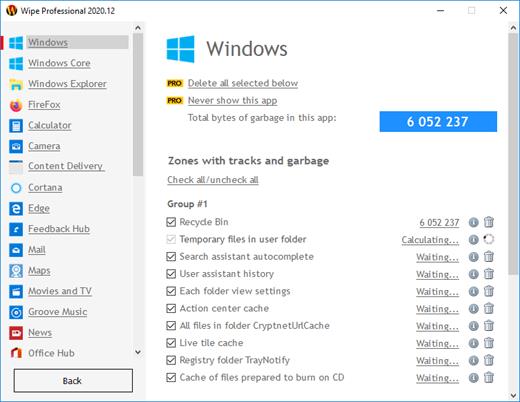
Description: The primary function of this utility is to put the utmost importance on the privacy and performance of your computer. Our software deletes temporary files, caches, cookies, Internet history, and more, thus freeing up valuable disk space. Deleting unnecessary files can be especially great for those running their systems on smaller SSDs. As a result of the software, you'll receive maximum confidentiality, so prying eyes won't be able to spy on you, record your activities, or do anything malicious.

Unlike other privacy software on the market that only remove cookies and browser history, our software can dive deeper. The program removes junk files that are created while surfing the Internet. These files don't only waste valuable space, but also allow software developers to track you and use that data to sell or promote their products and services.

In the latest version of our software, we have put a higher importance on cleaning. Unlike our competitors who routinely add tools to their software that are unrelated to cleaning and end up wasting your time; we do things differently. Our main focus is simple - make your computer clean and private. And we do it best.

Release Name: Wipe Professional 2026.03
Size: 6.1 MB
Links: HOMEPAGE – NFO – Torrent Search

Download: RAPiDGATOR
7 Comments
Mar 16

Karaosoft Karma 2026.3.16

Description: Manage your karaoke shows with ease. Clickless search, drag-n-drop functionality, and many other unique features designed to bring you the most simplified management of your karaoke shows. Karma is the culmination of years of research into every known method of running karaoke shows on the PC, to produce a product that is both robust yet simple to use and time saving. Karma eliminates many time wasting tasks to free you up for more enjoyable things like interacting with the crowd or even taking a break!

Features:
- Paperless slips - Let your singers use SingNext.com to send paperless slips right from their phones, without having to leave their seat.
- Triple display support - Optional triple display mode with 3 separate video outputs for KJ, singer, and crowd. Automatically shows lyrics to singer display while showing the crowd a different view with customizable information and displays during performances. For music videos, video automatically switches to crowd display when no singer is assigned.
- Private Messaging - Send private messages to singer screen (like "back off the mic" without embarrassing the singer), or vice versa with the crowd display.
- Superior Audio/Video Quality - Utilizes Karaosoft's custom hybrid audio/video engine for flawless sound and key changes without low end distortion. Post decoding video throughput for the smoothest video playback and synchronization on any hardware!
- Simplified Song Search - No need to take the time to drag your mouse to the search box. Just start typing!
- Drag and Drop songs and singers with ease. Change a singer's position in rotation by a simple drag and drop (mouse or touch), and watch the playlist order automatically change to suite the new rotation order!
- Touch screen scrolling with inertia
- Automatic Playlist sorting on any song add or rotation change. Any queued DJ music automatically stays in place while songs assigned to singers are automatically sorted around them.
- Auto-Play / Auto-Pitch - Set pitch ahead of time for individual songs to automatically be set when the song is played. Set DJ music to Autoplay one after another with automatic crossfade so you can take a break without worry.
- Panel Layout insures no window will ever overlap another during your show and all show related controls are always onscreen. Panels can be arranged in one of 64 different layouts, and then personally sized to fit your custom screen needs.
- On-The-Fly Lyrics timing - Ever have the lyrics ahead or behind the music? AV synch control can be changed on the fly.
- Version Changer - Singer didn't want to sing that version? Click the "Now Playing" bar and view all of the available versions for a quick change.
- Automatic Crossfader, Multiplex routing, and more!

System Requirements:
- Windows 11, 10, or Windows 8.1
- 2 Ghz or faster processor
- 4 GB RAM
- 1280 minimum resolution width for primary display

Release Name: Karaosoft Karma 2026.3.16
Size: 31.3 MB
Links: HOMEPAGE – NFO – Torrent Search

Download: RAPiDGATOR
7 Comments