Please REGISTER or RENEW your account on RAPiDGATOR.net and support us by doing through all RAPiDGATOR working download links on main posts...
Mar 13

CyberLink PhotoDirector Ultra 2026 v17.2.1512

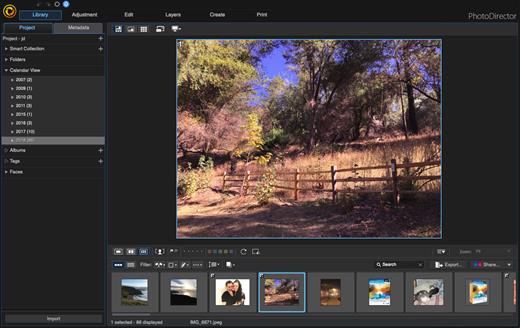
Description: Premium photo editing software for creative professionals. Create your masterpiece today. Capture. Edit. Retouch. Photo Editing, Now With AI. Split and combine color layers and reveal infinite variations around one theme. Enhance or totally replace the sky. Animate, blend, position, relight, and re-align.

Glitch Effect
Split and combine color layers and reveal infinite variations around one theme.

AI Sky Replacement
Enhance or totally replace the sky. Animate, blend, position, relight, and re-align.

Show Your True Colors
Customize colors with precision tools to edit the world the way you imagined.

Illuminate Photos
Create dreamy effects with Bokeh. Add natural glows, sparkles, or intense bursts of light.

Photo Editing Made Easier With AI
Automatically remove unwanted objects or people for a perfect shot, every time.

Precision Layer Editing
Layer, shape, and blend to create artistic scenes.

Immaculate Photo Retouching
From touch-ups to a complete overhaul, look flawless in every snap.

RAW Power
Support for all professional file formats, and the most popular cameras.

System Requirements
- Microsoft Windows 11, 10, 8/8.1, 7 (64 bit OS only)
- Intel Core™ i-series or AMD Phenom® II and above
- 128 MB VGA VRAM or higher
- 4GB memory required (For AI style transfer, 8GB or above recommended)
- 2GB space required
- 1024 x 768, 16-bit color or above

Supported Languages
- English
- French
- German
- Italian
- Spanish (European)
- Chinese Simplified
- Chinese Traditional
- Japanese
- Korean
- Dutch

Release Name: CyberLink PhotoDirector Ultra 2026 v17.2.1512
Size: 512.1 MB
Links: HOMEPAGE – NFO – Torrent Search

Download: RAPiDGATOR

10 Comments
Mar 13

reaConverter Pro 8.0.204

Description: Easily process full batches of files and folders. reaConverter combines powerful automation with intuitive tools to streamline image conversion and eliminate repetitive editing.

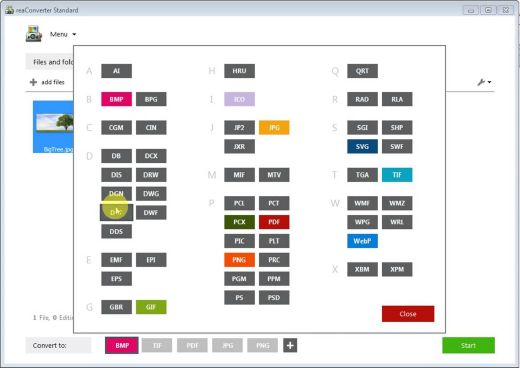
700+ File Formats
reaConverter delivers high-efficiency batch conversion for an extensive range of file formats.

Efficient Conversion
A powerful file conversion toolkit with advanced processing features — giving you precise, granular control over every output.

Image Editing
reaConverter simplifies batch image editing — apply touch-ups, transformations, and effects to unlimited images simultaneously.

Automation
Professional-grade automation features for high-volume file conversion and batch processing.

Development
Integrate reaConverter's functionality into scripts, applications, or websites using its command-line tool or DLL.

Release Name: reaConverter Pro 8.0.204
Size: 395.4 MB
Links: HOMEPAGE – NFO – Torrent Search

Download: RAPiDGATOR

10 Comments
Mar 13

TechSmith SnagIt 26.1.0.10201

Description: Screen capture loved by over 40 million people. Snagit is the ultimate screen capture and recording software for anyone who wants to look good, work smarter, and communicate clearly.

Easy to use, but full of advanced features
Don't let clumsy built-in tools hold you back. Snagit's comprehensive feature set makes it the top screen capture software for professionals.

Scrolling capture
Quickly capture images of anything and everything on your computer screen, even scrolling areas.

Simplify UI
Transform screenshots into simplified user interface (SUI) graphics in a single click.

Library
Say goodbye to the chaos and let Snagit keep your content effortlessly organized and synced across devices.
Filter and sort by date, file type, and application
Sync to Google Drive, OneDrive, and more
Tag images and videos

Smart move
Snagit automatically recognizes elements in your screenshot, granting you the magical ability to rearrange or remove UI elements.

Text recognition
Magically edit the text within an image, screenshot, or scanned document. You can even adjust the font, text size, and color.

Capture anything, exactly how you want it
This is the capture window where you can effortlessly customize and save your capture settings.

Image capture
Capture your full screen, a specific region, fixed image size, or scrolling area.

Video recording
Record video of all or part of your screen, plus your camera.

Audio recording
Record microphone and system audio.

Custom presets
Create custom presets and keyboard shortcuts for your go-to captures.

Unleash your creativity with the ultimate built-in editor
Effortlessly transform your captures into polished, professional-quality images with easy-to-use templates and mark-up tools.

Release Name: TechSmith SnagIt 26.1.0.10201
Size: 412.9 MB
Links: HOMEPAGE – NFO – Torrent Search

Download: RAPiDGATOR

9 Comments
Mar 13

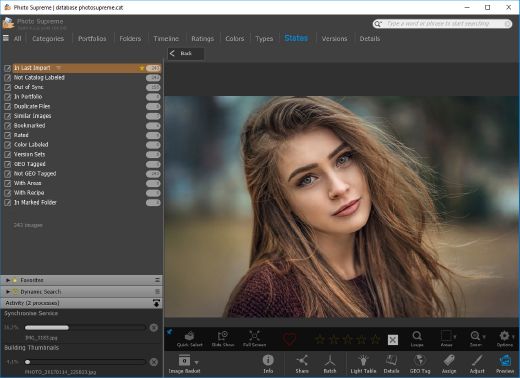
IDimager Photo Supreme 2026.0.1.8818

Description: Photo Supreme v2026 is a thoughtful and forward-looking release. This update has focused on smarter discovery, faster performance, and modern workflow expectations, especially around large catalogs, mobile integration, searches, and team environments.

Import and Select
One of the standout additions in Photo Supreme v2026 is the new multi-pass Import and Select workflow. This allows users to review and refine image selections in multiple stages instead of making all decisions in one pass. It’s especially useful for large shoots, letting photographers cull images more deliberately and with less pressure. In addition, the Import and Select feature now loads images faster than ever. Mac users will also appreciate direct iOS device importing, which makes it possible to bring photos straight from an iPhone or iPad into the catalog without relying on intermediary software. This significantly streamlines mobile-first workflows.

Powerful Searches
Photo Supreme now supports natural language searching, allowing users to find images using plain, conversational phrases rather than rigid metadata queries. This feature is powered by AI services such as OpenAI, Google Gemini, or local models with Ollama. This gives users flexibility in how advanced features are enabled. In addition, a new classification system enhances search accuracy by grouping images into meaningful categories upon import, making it easier to surface relevant results in large or complex catalogs.

Video & Media Handling
For users working with video, Photo Supreme v2026 introduces hover-based video previews. Simply hovering over a video thumbnail now reveals a short animated preview, making it much faster to identify clips without opening them individually. Support for modern formats has also been expanded, ensuring the software keeps pace with current media standards.

Sharing with ZIP
Exporting images is more flexible in v2026 thanks to ZIP output support in transfer profiles. This makes it easy to bundle images into a single archive for delivery, backup, or client sharing, all directly from within Photo Supreme. These enhancements simplify distribution workflows and reduce the need for external tools.

GEO Maps
GEOgraphic-Mapping features can now generate maps using not only Google Maps, but also OpenFreeMap with OpenStreetMaps. This removes the need for API keys while still delivering rich, interactive map displays. This update makes location-based browsing easier to configure and more accessible for all users.

Performance and Refinements
Photo Supreme v2026 delivers notable performance enhancements, resulting in faster browsing and a more responsive overall experience. Response times are improved by up to 10%, with especially noticeable gains for large libraries containing many catalog labels.
Catalogs with numerous stacks also see significant performance improvements, particularly when displayed in stacked views.
v2026 includes a wide range of refinements, such as: "Visually similar" stack detection, numerous stability fixes and workflow enhancements, polished UI behavior in collections, searches, and metadata handling

Wait, there's more, a lot more…
New "RAW Files" and "Video Files" catalog states
Added support for Google Gemini as an AI service
Added support for OpenAI GPT-5.2 as an AI Service
Added support for Ministral3 model with Ollama
Added file management support for ACR sidecar files
Update HTTP Server with Photo Supreme Online (Server Edition)
Faster face recognition
Added "AI-Estimated GEO Location" to the AI Panel
Faster result display in the Collection Viewer
"Cascade Metadata" from image to Stack or Version Set is now a background process
A highlighted stroke has been added to the active tabs, improving navigation
Now you can display metadata charts and graphs across multiple tabs
Added support for Ctrl/Cmd+Z functionality in text and memo fields
Defined the new Affinity v3 .AF and .AVIF file format as a supported "other file format"
Switching the collection viewer's view style is faster (eg from Basic to Grid to Clean to Custom Thumb Info)
Advanced Search now has an option to search by "File Size" and "File Size MB"
Finetuned the check for "need to compact" on PostgreSQL (Server Edition)
Bookmark keyboard shortcuts are now a "toggle", similar to ratings and color labels
Expanding nodes in the Catalog Tree is ~25% faster
When using the "Dump Full to Catalog File" feature, there's now the option to create either a "catalog dump" file, or a "catalog with thumbs" dump files
Added a XMP Storage Location for "original file AND non-standard sidecar file"
In "Stacked View", you can now select a specific item from the stack to show
Support for PostgreSQL 18.
And more…

Highlights for v2026
Multi-Pass "Import and Select": Seamlessly transition through passes with a fast-culling system that optimizes your workflow.
Direct iOS Image Import on macOS: Import images directly from your iOS devices with ease.
Video Thumbnail Preview: Hover over a video thumbnail or open the Quick View to view a live video preview.
Natural Language Search Powered by AI: Search your content using plain language, with smart integration through OpenAI, Google Gemini, or Ollama models.
Transfer Profiles can now create ZIP output files: Copy or send sets of images as a single ZIP file for easier sharing.
Maps with OpenFreeMap: Display images on interactive maps using OpenFreeMap/OpenStreetMaps with no API key needed.
Server Edition Thumbnail Caching: Enjoy faster performance with local thumbnail caching, automatic cleanup, and customizable settings for retention and cache size.
Classifications: Enhance search accuracy with an automatic image classification mechanism on import.

Release Name: IDimager Photo Supreme 2026.0.1.8818
Size: 163.6 MB
Links: HOMEPAGE – NFO – Torrent Search

Download: RAPiDGATOR

9 Comments
Mar 13

Disk Savvy 17.9.18

Description: Disk Savvy is a disk space usage analyzer capable of analyzing disks, network shares, NAS devices and enterprise storage systems. Users are provided with multiple disk usage analysis and file classification capabilities allowing one to gain an in-depth visibility into how the disk space is used, save reports and perform file management operations.
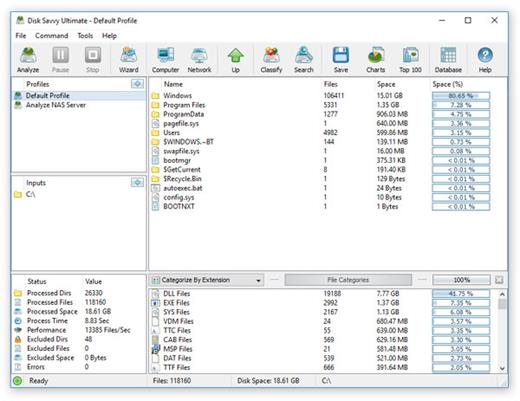
DiskSavvy is a powerful disk space usage analyzer allowing one to analyze disks, network shares, NAS storage devices and enterprise storage systems. The user is provided with the ability to analyze one or more disks, directories or network shares, detect directories and files using significant amounts of the disk space, generate various types of pie charts, save disk space usage reports and perform disk space usage history trend analysis operations.

In addition, DiskSavvy provides built-in file classification capabilities allowing one to classify and categorize files using a number of file classification plug-ins capable of recognizing more than 3,000 types of files and showing disk space usage per file type, category, file extension, user name, creation, last modification and last access time, etc. Users are provided with the ability to perform different types of file management operations on disk space analysis results, specific types of files or file categories.

DiskSavvy allows one to save disk space analysis results to a number of standard formats including HTML, PDF, Excel, XML, CSV, text and the native DiskSavvy report format. In addition, IT and storage administrators are provided with the ability to export disk space analysis results from multiple servers and/or NAS storage devices to a centralized SQL database and then perform advanced disk space usage history trend analysis operations and display disk space usage per server and disk space usage per user.

Analyzing Network Servers and NAS Storage Devices
DiskSavvy allows one to scan the network, discover network servers and NAS storage devices, automatically detect all accessible network shares and analyze disk space usage in hundreds of network servers and NAS storage devices. In addition, the user is provided with the ability to export the list of detected servers and NAS storage devices (including lists of network shares for each server) into HTML, PDF, text and CSV reports.

In order to analyze one or more servers or NAS storage devices, press the 'Network' button located on the main toolbar and wait while DiskSavvy will scan the network and show a list of detected network servers and NAS storage devices. On the network servers and NAS storage devices dialog, select the required servers and press the 'Analyze' button.

DiskSavvy will show all network shares hosted on the selected servers and NAS storage devices allowing one to analyze disk space usage and save various type of disk space analysis charts and reports. In addition, DiskSavvy provides a large number of advanced disk space analysis options allowing one to tune and customize disk space analysis operations for user specific needs and hardware configurations.

DiskSavvy Command Line Utility
In addition to the DiskSavvy desktop GUI application, IT administrators are provided with a command line utility allowing one to perform disk space analysis operations, save disk space usage reports and export disk space analysis results to an SQL database. The DiskSavvy command line utility may be used to automate disk space analysis operations and integrate disk space analysis capabilities into user-custom batch files and shell scripts.

DiskSavvy Disk Space Analysis Server
Finally, enterprise customers are provided with DiskSavvy Server, a server-based product version, which runs in the background as a service and allows one to analyze a number of servers or NAS storage devices simultaneously, schedule periodic disk space analysis operations, submit disk space analysis reports from multiple servers to a centralized SQL database, perform advanced disk space usage history trend analysis operations, analyze disk space usage per server, analyze disk space usage per user and execute conditional, rule-based disk space analysis actions.

DiskSavvy Server may be controlled using a full-scale client GUI application locally or via the network. The client GUI application provides all features available in the desktop product version and additional capabilities allowing one to analyze multiple servers and/or NAS storage devices simultaneously, schedule periodic disk space analysis operations and perform advanced disk space usage history trend analysis operations. In addition, to the client GUI application, DiskSavvy Enterprise provides a web-based management interface, which can be used to control one or more servers using a regular web browser.

Batch Disk Space Analysis Operations
DiskSavvy Server and DiskSavvy Enterprise provide the ability to scan the network, detect all network servers and NAS storage devices, execute one or more pre-configured disk space analysis commands on hundreds of network servers and NAS storage devices and generate an individual report for each analyzed server, NAS storage device or network share.

Batch Disk Space Analysis Operations
In the simplest case, just press the 'Network' button located on the main toolbar, search all network servers and NAS storage devices on the network, select one or more servers to be analyzed, press the right mouse button and select the 'Batch Disk Space Analysis' menu item. DiskSavvy will show a list of pre-configured disk space analysis commands allowing one to select one or more commands to be executed on all selected network servers and NAS storage devices.

Batch Disk Space Analysis Mode
Depending on the selected configuration, DiskSavvy will save in the built-in reports database an individual disk space analysis report for each analyzed network server, NAS storage device or network share. Once the batch disk space analysis is completed, the user will be provided with the ability to open saved disk space analysis reports, review disk space analysis results, generate various types of pie charts and export reports to a number of standard formats including HTML, PDF, Excel, text, CSV and XML.

Release Name: Disk Savvy 17.9.18
Size: 82.2 MB
Links: HOMEPAGE – NFO – Torrent Search

Download: RAPiDGATOR

12 Comments
Mar 13

Veeam Agent for Windows 13.0.2.1102

Description: Veeam Agent for Microsoft Windows provides a simple solution for backing up Windows-based desktops and laptops/notebooks. With Veeam Agent for Microsoft Windows Fee, you can easily back up your computer to an external hard drive or NAS (network-attached storage) share. And if your system crashes, hard drive fails, or a file gets corrupted or accidentally deleted, you can recover what you need in minutes - like it never even happened.

Veeam Agent for Microsoft Windows is built on the same technology used in #1 Veeam Backup & Replication software.

Get image-based backups for your entire computer, volume-level backup, individual file-level backup or folder-level backup that’s built on proven Veeam technologies.

Bootable recovery media: Create a recovery image of your computer on several different kinds of media, including removable storage devices (e.g. USB flash drives, SD cards, etc.), CD/DVD/BD media or ISO image.

Release Name: Veeam Agent for Windows 13.0.2.1102
Size: 176.4 MB
Links: HOMEPAGE – NFO – Torrent Search

Download: RAPiDGATOR

12 Comments
Mar 13

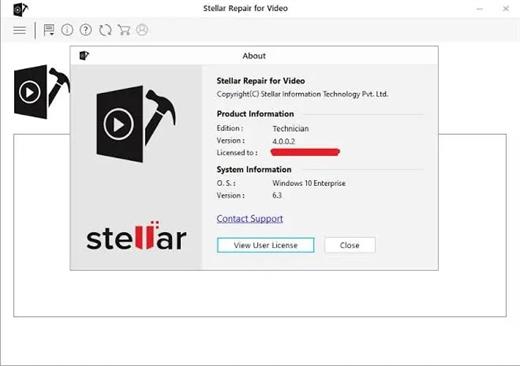
Stellar Repair for Video 6.9.1

Description: Best Video Repair Software to Fix Corrupt Videos. DIY Video Repair Tool to repair corrupt or unplayable MP4, MOV, AVI, MKV, AVCHD, MJPEG, WEBM, ASF, WMV, FLV, DIVX, MPEG, MTS, M4V, 3G2, 3GP, and F4V files.

Repairs multiple videos simultaneously for numerous formats.
Supports HD, 4k, 8k, 12k, 16k & VR video footages.
'Advanced Repair’ for severely corrupt videos.

All-in-One Video Repair Software
Stellar Repair for Video is a powerful tool to repair inaccessible and damaged videos shot from leading camera brands (such Canon, Nikon, Sony), mobile phones and other video devices.

Repair Videos from Any Camera & Device
Fix videos saved in memory cards, USB drives, SSD, HDD & CF cards.
Repair unplayable videos shot on Android or iPhone smartphones.
Repairs videos recorded with DSLR, DJI, GoPro & CCTV.
Repairs corrupt videos recovered from all storage drives.

Repairs corrupt MP4, MOV & AVI Files
The tool repairs videos of all major file formats that work in Windows such as MP4, MOV, etc. Stellar Repair for Video tool repairs damaged or corrupted videos caused due to OS crashes, viruses, malware attacks, editing/ recording/ converting errors, improper file transfer, video compression, and more.

Fix Grainy & Blurry Videos
The video repair tool fixes a wide range of video errors including grainy, blurry unplayable, stuttering, flickering, black screen, out-of-sync, choppy, jerky, truncated, and frozen videos. The software also fixes video errors like 'error loading media file could not be played', ‘no sound in videos’, ‘delay in audio and video sync', and more.

Repairs Broken or Damaged Videos
The video file repair software is effective in repairing damaged videos shot with DSLRs, digital cameras, drones, CCTV, Dashcam, camcorders, Android, iPhones, etc. These include devices of popular brands such as Sony®, Canon®, Nikon®, FujiFilm®, GoPRo®, DJI® (Mavic, Phantom), Panasonic®, Samsung®, Olympus®, Flip Video®, Pentax®, Mamiya® etc.

Fix Unsupported Video Codec Error
The video repair software for PC is compatible with all video codecs used in video files, including H.263, H.264, H.265, HEVC, MPEG4, 3GP, Windows Media 8, Xvid, DivX, JPEG 2000, and others. It resolves corruption in video frames, header, and video slider for seamless video playback.

Release Name: Stellar Repair for Video 6.9.1
Size: 89.6 MB
Links: HOMEPAGE – NFO – Torrent Search

Download: RAPiDGATOR
11 Comments
Mar 13

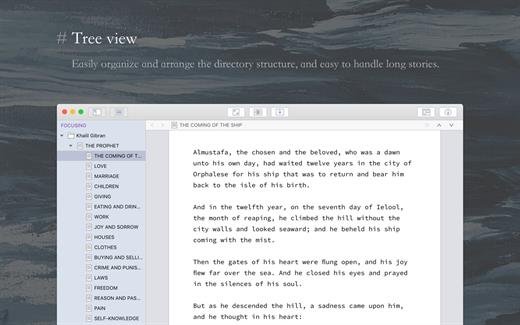
TominLab WonderPen 3.0.8.8352

WonderPen is a professional writing app with a focused and fluid writing experience.

Statistics
Want to know how many words you wrote every day? Take a look at the typing statistics, and the progress of each day is clear at a glance.

Interface Lock
Need to leave the computer temporarily and don’t want others to see your work? Turn on the interface lock.

Split and Merge Chapters
Habitually write a large story first and then split the chapters? No problem, just click the right mouse button at the appropriate place in the document and click Chapter Split. Correspondingly, multiple chapters can also be easily merged into one.

Writing Targets
Set writing targets, monitor your writing progress in real time, and make writing more rhythmic and directional.

Share Typing Statistics
You can generate an image card of the daily typing number, which is convenient to share or show off your typing results.

Highlight Cards
Highlight the title of the card in the editor for quick reference.

Release Name: TominLab WonderPen 3.0.8.8352
Size: 221 MB
Links: HOMEPAGE – NFO – Torrent Search

Download: RAPiDGATOR

12 Comments
Mar 13

Ant Download Manager Pro 2.16.8.92751

Description: Ant Download Manager (AntDM) is a quick download manager for any Internet file, that fully integrates with all popular browsers. AntDM allows to download free streaming video and audio from numerous web sites, supports P2P peer-to-peer protocol. AntDM supports downloading files from the most popular Premium Link Generators (Debrids).

Ant Download Manager (AntDM) - is a tool that allows you to repeatedly increase the speed of file downloads due to multiple download streams, resume, schedule downloads, capture and download audio and video streams.

Automatically processes download errors, recovers from temporary network errors, reconnects in case of server response delays, has the ability to resume interrupted downloads due to loss of connection, network problems, computer shutdown, or unexpected power outages.

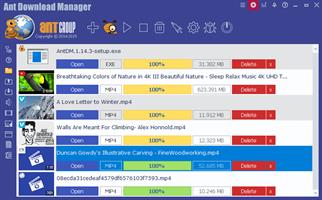
The standard GUI for softwares of this class makes AntDM friendly and easy to use. It has two screens - the first is more common for regular downloads and the second is using video preview for easy tracking of video downloads.

Has download queues, which allows you to accumulate download links at a convenient or scheduled time for the user.

Supports proxy-servers, HTTP and FTP file protocols and their protected versions of HTTPS and FTPS, as well as the main streaming protocols for audio and video content M3U8, MPEG-DASH, VIMEO-STREAM, firewalls, redirects, cookies, authorization, processing of audio and video content.

Supports BitTottrent a P2P (peer-to-peer) file sharing protocol.

Can be easily integrated into the main popular browsers Microsoft EDGE (Chromium-based), Google Chrome, Mozilla Firefox and their numerous clones: 360Chrome, Brave, CCleaner, Chedot, CocCoc, Comodo Dragon, Comodo IceDragon, Maxthon6, Opera, Slimjet, SRWare Iron, Torch, UC Browser, Vivaldi, Yandex, Waterfox, etc. The integration of extension into browsers is used to automatically capture file or media links and download them. Also you can not integrate AntDM extensions into your browsers, but use AntDM autonomously. For example, drag and drop download links from a browser into AntDM, download any single links manually, in a list or in batch mode from a file.

Allows not only downloading audio files, but also extracting audio tracks from video files, converting them to the popular MP3 format and adding basic accompanying information to them.

Supports most popular Generators Premium Links (Debrids): alldebrid.com, cocoleech.com, debrid-link.fr, ffdownloader.com, linksnappy.com, mega-debrid.eu, real-debrid.com, premium.rpnet.biz, simply-debrid.com, premiumize.me, etc.

Other features include multilingual support, download categories, download log, priorities and changes of download speed, task scheduler, sounds of various events, CHM User Guide, virus protection when download completion and many more.

Release Name: Ant Download Manager Pro 2.16.8.92751
Size: 60.4 MB
Links: HOMEPAGE – NFO – Torrent Search

Download: RAPiDGATOR

10 Comments
Mar 13

FTPie Pro 2026.3.1

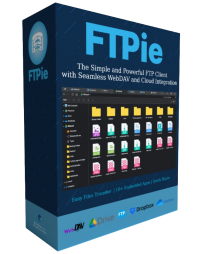
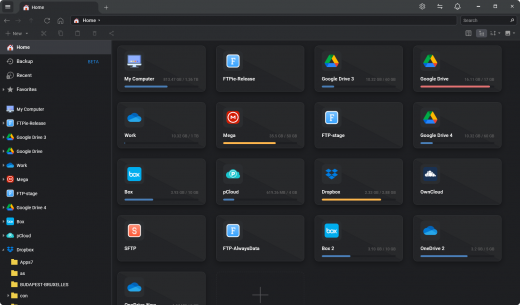
Description: Easy Cloud & FTP. A Powerful FTP and Clouds Client with Seamless Google Docs and Microsoft 365 Apps Integration.

Transfer Files
Easily transfer, upload, and manage files between your PC, cloud storage, and FTP

Embedded Apps
Manage files effortlessly with FTPie's built-in viewers and editors, all within the app.

Quick Share
Upload files and generate shareable URLs with a right-click using our shell extension.

Quick Upload
Right-click to upload files or folders to cloud storage or FTP with our shell extension.

Document Editing
Edit Google Docs and Microsoft Office files in FTPie, with seamless local app integration and automatic uploads.

Folder Shortcuts
Instantly create desktop shortcuts for cloud and FTP folders enabling quick access with a double-click.

Release Name: FTPie Pro 2026.3.1
Size: 196.4 MB
Links: HOMEPAGE – NFO – Torrent Search

Download: RAPiDGATOR
11 Comments