Please REGISTER or RENEW your account on RAPiDGATOR.net and support us by doing through all RAPiDGATOR working download links on main posts...
Mar 25

Astute Graphics Plug-ins Elite Bundle 4.5.0

Description: Makers of award winning, time saving and creative tools such as Phantasm, VectorScribe, WidthScribe and many more. Get the complete set of plug-ins and transform your workflow in Illustrator. Add speed, ease and precision with all of our plug-ins and become an Astute Graphics Plug-ins Elite Bundle!?

AstuteBuddy
Keyboard shortcut panel

Autosaviour
Autosave, backups + reminders

DirectPrefs
Nudge distance, angles + guides

ColliderScribe
Precise alignment + selection

DynamicSketch
Intuitive vector sketching
FindReplace
Instantly locate + modify objects

InkFlow
Drawing + lettering in one tool

InkQuest
Pre-press controls and checks

InkScribe
Precise path creation

MirrorMe
Instant symmetry

Phantasm
Instant color control + halftone

Rasterino
Image crop + editing

Stipplism
Live stipple effect

Stylism
Live effects made easy

SubScribe
Create accurate artwork

Texturino
Textures + opacity brush

VectorFirstAid
Clean up vector documents

VectorScribe
Editing, shapes, corners + measure

WidthScribe
Variable stroke width effects

Reform
Shape + manipulate

Texturino Texture Packs – Pro
– High quality repeating and non-repeating textures
– Import your own textures
– Quickly and naturally brush an opacity mask
– Organize your textures in the texture manager

System Requirements:
– Adobe Illustrator 2022
– Windows 11/10/8/7 (64-bit)

Install Notes:
– Install pre-done setup.
– Setup located in default AI installation directory.
– Tested on AI 2022 latest update without problems.
– Plug-in can be found under Window menu in AI.

Release Name: Astute Graphics Plug-ins Elite Bundle 4.5.0
Size: 667.5 MB
Links: HOMEPAGE – NFO – Torrent Search

Download: RAPiDGATOR

9 Comments
Mar 25

Perfectly Clear WorkBench 5.0.4.3154

Description: Perfectly Clear is the program's latest version, which also comes as a plugin for Photoshop & Lightroom. The essence of this development is simple; you have a picture, you do not like it, the skin is dull, pimples, in short, there are defects, now you can not bother with editing; a couple of clicks and here is a corrected photo, perfect, as it should be, not ashamed of social networks to pour. You can use the pens to adjust all correction parameters; many use automatic mode.

The program has 20 indicators for them that reconciliation and adjustment take place, and as a result, the picture is beautiful without any difficulties. The cameras have limitations; they can add noise to the picture, light a photo, make the skin tone terrible, etc. This plugin knows all these restrictions and will detect, eliminate, and provide; you only have to save the result.

The application will find and eliminate irregularities and other skin defects, work with dark circles under the eyes, remove excess shine in the picture, add shine, enlarge the eyes, whiten teeth, and tonify the skin. In short, now you can safely wake up and be immediately photographed; the program will process everything and be like candy, do not spend a couple of hours standing in front of a mirror.

What's New in Perfectly Clear WorkBench
Beautiful new interface
New image correction tools:
Preprocessing section for Input Looks and "Image Ambulance" for manual exposure corrections
"Face Aware" exposure for more accurate auto-exposure corrections in portraits and group photos
Black Point tool to deepen blacks
New Color Vibrancy tool to complement our previous "Vibrancy" control (now renamed to Color Restoration)
Sky and Foliage enhancements
Existing tools have been improved:
Added strength sliders to Light Diffusion and Vibrancy for better control
Better 'color pickers' for Skin Tone and Blush adjustments
Manually identify faces that are not detected automatically
One-click to zoom into individual faces
Modify facial regions to provide the best corrections
Histogram
Much improved preset management

Release Name: Perfectly Clear WorkBench 5.0.4.3154
Size: 260.9 MB
Links: HOMEPAGE – NFO – Torrent Search

Download: RAPiDGATOR

11 Comments
Mar 25

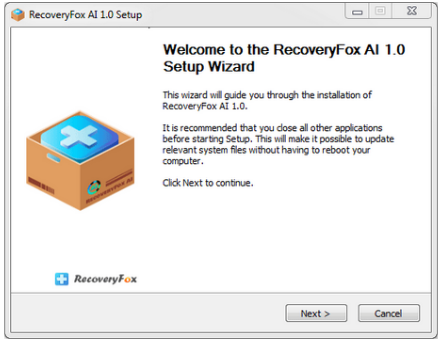
RecoveryFox AI 1.0

Description: Recover smarter with AI. Use it to precisely identify every lost data fragment and rebuild them into complete files, perfect for different data loss scenarios. Natively support a wide range of file types and drives to meet all your recovery needs.

98% Recovery Rate
With a proven 98% success rate, RecoveryFox AI uses advanced algorithms to recover lost or deleted files — from photos and videos to critical documents and other file types —quickly and accurately.

Restore Original File Folder Structure
With one-click, RecoveryFox AI can recover recently deleted files with their original names and folder structure.

Major File System Support
Support major file systems NTFS, exFAT, and FAT32, ensuring compatibility with a wide range of storage media.

Universal File Type Support
Depending on your needs, RecoveryFox AI can serve as photo recovery software, video recovery software, PDF recovery software, Zip file recovery software, etc. making it one of the best data recovery software.

Broad Device Compatibility
Capable of recovering data from internal hard drives and external drives including HDDs, SSDs, USB flash drives, SD cards, TF cards, cameras and more.

Non-Destructive Recovery Process
Operating in read-only mode, RecoveryFox AI restores data without the risk of data corruption or inadvertent alterations to the files being recovered, it also has no harm to your drives.

Various Filters for Easy Search
Refine files you want to recover by filters: Type, Date, Size. Our data recovery software also allows you to search target files from the scan results by filename keywords and file extension.

Preview Before You Recover
The built-in preview window lets you check recoverable files—including videos, audio, documents, photos, and webfiles—before starting the recovery process, ensuring you retrieve the right ones.

Preview Before You Recover
The built-in preview window lets you check recoverable files—including videos, audio, documents, photos, and webfiles—before starting the recovery process, ensuring you retrieve the right ones.

Release Name: RecoveryFox AI 1.0
Size: 32.6 MB
Links: HOMEPAGE – NFO – Torrent Search

Download: RAPiDGATOR

9 Comments
Mar 25

Journal Plus 3.4.0

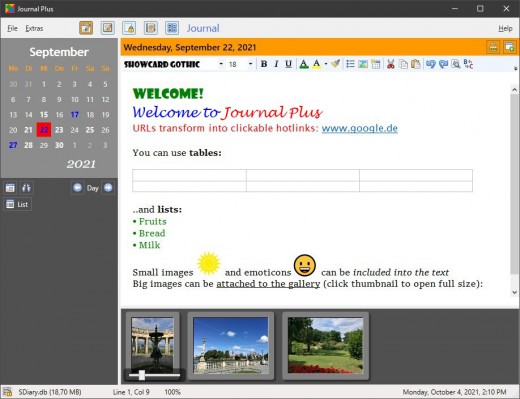
Description: Journal Plus is a fully-featured, all-in-one journaling / diary / note taking program with a rich text editor. It comes with several modules: Journal / Diary, Notebook, Logins / Passwords, Finance / Numbers, Contacts.

All documents are stored in a single, 256 bit AES-encrypted SQLite database file. Included image gallery: attach photos to your text documents. Local and global search functions. Simple and intuitive interface for unlimited documents. Generate strong passwords with the integrated password generator and log in to your web sites safely and easily. Organize numbers with the finance manager module and show them in the integrated graph/statistics bar. Undock documents in read-only popup windows.

Full-featured rich text editor with text formatting, hyperlinks, lists, emojis and images. Big images can be attached to each document in the photo gallery. Organize documents in the notebook module with folders and icons. In the journal module you can write diary entries for past and future days: just click a date at the integrated resizable calendar and start typing. You can search for entries with the global search function and find or replace words in a single document. You can also have several database files and switch between them easily. No save-button required, everything is saved in the background. Journal Plus will become an indispensable tool for your private life and your business day.

Features
The entire data is saved in one single SQLite database file with 256 bit encryption (the whole database gets encrypted and there is no way to unlock it without your password)
The Journal and Notebook modules have a full-featured rich text editor (RTF format)
Select Font, style and color, undo/redo, copy format
Insert images and emoticons (in-line images are not compressed in richtext files, so keep them small)
Image Gallery - for every document there can be an unlimited number of large JPEG or PNG images in a separate gallery (double-click to open full size, with Save-As function)
Search and replace
Global search function - find a word in any document and jump to it with one click
Insert tables and lists
Import text in RTF or TXT format (Journal, Notebook) or CSV (other modules)
Export single documents to RTF, Plain Text or HTML (Journal, Notebook) or CSV (other modules)
Organize documents with folders (Notebook, Logins, Finance) and assign icons to your documents in the Notebook
Password Manager to keep your login data save and in one place. Login to your websites with just a few clicks ("Copy on Click" option copies your login and password to the clipboard on right-click)
Password Generator with many options, for generating strong passwords
Included Contact Manager
Undock windows with a read-only version of the current document, to see multiple documents at the same time
Store numbers of any kind for each calendar date with the Finance module (like the balance of your stocks or your income or expenses) and display them in the integrated graph module, with minimum, maximum and total value
Auto-save (every minute and on every document or module change): no save button required
Auto-backup on program start (up to 10 copies for the previous days)
Global Hotkey for showing and hiding the program window - so it is always available when you need it and out of the way if you don't

Release Name: Journal Plus 3.4.0
Size: 7 MB
Links: HOMEPAGE – NFO – Torrent Search

Download: RAPiDGATOR

9 Comments
Mar 25

FRITZ 20.12

Description: FRITZ 20 is more than just a chess engine – it is a training revolution for ambitious players and professionals. Whether you are taking your first steps into the world of serious chess training, or already playing at tournament level, FRITZ 20 will help you train more efficiently, intelligently and individually than ever before.

New: playing style simulation at the highest level
FRITZ 20 analyses your next opponent – and plays like them! Use the style analysis in ChessBase 18 to configure whether Fritz should play aggressively, riskily, positionally or or exchange-oriented. This allows you to train specifically for your next game – realistically and practically.

Compete against legends
Compete against the strategies of the greatest players in history: Morphy, Lasker, Capablanca, Tal, Fischer, Karpov – with ELO ratings tailored to you, but in their authentic style. The unique style engine simulates their playing style as convincingly as only FRITZ can. New: the additional playing styles ‘Hypermodern’ and ‘Romantic’.

Play better - even under time pressure
Perfect your reflexes with the new Bullet Training mode: configure the time limit exactly, and learn to keep your nerves under pressure – ideal for blitz and bullet players on online platforms.

AI that understands chess – and speaks
Experience a new dimension of interaction with AI chat and voice output: polished commentary, amusing analyses and subtle hints – spoken in natural language if desired. Fritz commentary at its best. Even stronger. Even more beautiful. Even more direct.

Highlights in Fritz 20
- Fritz with 3,580 ELO – world-class level
- Capablanca, Tal, Kasparov Master as virtual opponents
- Opponent simulation via ChessBase 18 Style Report
- Manual opponent configuration
- New playing styles: ‘Romantic’ and ‘Hypermodern’
- Bullet training, AI chat, new 3D graphics, game controller support, new achievements

Minimum Requirements
Desktop PC or notebook, 4 threads, 8 GB RAM, Windows 10 with 64-bit

Recommended Requirements
PC Intel i7, i9 or Ryzen 7/9, 16 GB RAM, Windows 11 with 64-bit, Windows Media Player, graphics card with 1 GB RAM

Supported Languages
German, English, Spanish, French, Italian

Release Name: FRITZ 20.12
Size: 1.6 GB
Links: HOMEPAGE – NFO – Torrent Search

Download: RAPiDGATOR

9 Comments
Mar 25

Scooter Beyond Compare 5.2.1.32035

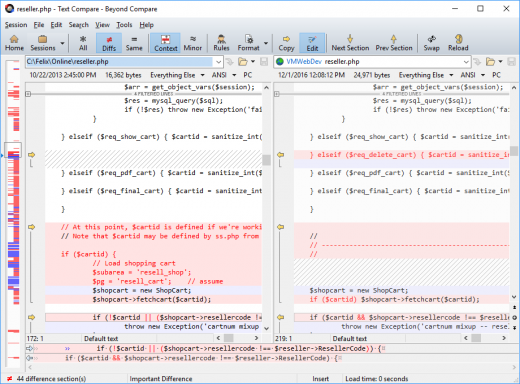
Description: Change is inevitable, so manage it with the best tools. Beyond Compare is the popular choice for data comparison.  Compare folders, text files, images, and tables.  Review differences efficiently and merge changes with confidence.

Compare
Compare files and folders using simple, powerful commands that focus on the differences you're interested in and ignore those you're not.

Merge
Combine changes from two versions of a file or folder into a single output.

Synchronize
Synchronize your local data, FTP sites, and cloud storage.

Compare Folders, Files
FTP sites, cloud storage, and zip files are integrated seamlessly, and powerful filters allow you to limit what you see to only what you're interested in.
Once you've found specific files you're interested in, Beyond Compare can intelligently pick the best way to compare and display them.
Text files can be viewed and edited with syntax highlighting and comparison rules tweaked specifically for documents, source code, and HTML.
Data files, executables, binary data, and images all have dedicated viewers as well, so you always have a clear view of the changes.

Merge Folders, Files
Beyond Compare's merge view allows you to combine changes from two versions of a file or folder into a single output.  Its intelligent approach allows you to quickly accept most changes while carefully examining conflicts.
You can use Beyond Compare directly from most version control systems, giving you all of the powerful comparing and merging support you need when you need it most.  Integrated source control commands are available to check in and check out files without interrupting your work.
Color coding and section highlighting allow you to accept, reject, or combine changes, simply and easily.  When merging files you can change any line in the output with the built-in syntax-highlighting editor.  By using Beyond Compare's powerful file type support and ability to favor changes from one file, you can trivially accept many changes without even seeing them.

Synchronize Locations
Beyond Compare's intuitive Folder Sync interface lets you reconcile differences in your data automatically.  You can efficiently update your laptop, backup your computer, or manage your website, and Beyond Compare will handle all the details.  You can copy to and from disks, FTP servers, and zip files, all using the same interface.  Anything you don't want affected can be easily filtered out, and all of the powerful comparison techniques are available, making the backup as fast or robust as you need.
You can automate repetitive tasks using a flexible scripting language, and any script can be called from the command line, allowing you to schedule your syncs for when it's most convenient.

Release Name: Scooter Beyond Compare 5.2.1.32035
Size: 28 MB
Links: HOMEPAGE – NFO – Torrent Search

Download: RAPiDGATOR

9 Comments
Mar 25

IDimager Photo Supreme 2026.2.0.8893

Description: Photo Supreme v2026 is a thoughtful and forward-looking release. This update has focused on smarter discovery, faster performance, and modern workflow expectations, especially around large catalogs, mobile integration, searches, and team environments.
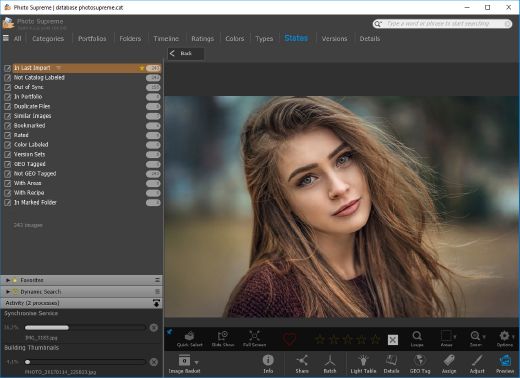
Import and Select
One of the standout additions in Photo Supreme v2026 is the new multi-pass Import and Select workflow. This allows users to review and refine image selections in multiple stages instead of making all decisions in one pass. It’s especially useful for large shoots, letting photographers cull images more deliberately and with less pressure. In addition, the Import and Select feature now loads images faster than ever. Mac users will also appreciate direct iOS device importing, which makes it possible to bring photos straight from an iPhone or iPad into the catalog without relying on intermediary software. This significantly streamlines mobile-first workflows.

Powerful Searches
Photo Supreme now supports natural language searching, allowing users to find images using plain, conversational phrases rather than rigid metadata queries. This feature is powered by AI services such as OpenAI, Google Gemini, or local models with Ollama. This gives users flexibility in how advanced features are enabled. In addition, a new classification system enhances search accuracy by grouping images into meaningful categories upon import, making it easier to surface relevant results in large or complex catalogs.

Video & Media Handling
For users working with video, Photo Supreme v2026 introduces hover-based video previews. Simply hovering over a video thumbnail now reveals a short animated preview, making it much faster to identify clips without opening them individually. Support for modern formats has also been expanded, ensuring the software keeps pace with current media standards.

Sharing with ZIP
Exporting images is more flexible in v2026 thanks to ZIP output support in transfer profiles. This makes it easy to bundle images into a single archive for delivery, backup, or client sharing, all directly from within Photo Supreme. These enhancements simplify distribution workflows and reduce the need for external tools.

GEO Maps
GEOgraphic-Mapping features can now generate maps using not only Google Maps, but also OpenFreeMap with OpenStreetMaps. This removes the need for API keys while still delivering rich, interactive map displays. This update makes location-based browsing easier to configure and more accessible for all users.

Performance and Refinements
Photo Supreme v2026 delivers notable performance enhancements, resulting in faster browsing and a more responsive overall experience. Response times are improved by up to 10%, with especially noticeable gains for large libraries containing many catalog labels.
Catalogs with numerous stacks also see significant performance improvements, particularly when displayed in stacked views.
v2026 includes a wide range of refinements, such as: "Visually similar" stack detection, numerous stability fixes and workflow enhancements, polished UI behavior in collections, searches, and metadata handling

Wait, there's more, a lot more…
New "RAW Files" and "Video Files" catalog states
Added support for Google Gemini as an AI service
Added support for OpenAI GPT-5.2 as an AI Service
Added support for Ministral3 model with Ollama
Added file management support for ACR sidecar files
Update HTTP Server with Photo Supreme Online (Server Edition)
Faster face recognition
Added "AI-Estimated GEO Location" to the AI Panel
Faster result display in the Collection Viewer
"Cascade Metadata" from image to Stack or Version Set is now a background process
A highlighted stroke has been added to the active tabs, improving navigation
Now you can display metadata charts and graphs across multiple tabs
Added support for Ctrl/Cmd+Z functionality in text and memo fields
Defined the new Affinity v3 .AF and .AVIF file format as a supported "other file format"
Switching the collection viewer's view style is faster (eg from Basic to Grid to Clean to Custom Thumb Info)
Advanced Search now has an option to search by "File Size" and "File Size MB"
Finetuned the check for "need to compact" on PostgreSQL (Server Edition)
Bookmark keyboard shortcuts are now a "toggle", similar to ratings and color labels
Expanding nodes in the Catalog Tree is ~25% faster
When using the "Dump Full to Catalog File" feature, there's now the option to create either a "catalog dump" file, or a "catalog with thumbs" dump files
Added a XMP Storage Location for "original file AND non-standard sidecar file"
In "Stacked View", you can now select a specific item from the stack to show
Support for PostgreSQL 18.
And more…

Highlights for v2026
Multi-Pass "Import and Select": Seamlessly transition through passes with a fast-culling system that optimizes your workflow.
Direct iOS Image Import on macOS: Import images directly from your iOS devices with ease.
Video Thumbnail Preview: Hover over a video thumbnail or open the Quick View to view a live video preview.
Natural Language Search Powered by AI: Search your content using plain language, with smart integration through OpenAI, Google Gemini, or Ollama models.
Transfer Profiles can now create ZIP output files: Copy or send sets of images as a single ZIP file for easier sharing.
Maps with OpenFreeMap: Display images on interactive maps using OpenFreeMap/OpenStreetMaps with no API key needed.
Server Edition Thumbnail Caching: Enjoy faster performance with local thumbnail caching, automatic cleanup, and customizable settings for retention and cache size.
Classifications: Enhance search accuracy with an automatic image classification mechanism on import.

Release Name: IDimager Photo Supreme 2026.2.0.8893
Size: 163.1 MB
Links: HOMEPAGE – NFO – Torrent Search

Download: RAPiDGATOR

10 Comments
Mar 25

TextSoap 9.7.1

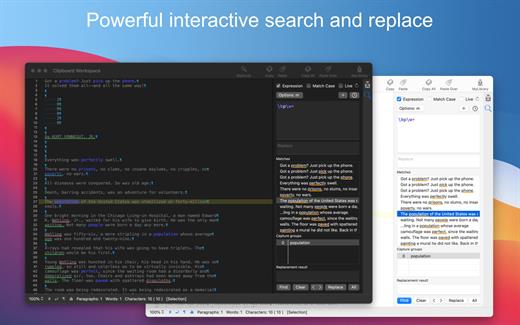
TextSoap can automatically remove unwanted characters, fix up messed up carriage returns, and do pretty much anything else that we can think of to text. Save time and effort. Be more productive.

Stop manually fixing text documents and emails. Let TextSoap help you automate away all that tediousness. And do it all from within your favorite app using TextSoap Menu. Enable it in preferences and access TextSoap in most apps that support standard copy and paste.

Easy to learn for casual users, TextSoap offers the flexibility that expert users need.

What’s New

Version 9.7.1:


  • Release notes were unavailable when this listing was updated.
Compatibility

macOS 11.0 or later


Release Name: TextSoap 9.7.1
Size: 27.8 MB
Links: HOMEPAGE – NFO – Torrent Search

Download: RAPiDGATOR

8 Comments
Mar 25

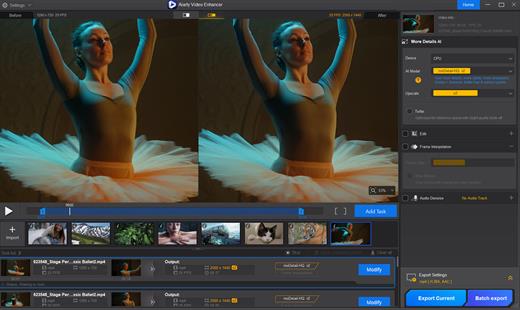
Aiarty Video Enhancer 3.6

The state-of-the-art AI video enhancer software to generate more details, super denoise, deblur, upscale, and restore flawed videos to 4K clarity. With specialized AI models, it delivers superior visual quality at turbo speed, empowering content creators and video enthusiasts.

Restore to Clear Audio

Audio Denoise module to analyze and refine your audio tracks. 1-click background noise removal and vocal clarity boost.

Enhance to 4K Clarity with Details

Tailored AI Models to transform low quality, stuttering, or grainy videos to 4K. Enjoy cinemat

Silky Smooth Slow Motion

The frame interpolation module uses AI to generate new, high-quality frames, ready for fluid and smooth 8X/16X slow-motion.

Industry-leading Video Upscaling and Enhancement with AI

Leveraging the proprietary video and image training dataset, the tailored AI models in Aiarty Video Enhancer deliver best quality at GPU-optimized processing speed, with dedicated roles to generate more details for visual sharpness, restore flawed and degraded videos, or tackle low-light challenging footage.

What’s New

Version 3.6:


  • Release notes were unavailable when this listing was updated.
Compatibility

macOS 10.15 or later


Release Name: Aiarty Video Enhancer 3.6
Size: 207.2 MB
Links: HOMEPAGE – NFO – Torrent Search

Download: RAPiDGATOR

9 Comments