Please REGISTER or RENEW your account on RAPiDGATOR.net and support us by doing through all RAPiDGATOR working download links on main posts...
Mar 25

Aiarty Image Matting 2.7

Blend Naturally and Creatively
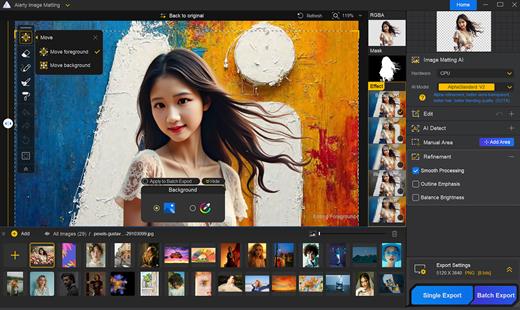
High-Precision Alpha Matting
Go a step further with dynamic transparency control and edge optimization even in complex edge cases. This ensures excellent detail preservation and makes background integration seamless.

Versatile Background Effects
Replace backgrounds with transparency, solid colors, custom effects like blur, or other images. Highlight the subject and create appealing compositions for e-commerce, personal projects, and more.

What’s New

Version 2.7:


  • Release notes were unavailable when this listing was updated.
Compatibility

macOS 10.15 or later


Release Name: Aiarty Image Matting 2.7
Size: 206.1 MB
Links: HOMEPAGE – NFO – Torrent Search

Download: RAPiDGATOR

7 Comments
Mar 25

PDF Squeezer 4.7.0 fix

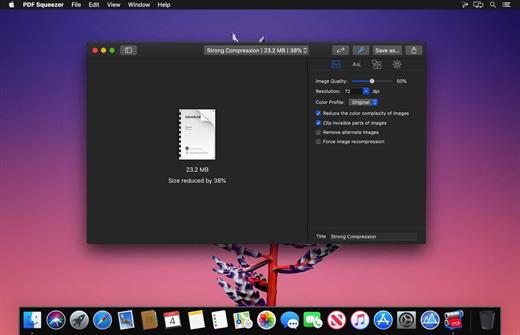
PDF Squeezer is an easy-to-use PDF compression tool.

It reduces the size of large PDF documents by compressing images and removing irrelevant information. This will help you obtain important savings in bandwidth costs, digital storage costs and network transmission times.

Features


  • Simply drag and drop your file into the application window
  • Choose from predefined compression filters or create your own
  • Compress all files in a folder and its subfolders
  • Batch compress multiple files
  • Finder, Safari and Preview ad-on available via the share menu
  • Support for password protected PDFs
  • Automatic compression and save with ‘One-Click-Compression’
What’s New

Version 4.7.0:


  • Release notes were unavailable when this listing was updated.
Compatibility

macOS 10.13.0 or later


Release Name: PDF Squeezer 4.7.0 fix
Size: 48.6 MB
Links: HOMEPAGE – NFO – Torrent Search

Download: RAPiDGATOR

10 Comments
Mar 25

TablePro 0.23.2

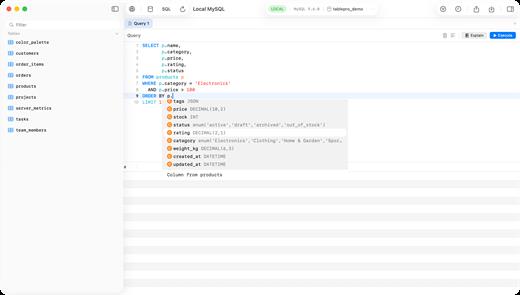
TablePro is a native macOS database client built with SwiftUI and AppKit, designed to deliver a fast and seamless experience for working with databases. Unlike traditional tools built on Java or Electron, TablePro runs as a true Mac application, launching instantly and using minimal system resources. 

It supports major databases including MySQL, PostgreSQL, MariaDB, and SQLite, providing a unified interface for managing data, writing queries, and exploring schemas. 

With a focus on performance and usability, TablePro offers a powerful SQL editor, an intuitive data grid, and secure connection options, making it suitable for both everyday queries and complex database workflows.

What’s New

Version 0.23.2:


  • Release notes were unavailable when this listing was updated.
Compatibility

macOS 14.0 or later


Release Name: TablePro 0.23.2
Size: 38.9 MB
Links: HOMEPAGE – NFO – Torrent Search

Download: RAPiDGATOR

10 Comments
Mar 25

PDFify 4.4

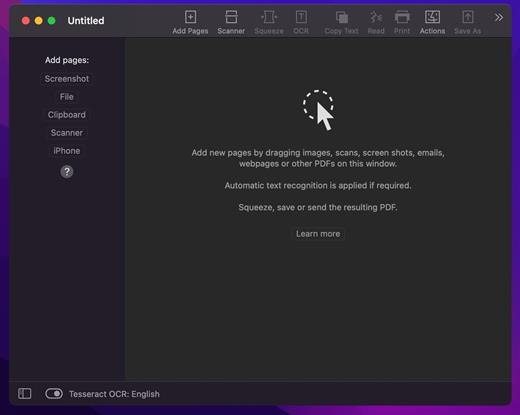
PDFify creates searchable PDF for more than 100 languages! Reduce file size at the same time! Not only existing PDF can be processed, but also images, scans, screenshots, emails, web pages and more. Just drag your files to PDFify and the rest happens automatically.

In addition to Apple’s integrated text recognition, the proven alternative “Tesseract” is also supported. Find your personal favorite. Finder Quick Actions allow you to quickly edit multiple files in one go.

Powerful functions make it easy to add new pages to the PDF

• Take screenshots directly from the app.
• Use your iPhone camera as a scanner.
• The app offers its own great scanner dialog.
• Choose PDFify as the destination for your ScanSnap scans.
• Paste pages directly from the clipboard.

Other useful features make PDF handling better

• Have the computer read content aloud.
• Reduce the size of the PDF file.
• Copy all text content with one click.
• Share, save or print the finished PDF.
And if you make a mistake, UNDO has you covered.

What’s New

Version 4.4:


  • Release notes were unavailable when this listing was updated.
Compatibility

macOS 10.13.2 or later


Release Name: PDFify 4.4
Size: 32 MB
Links: HOMEPAGE – NFO – Torrent Search

Download: RAPiDGATOR

8 Comments
Mar 25

Scrutiny 12.11.4

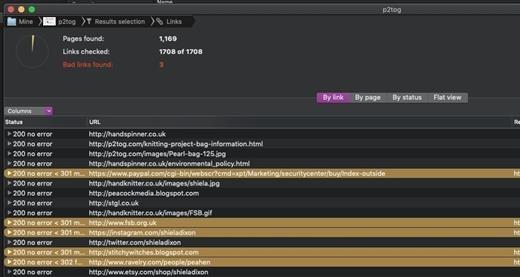
Scrutiny is a suite of web optimization tools. Native cocoa app (i.e., not Java) fast and efficient. 30-days free trial. This is a major update from v5. This is a completely free upgrade for v5 users and there is an upgrade path from v4.

Features


  • Link checker
  • SEO analysis
  • XML Sitemap generation, optionally include images / pdf pages
  • Page load speed test
  • Spelling and grammar checking
  • Scans sites requiring authentication
  • Search your site (source or visible text) obtain a list of pages containing a search term or not containing a search term
  • Website monitoring of as many URL’s as you like with a choice of alerts and logging
  • Scheduling made easy with a few easy clicks (the old method using iCal will still work)
  • On finish, send an email, save a report, open a file or applescript, FTP the sitemap XML, and other actions
  • Opens and scans a list of links in HTML, CSV, plain text format, or XML sitemap
What’s New

Version 12.11.4:


  • Release notes were unavailable when this listing was updated.
Compatibility

macOS 10.14 or later


Release Name: Scrutiny 12.11.4
Size: 6.2 MB
Links: HOMEPAGE – NFO – Torrent Search

Download: RAPiDGATOR

10 Comments
Mar 25

Pro Microphone 1.8.4

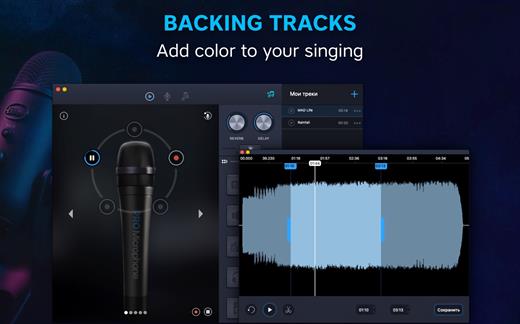
Voice & music recording studio For beginner singers or those who want to be heard – Pro Microphone. Make your voice sound louder! Sing and save all of your songs, choose different mics to match your mood! Professional studio microphone is always in your Mac.

VARIOUS MIC TYPES


  • Dynamic, stage, valve, condenser and others;
  • Each of them has its own sound effects!
  • Detailed information about each mic with its frequency response.
SPEAK, SING, RECORD

  • Recordings and loops with multiple slots;
  • Various backing tracks.
YOUR BACKING TRACKS

  • Just drag & drop files
  • Edit it if needed
What’s New

Version 1.8.4:


  • We fixed minor bugs and made general improvements to make the app better for you. Please continue to send your feedback to help us improve the app in future updates.
Compatibility

macOS 10.12 or later, 64-bit processor


Release Name: Pro Microphone 1.8.4
Size: 143.5 MB
Links: HOMEPAGE – NFO – Torrent Search

Download: RAPiDGATOR

10 Comments
Mar 25

Unite Pro 1.1

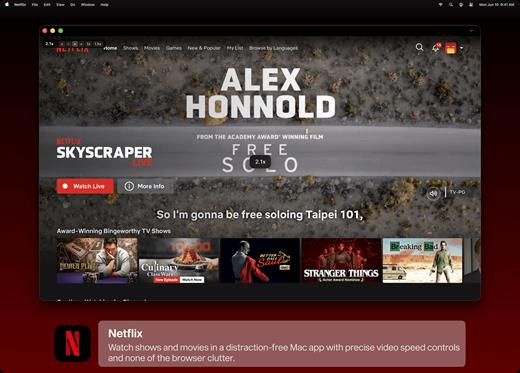
Unite for macOS lets you turn any website into a fully native Mac app with deep customization, fast performance, and macOS integration. Instead of opening sites in a browser with many tabs, Unite creates standalone apps that live in your Dock, support native window controls, and behave like real macOS software.

With Unite you can create an app in seconds by entering a URL, choosing an icon, and tailoring appearance and behavior to your preferences. Each app runs in its own isolated, lightweight WebKit‑based environment that feels more integrated and efficient than browser web apps or Electron alternatives. 

Unite apps offer extensive customization. You can hide or show title bars, adjust colors to match site branding, control window appearance, manage multiple tabs with advanced options like pinning and locking, and choose how links open within or outside the app. Notifications and macOS Focus Modes work per app, helping reduce distractions. 

Unite also includes flexible app modes, such as standard Mac windows, sidebar views, floating windows, compact views, and menu bar utilities. A built‑in ad blocker and customizable keyboard shortcuts streamline everyday use and navigation. 

What’s New

Version 1.1:


  • Release notes were unavailable when this listing was updated.
Compatibility

macOS 15 or later


Release Name: Unite Pro 1.1
Size: 28.9 MB
Links: HOMEPAGE – NFO – Torrent Search

Download: RAPiDGATOR

9 Comments
Mar 25

Butler 4.4.8

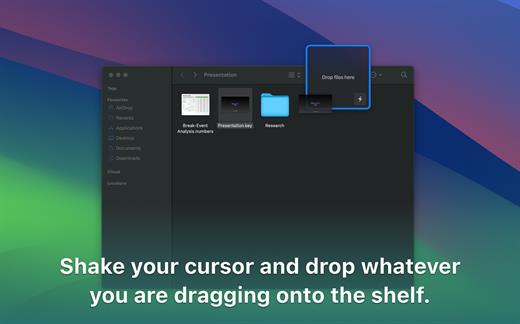
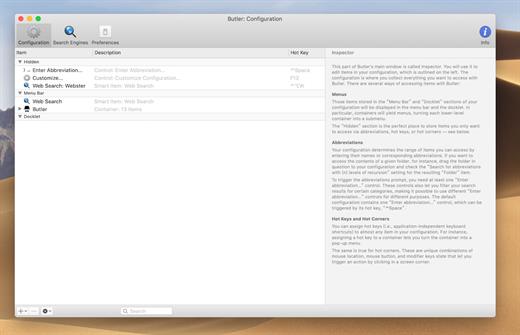
Butler makes it easier for you to perform a wide variety of potentially recurring tasks. Just arrange these tasks in Butler’s fully customizable configuration and assign one or more triggers to a task.

Available Triggers


  • freely configurable system-wide menus in your menu bar/Butler’s docklet
  • freely configurable pop-up menus — triggered via hot key or hot corner (see below)
  • abbreviations — for example, enter “qt” to launch QuickTime Player
  • hot keys — for example, hit [F1] make iTunes switch to the next track
  • hot corners — for example, [shift]-[right mouse button click] in the lower left corner of your screen to pop up a menu that lists all system preference panes
  • events — for example, launch iChat when Butler starts up and the [option] key is not held
Possible Tasks

  • launch applications
  • open files
  • access preference panes
  • manage bookmarks
  • search the web
  • run AppleScripts
  • extend the pasteboard
  • enter text snippets
  • simulate keystrokes
  • control iTunes
  • more…
What’s New

Version 4.4.8:


  • Release notes were unavailable when this listing was updated.
Compatibility

macOS 10.13 or later


Release Name: Butler 4.4.8
Size: 7 MB
Links: HOMEPAGE – NFO – Torrent Search

Download: RAPiDGATOR

10 Comments
Mar 25

CleanShot X 4.8.8

CleanShot is the ultimate screen recording app made for macOS. With its rich toolkit, CleanShot actually feels like 6 apps in one. You can use it to swiftly capture Mac’s screen without desktop icons, record and trim video, annotate, save screenshots to dedicated cloud, and more.
Features:

CleanShot Cloud

You can instantly save your screen captures to CleanShot Cloud, dedicated screenshots hosting integrated with the app. Right from the quick menu, upload your screenshot to the cloud, and get a link to it in a click.

Hide desktop icons

CleanShot hides desktop icons, so that you can capture your Mac’s screen on the spot, without wasting time on a cleanup. If you need a quick capture, toggle the icons and bring them back once you’re finished. You can even set a custom wallpaper like an image or plain color for your screenshots.

Record screen

CleanShots lets you choose between recording a video or a GIF, whether you capture a specific window, part of the screen, or fullscreen. Even set your custom dimensions before hitting the Record button. You can also disable desktop notifications for when you’re recording.

Quick Access Overlay

Right after taking a screenshot, you’ll see a small pop-up window appear on the screen. It’s the shortcut to viewing, annotating, or sharing whatever you’ve just captured. Essentially, Quick Access Overlay gives you an instant editing toolkit, plus saves you from searching and reopening screenshots.

Simple yet powerful

CleanShot teaches you to use simple actions while capturing the screen — yet provides tons of options to do it. You can grab the area, fullscreen, window, or even a scrolling window. Set a timer if you need a few seconds to capture the right moment. In your hands, it caters for your needs.

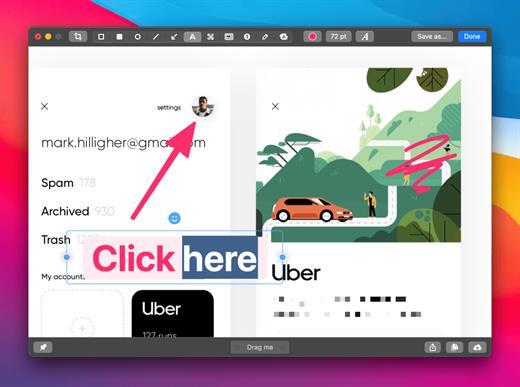
Annotate, highlight or blur

No screenshot is perfect. Using CleanShot’s built-in editor, you can highlight or hide specific parts of your screenshots as well as add annotations flexibly. Just click on the pencil icon in the Quick Access Overlay to edit screen captures in a flash.

What’s New

Version 4.8.8:


  • Fixed an issue that caused CleanShot to crash during screen recording
Compatibility

macOS 10.14.4 or later
Apple Silicon or Intel Core processor


Release Name: CleanShot X 4.8.8
Size: 43.7 MB
Links: HOMEPAGE – NFO – Torrent Search

Download: RAPiDGATOR

10 Comments