Please REGISTER or RENEW your account on RAPiDGATOR.net and support us by doing through all RAPiDGATOR working download links on main posts...
Mar 23

Bartender 6.4.2

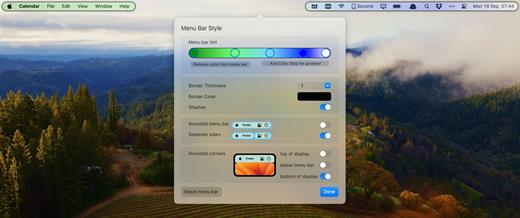
Bartender lets you organize your menu bar apps.

Features


  • Take control of your menu bar – With Bartender you can choose which apps stay in the menu bar, are displayed in the Bartender Bar or are hidden completely.
  • The Bartender Bar – The Bartender Bar can be displayed and hidden as you want, by clicking on the Bartender Icon or via a hot key.
  • Menu bar apps still work the same – Apps still work the same when they are in the Bartender Bar allowing you quick access to them when needed, but keeping them out of sight when not.
  • Show an app in the menu bar when it updates – Set up your apps to be displayed in the menu bar for a period of time when they update.
  • Order your menu bar items – With Bartender you can set the order of the menu bar items, both in the menu bar and in the Bartender Bar, simply by ⌘+dragging the items. The order you set is maintained after restarts. So your menu bar items are always in the order you want.
  • Minimalism – If you want a really clean look and privacy, Bartender can also be hidden.
  • The Bartender Bar can be placed where you want – The Bartender Bar can be moved at any time to any horizontal position immediately under the menu bar. Or it can open under the Bartender icon.
  • Keyboard Navigate your menu bar items – Keyboard navigate all menu items both in the menu bar and the Bartender Bar; simply arrow through them and press return to select.
  • Search menu bar items – You can search the Bartender Bar for menu items, allowing you quick access to a menu item without looking for it. Simply display the Bartender Bar and start typing, then press enter to select the menu item.
Bartender lets you organize your menu bar apps by hiding them, rearranging them, or moving them to Bartender’s Bar. You can display the full menu bar, set options to have menu bar items show in the menu bar when they have updated, or have them always visible in Bartender’s Bar.

What’s New

Version 6.4.2:


  • Release notes were unavailable when this listing was updated.
Compatibility

macOS 14.0 or later


Release Name: Bartender 6.4.2
Size: 29.8 MB
Links: HOMEPAGE – NFO – Torrent Search

Download: RAPiDGATOR

6 Comments
Mar 23

EazyDraw 12.4.6

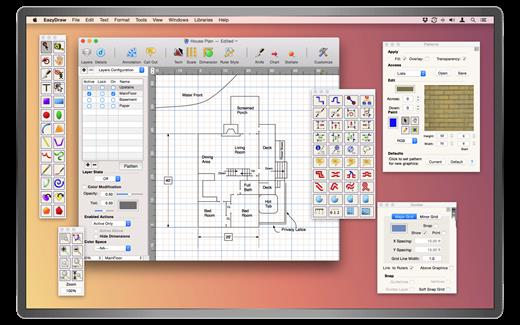
EazyDraw is a vector drawing application. For the full journey from Jaguar to El Capitan, EazyDraw has been the trail-blazing app for the new vector-drawing paradigm on the Mac.

EazyDraw provides a balanced feature set that includes tools needed for technical drawing, Web and app graphic design, print publishing, logos, page — text layout and more. Easy enough for everyone, but with the depth your project will need.

Includes comprehensive support for bitmap and vector graphic formats. Import and ungroup for editing PDF and EPS. Import and export SVG and now DXF. Preview and publish to EPS and TIFF with RGB or CMYK process colors. Exchange scaled CAD drawings with DXF. Publish Web graphics. Create Mac, iPhone, and iPad app-development graphics and icons.

What’s New

Version 12.4.6:


  • Release notes were unavailable when this listing was updated.
Compatibility

macOS 10.13 or later
Apple Silicon or Intel Core processor


Release Name: EazyDraw 12.4.6
Size: 160.3 MB
Links: HOMEPAGE – NFO – Torrent Search

Download: RAPiDGATOR

6 Comments
Mar 23

CopyClip 2 v3.989

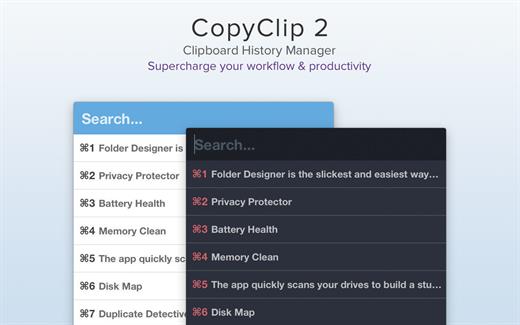
CopyClip is the slickest and most efficient premium clipboard manager for your Mac. Running discreetly from your menu bar, the app stores all that you have copied or cut in the past, allowing you to quickly find that snippet of text you’ve been looking for.

CopyClip Features


  • Ability to store up to 230 clippings
  • Option to paste clippings with the original formatting if desired
  • Ability to search through clippings using the embedded search bar
  • Keyboard shortcuts to paste clippings
  • Right-click option to ‘pin’ chosen clippings to the top of the list
  • You can exclude apps you wish not to copy clippings from
  • Option to edit and delete individual clippings, as well as delete all clippings at once
  • Toggle between Dark/Light user interface themes
  • Works on both the menu bar and the Dock
What’s New

Version 3.989:


  • Bug fixes
Compatibility

macOS 11.5 or later.


Release Name: CopyClip 2 v3.989
Size: 9.4 MB
Links: HOMEPAGE – NFO – Torrent Search

Download: RAPiDGATOR

8 Comments
Mar 23

DoubleTake 2.7.9

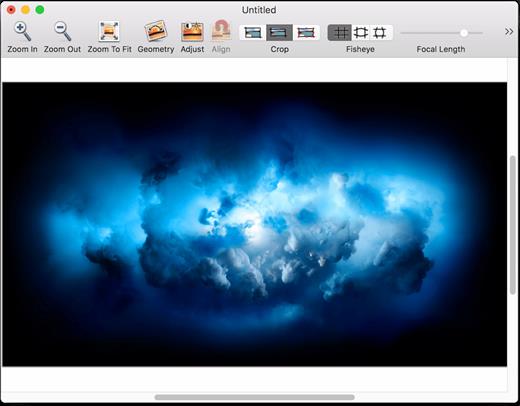
DoubleTake is for Mac users who like compact cameras, but sometimes wish they could magically pull a wide angle lens out of their pocket, or plug in a sensor with a few extra megapixels for that large print.

DoubleTake handles this by giving you both automatic and manual control of how to stitch photos perfectly, with simple drag-and-drop.

What’s New

Version 2.7.9:


  • Release notes were unavailable when this listing was updated.
Compatibility

macOS 10.11 or later


Release Name: DoubleTake 2.7.9
Size: 8.3 MB
Links: HOMEPAGE – NFO – Torrent Search

Download: RAPiDGATOR

7 Comments
Mar 23

CoolUtils PDF Combine 8.1.0.70/7

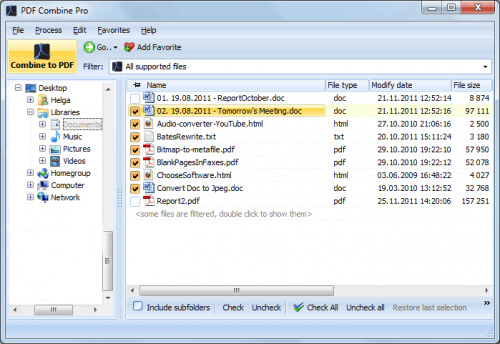
Description: PDF Combine Pro is a life saver for those who need to combine PDF, DOC, TXT, DOCX, HTML, XLS files, images (TIFF, JPEG, PNG) and emails into one PDF. Now you do not have to use several programs and converters to get one PDF. PDF Combine Pro does it in one go. Supported input formats include DOC, DOCX, RTF, TXT, XLS, XLSX, HTML, HTM, MHT, PS, EPS, PRN, PDF, TIFF, JPEG, PNG, PST, EML, MSG.

PDF Combine Pro can combine files within folders. For example, you have 3 folders with different file types inside each. The app can produce three combined PDF files.
It can easily create bookmarks that can be used as table of contents.
Users can add custom Cover pages to the combined PDF.
Legal users will appreciate the flexible bates stamping option.
Transparent user interface and full command line support.

Unique options of PDF Combine Pro
With PDF Combine Pro you can combine PDF files as well as DOC, TXT, XLS, HTML, TIFF, JPEG, PNG into one PDF. A unique all-in-one tool!
Combine PDF, Doc, TXT, TIFF files within folders. If you have 10 folders with multiple files in each, you can get 10 PDF files in one process.
Combine PDF files by common name part. The app can analyze the whole file name or any range of characters you set (i.e. analyzing the first 2 characters PEdouglas.pdf, PEmike.pdf, PEhelen.pdf will be combined into one file).
Want more order? Add pagination. Just tick the box, no additional steps are required.
It's easy to change the order of the docs you want to combine; just drag and drop them up or down.
PDF Combine Pro will also offer you to add your digital signature to the combined PDF file.
The interface is very clear. The wizard helps you to make all the settings.
You can also add bookmarks. Use file names, document titles or external file to create your table of contents.
When you combine files of different formatting, some files may not fit. Use fit-to-page option to properly locate all the files in the output PDF.
Use a duplex printer? PDF Combine solves the problem of printing PDF files double sided with an odd number of pages. It adds a blank page if the file has an odd number of pages, so the next file is not printed on the back side of the previous one.
The built-in Preview panel helps you to view each file either scaled or in actual size.
Our app can also function as PDF encrypter, setting user permissions or password protection.
We also offer a special server PDF Combine Pro (SDK). It has no GUI, no interrupting messages.
PDF Combine Pro can be run via command line (get the ready-to-use command line from GUI settings).

Release Name: CoolUtils PDF Combine 8.1.0.70/7
Size: 310.3 MB
Links: HOMEPAGE – NFO – Torrent Search

Download: RAPiDGATOR

7 Comments
Mar 23

AI Text To Speech Generator Pro 1.1.2

Description: Transform your written words into ultra-realistic, human-like audio with AI Text To Speech Generator Pro. Whether you are a content creator making video voiceovers, a student listening to study notes, or an author creating audiobooks, this powerful desktop utility provides professional-grade speech synthesis without the expensive monthly subscriptions.

Unlike cloud-based alternatives, AI Text To Speech Generator Pro runs state-of-the-art neural network models directly on your PC. This guarantees 100% privacy, zero data collection, and the ability to generate unlimited audio completely offline!

REVOLUTIONARY AI ENGINES INCLUDED
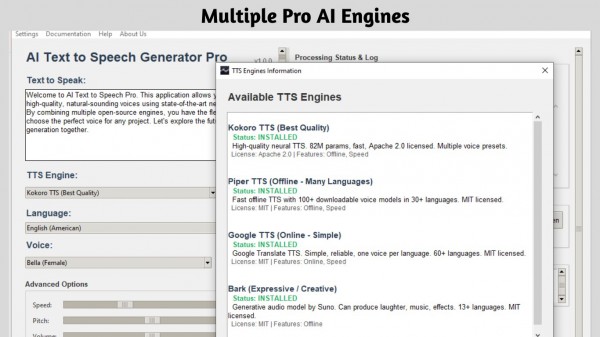
- Kokoro TTS: The industry-leading model for broadcast-quality, ultra-realistic human voices.
- Piper TTS: Fast, offline speech generation supporting over 30+ languages and dozens of distinct accents.
- Bark (by Suno): A highly expressive and creative AI that can generate natural voice inflections, hesitations, sighs, and even laughs.
- Google TTS (gTTS): A lightweight, reliable online fallback for simple translation reading.

CORE FEATURES
- Total Control: Fine-tune the speed (-50% to +100%), adjust voice pitch, and boost output volume to get the perfect take.
- Long-Form Audio: Paste entire articles or book chapters. The app automatically chunks long text to prevent memory crashes and seamlessly stitches the final audio together.
- Export Options: Save your generated speech locally as high-quality WAV or MP3 files.
- Built-In Studio: Preview voices using the Voice Browser and listen to your generated tracks instantly with the built-in media player.
- Complete Privacy: Your text is never uploaded to the cloud (when using offline models). Keep your proprietary scripts and personal documents safe.

Stop paying per-character for AI voiceovers. Unlock the power of local AI and generate unlimited, natural-sounding speech today with AI Text To Speech Generator Pro!

System Requirements
- OS: Windows 10 version 17763.0 or higher
- Memory: 4 GB (Minimum), 8 GB (Recommended)
- Processor: x64 Dual-Core Processor (Minimum), Quad-Core Processor or better (Recommended)

Release Name: AI Text To Speech Generator Pro 1.1.2
Size: 1.7 GB
Links: HOMEPAGE – NFO – Torrent Search

Download: RAPiDGATOR

6 Comments
Mar 23

2BrightSparks SyncBackPro 11.3.142

Description: SyncBackPro backup software, the professional's tool to backup, synchronize, and restore data files. SyncBackPro for Windows is used by individuals, small businesses, and mission critical organizations throughout the world including law enforcement agencies, hospitals, and government departments.

Install SyncBackPro on a Windows computer and backup all your important files and data across multiple operating systems using SyncBack Touch. SyncBack Touch works with Windows, macOS, Linux and Android devices.

Features:
Copy Locked or Open Files
Supports Amazon S3™ and compatible services, Google Drive™, Google Storage™, Google Photos™, Microsoft Azure™ Blob Storage, Microsoft OneDrive™, OneDrive for Business (Office 365), SharePoint™ (Office 365), Dropbox™, Box, SugarSync™, Rackspace™ / OpenStack, Backblaze™ B2, OVH™, Egnyte™, Citrix ShareFile™, pCloud™ and WebDAV. Parallel and threaded file transfers supported.
Fast Backup, Intelligent Synchronization and Incremental Backups
Backup Emails Stored on a POP3/IMAP4/Exchange Server
Versioning, with delta-copy - Keep Previous Backup Versions
Scripting - Configure How SyncBackPro Runs
Powerful and Modern FTP & SFTP support
Advanced Compression and Encryption, with parallel compression
Automatic Drive Failure (S.M.A.R.T.) and Ransomware Detection

Release Name: 2BrightSparks SyncBackPro 11.3.142
Size: 104.8 MB
Links: HOMEPAGE – NFO – Torrent Search

Download: RAPiDGATOR

8 Comments
Mar 23

Ashampoo 3D CAD Architecture 14.0

Description: Want to plan your home in peace and comfort on your PC? Ashampoo 3D CAD Architecture is the user-friendly design software for anyone ready to turn their vision into reality! The step-by-step wizard delivers quick and easy results, even for beginners. With 2D, 3D, and cross-section views, you always know exactly where your project stands and can instantly spot what’s missing and where changes are still needed—perfect for identifying weaknesses and avoiding design bottlenecks.

New: A powerful electrical planning assistant helps place outlets, switches, and lighting fixtures quickly and accurately. Whether building from scratch, renovating, or just redecorating, find out what your future space will look like today. Get the 3D home planner that truly moves your project forward!

Powerful electrical planning assistant included!
Electrical planning has never been easier: With the new assistant, you can place outlets, switches, and lights exactly where you need them–with just a few clicks. Choose from predefined room types and equipment configurations or create your own templates. The assistant automatically analyzes your rooms and suggests optimal placements–saving you time and helping you avoid mistakes. Whether you're a beginner or a pro, this feature makes electrical planning faster, easier, and more intuitive!

Customization and full control over electrical symbols
In addition to the built-in symbols, you can add and manage your own electrical symbols. Use custom directories to directly integrate personalized elements into your plans. The assistant automatically creates a dedicated layer for electrical symbols, so you can show or hide the entire electrical installation with a single click. You can also manually move, rotate, and adjust all symbols–for maximum flexibility and precision! The assistant even auto-enhances your planning with a parts list of all electrical components used in your project.

New doors and sliding doors–enhancing design flexibility for more realistic drafts
New door models give you even more creative options. Innovative extra: Doors with asymmetrical wall openings. Now you can realistically depict sliding doors with track systems and without awkward overlaps. This added flexibility lets you design your floor plans even more accurately and individually, perfect for modern open concepts and advanced architectural projects!

New feature highlights
Hidden line optimization in elevation views
Fire Escape Plan plugin
Wizard for scale, frame placement, and plan layout
Comprehensive 2D symbol catalog with automatic legends
Exporting a List of 2D Symbols (PDF, RTF, Excel)
More than 280 new, freely scalable 3D objects
Extended PV objects including current solar modules and balcony power systems

Photovoltaic installations - rooftop arrays and flat roofs
No good project design should be without photovoltaic installations. For roof-mounted system, you can already specify their layout, select modules from the object catalog and their placement during the setup phase. For flat roofs, you can simply specify which parts will be or will not be used for photovoltaic elements during the design phase. When you're done, you can place the entire installation in just two clicks and adjust distances between rows of panels or rotate and realign them - it's the perfect approach to preliminary planning!

Powerful area analysis
Due to popular demand, we have added additional area analysis and calculation features plus suitable output templates. Aside from living space you can now also process floor space, walls, ceilings, facades and many other areas. Facade areas can also be easily exported to PDF, RTF or Excel files! Position lists for windows are also no longer a problem.

Mirror objects with ease
Two powerful tools will help you mirror 3D and 2D objects and symbols either across any axis or their center points. This also works with multi-selections of the same element type which can save you a lot of time! CAD software doesn't get any more flexible than this!

Unmatched efficiency
The clean, thematically structured user interface gives you 1-click access to all features. Everything is logically arranged and easily accessible. You decide whether you'll use classic toolbars or the modern ribbons you know from Microsoft Office products.

Input aids and wizards for straightforward handling
From roof designs to terrain modeling - Ashampoo 3D CAD provides useful input aids and wizards for all complex operations. You focus on the contents and the software does the rest - as it should be.

Exterior and interior design elements included
The built-in object catalog gives you access to various building components, textures, materials and symbols. It takes only a single click to place doors, windows, balconies, carports as well as sanitary and electrical installations in your designs. You can import additional objects from SketchUp and Collada. This gives you a detailed view of the finished project already in the planning phase - down to the last details!

Building material hub with "informed" CAD textures
mtextur.com provides architects, designers and planners with details on building materials and their manufacturers for free. Found materials are downloadable as high resolution CAD and BIM textures for immediate use with your planning software of choice. You may also search for specific building materials based on material group, color, use case, manufacturer or product line. Links to additional details, reference examples and PDFs with details on various materials are also available. With over 10k informed materials, mtextur is the biggest hub for real CAD textures (online since 2006) world-wide. This will truly simplify all of your planning in the age of BIM (Building Information Modeling).

Release Name: Ashampoo 3D CAD Architecture 14.0
Size: 1.7 GB
Links: HOMEPAGE – NFO – Torrent Search

Download: RAPiDGATOR

6 Comments
Mar 23

All Video Downloader Pro 10.3

Description: All Video Downloader Pro is a professional Windows app for downloading and converting your favorite videos from video sharing sites. It accelerates your downloads by up to 5 times!
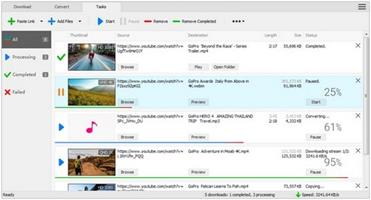
Features:

Download videos from hundreds of video sharing sites.
All Video Downloader Pro can download videos from YouTube, Facebook, Dailymotion, and hundreds of other video sharing sites. After downloaded, you'll be able to play them smoothly on your PC or mobile devices, even if you don't have internet access.

Accelerate downloads by up to 5 times.
All Video Downloader Pro features a multithreading download acceleration engine that can boost and increase your download speeds by up to 500% faster.

Download 4K, 2K, HD 1080p, HD 720p, and 3D videos.
All Video Downloader Pro allows you to download videos in different resolutions, including 4K/2160p, 2K/1440p, HD 1080p, HD 720p, 480p, 360p, and 240p. You can download 1080p HD videos to enjoy quality graphics on your TV, you can also download 240p videos in order to save space on your mobile devices.

YouTube to MP3 downloader.
All Video Downloader Pro allows you to download only audio stream directly from YouTube and save it as MP3, without downloading the entire video file.

Download entire playlist from YouTube at one time.
All Video Downloader Pro enables you to download an entire YouTube playlist with just a few clicks. All videos in the playlist can be downloaded automatically at one time.

Download multiple videos at a time.
All Video Downloader Pro supports simultaneous downloads that allows you to download more than one video at the same time.

Download subtitles in selected language and format.

Pause and resume downloads.
You may pause your downloads at any time. All Video Downloader Pro can resume broken download from where it was interrupted. You don't need to start from the beginning again.

Preview incomplete video while downloading.
While downloading, you can click the Preview button to play incomplete video and make sure that the content you are downloading is really the video of your choice.

Convert downloaded videos to any format.
All Video Downloader Pro can automatically convert downloaded videos to the format you choose. It supports MP4, FLV, WMV, MOV, ASF, AVI, DV, M4V, MKV, MPG, OGV, SWF, TS, VOB, WEBM, DVD, VCD, SVCD, and many others.

Optimize downloaded videos for any device.
All Video Downloader Pro can automatically optimize downloaded videos for your mobile devices, so you can watch them on your iPhone, iPad, Android phone, Android tablet, Xbox, Windows phone, PSP/PS4/PS3, Samsung Galaxy, etc.

Video to MP3 converter.
All Video Downloader Pro is capable of extracting audio streams from videos and save them as MP3, WAV, WMA, AC3, AAC, OGG, M4A, FLAC, MP2, or any other audio format.

Video and audio converter.
All Video Downloader Pro is a powerful video and audio converter too. It allows you to convert any video/audio files on your disk to the format you wish so that they are playable on your media player or mobile devices.

Ready-made video/audio format presets.
All Video Downloader Pro provides ready-made presets for all popular video and audio formats. You can also custom output video/audio format settings.

Schedule downloads.
All Video Downloader Pro can automatically start downloads at a set time, and shut down your computer when all done. You will no longer have to wait for your long list of videos to finish downloading.

Support drag-and-drop.
You may simply drag and drop a video link/URL from your web browser to All Video Downloader Pro's Drop Box to start a download. You don't even need to copy and paste video link/URL manually.

All Video Player.
All Video Downloader Pro includes a simple and easy-to-use media player - All Video Player, for playing MP4, WebM, FLV, MP3, AAC, and any other format video/audio files that Windows Media Player cannot play.

Release Name: All Video Downloader Pro 10.3
Size: 148.2 MB
Links: HOMEPAGE – NFO – Torrent Search

Download: RAPiDGATOR

6 Comments
Mar 23

CoolUtils PDF Combine Pro 4.2.0.163/115

Description: PDF Combine Pro is a life saver for those who need to combine PDF, DOC, TXT, DOCX, HTML, XLS files, images (TIFF, JPEG, PNG) and emails into one PDF. Now you do not have to use several programs and converters to get one PDF. PDF Combine Pro does it in one go. Supported input formats include DOC, DOCX, RTF, TXT, XLS, XLSX, HTML, HTM, MHT, PS, EPS, PRN, PDF, TIFF, JPEG, PNG, PST, EML, MSG.

PDF Combine Pro can combine files within folders. For example, you have 3 folders with different file types inside each. The app can produce three combined PDF files.
It can easily create bookmarks that can be used as table of contents.
Users can add custom Cover pages to the combined PDF.
Legal users will appreciate the flexible bates stamping option.
Transparent user interface and full command line support.

Unique options of PDF Combine Pro
With PDF Combine Pro you can combine PDF files as well as DOC, TXT, XLS, HTML, TIFF, JPEG, PNG into one PDF. A unique all-in-one tool!
Combine PDF, Doc, TXT, TIFF files within folders. If you have 10 folders with multiple files in each, you can get 10 PDF files in one process.
Combine PDF files by common name part. The app can analyze the whole file name or any range of characters you set (i.e. analyzing the first 2 characters PEdouglas.pdf, PEmike.pdf, PEhelen.pdf will be combined into one file).
Want more order? Add pagination. Just tick the box, no additional steps are required.
It's easy to change the order of the docs you want to combine; just drag and drop them up or down.
PDF Combine Pro will also offer you to add your digital signature to the combined PDF file.
The interface is very clear. The wizard helps you to make all the settings.
You can also add bookmarks. Use file names, document titles or external file to create your table of contents.
When you combine files of different formatting, some files may not fit. Use fit-to-page option to properly locate all the files in the output PDF.
Use a duplex printer? PDF Combine solves the problem of printing PDF files double sided with an odd number of pages. It adds a blank page if the file has an odd number of pages, so the next file is not printed on the back side of the previous one.
The built-in Preview panel helps you to view each file either scaled or in actual size.
Our app can also function as PDF encrypter, setting user permissions or password protection.
We also offer a special server PDF Combine Pro (SDK). It has no GUI, no interrupting messages.
PDF Combine Pro can be run via command line (get the ready-to-use command line from GUI settings).


Release Name: CoolUtils PDF Combine Pro 4.2.0.163/115
Size: 414.7 MB
Links: HOMEPAGE – NFO – Torrent Search

Download: RAPiDGATOR

8 Comments