Please REGISTER or RENEW your account on RAPiDGATOR.net and support us by doing through all RAPiDGATOR working download links on main posts...
Mar 22

RegEx Wizard 2.1.5

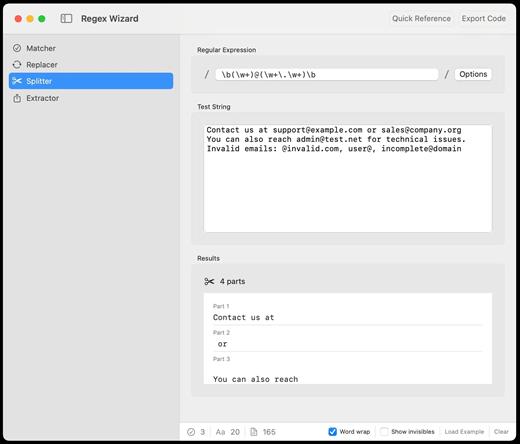
Want to create, test, and master regex patterns with real-time validation and instant feedback? This is the only regex tool you’ll ever need.

FEATURES
What you’ll love

Real-time Testing
See your regex patterns come to life instantly. Test against your own text with live highlighting and immediate feedback on matches.

Multi-language Export
Generate production-ready code in 10+ programming languages including Swift, Python, JavaScript, Java, Go, Rust, and more.

Visual Pattern Builder
Build complex patterns with confidence using our visual regex constructor. Perfect for beginners and experts alike.

Smart Validation
Catch regex errors before they become bugs. Real-time syntax validation with helpful error messages and suggestions.

Pattern Library
Access a comprehensive quick reference of regex patterns, character classes, quantifiers, and advanced constructs.

Professional Tools
Match, replace, split, and extract text with specialized tools for every regex operation you’ll ever need.

What’s New

Version 2.1.5:


  • Release notes were unavailable when this listing was updated.
Compatibility

macOS 12.0 or later


Release Name: RegEx Wizard 2.1.5
Size: 5 MB
Links: HOMEPAGE – NFO – Torrent Search

Download: RAPiDGATOR

9 Comments
Mar 22

AudiBar 1.2.0

Simple audio playback and live streaming from your menu bar. No library management, no complexity. Just drag, drop, and play files or tune into internet radio.

AudiBar: Menu Bar Audio Playback and Streaming Made Simple

Stop fighting with bloated music apps. AudiBar lives in your menu bar and does two things exceptionally well: plays your audio files instantly and streams internet radio effortlessly. No library management, no cloud sync, no subscriptions. Just drag a file onto the menu bar and it plays, or add radio stations for instant streaming.

Premium Features (One-Time Purchase)


  • Playlist management with visual track list and playback controls
  • Seek slider with previous/next track buttons
  • Current time display with elapsed and total duration
  • Playlist sorting by title or duration
  • Drag folders to create playlists instantly
  • Auto-play next track with seamless transitions
  • Shuffle mode for randomized playback
  • Unlimited tracks per playlist
  • Add currently playing track to playlist
  • Persistent playlists across restarts
  • Visual highlighting of currently playing track
  • Internet radio streaming with saved stations
  • Stream list panel with management options
  • Multiple streaming formats: M3U/M3U8, PLS, XSPF, ASX/WAX, RSS/XML, direct URLs
  • Smart track naming with metadata extraction or filename display
  • Configurable settings panel
  • Tooltips for all controls
Free Features

  • Instant playback from menu bar
  • Drag-and-drop file loading
  • Play/pause controls with real-time progress
  • Time display
  • File picker for browsing
  • All major audio formats supported
  • iCloud Drive support with smart loading
  • Scrolling display for long filenames
  • Clean, distraction-free interface
  • Context menu for quick actions
  • Remembers last played track or stream
  • Native macOS window controls
What’s New

Version 1.2.0:


  • Release notes were unavailable when this listing was updated.
Compatibility

macOS 13.5 or later.


Release Name: AudiBar 1.2.0
Size: 4.8 MB
Links: HOMEPAGE – NFO – Torrent Search

Download: RAPiDGATOR

9 Comments
Mar 22

Power Menu 1.22

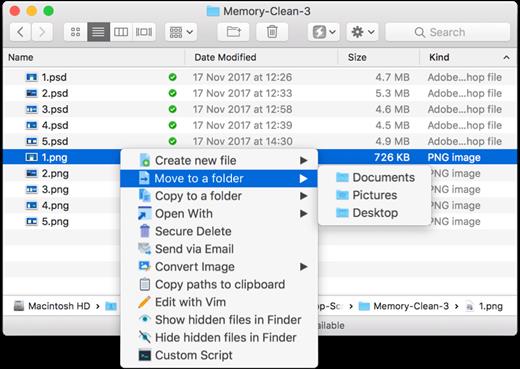
Power Menu is a highly configurable Finder extension that adds powerful actions to the right click menu and toolbar within Finder – this makes it quick and easy to do things such as move and copy files, convert images, create new documents and much more. The app comes bundled with several useful preset actions (see below) and supports user-created shell scripts that allow for virtually limitless creativity.

What’s New

Version 1.22:


  • Release notes were unavailable when this listing was updated.
Compatibility

macOS 11.5 or later


Release Name: Power Menu 1.22
Size: 17.6 MB
Links: HOMEPAGE – NFO – Torrent Search

Download: RAPiDGATOR

9 Comments
Mar 22

Duplicate Detective 2 v1.0.171

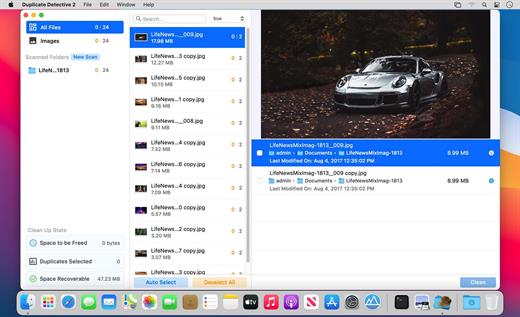
Duplicate Detective is the most comprehensive duplicate finder for your Mac. It quickly scans your hard drive to find all the duplicate files and folders on your Mac. You can then selectively choose which duplicates to delete and free up precious space on your hard drive.

Crisp and Clean Interface


  • Intuitive and easy to navigate
  • Retina-ready graphics
  • Scan individual or multiple folders in one go
  • Drag and drop support to add folders before scanning
Robust Search Engine

  • Files compared via our advanced SHA-1 hash checksum algorithm
  • Super fast and accurate duplicate detection algorithms
  • Locate duplicate images, audio, archives, entire folders and more
  • Support for iPhoto Albums
  • Support for external hard drives and network volumes
  • Blacklist certain folders to ensure they are never scanned
Filtering and Removal

  • Filter and sort duplicates depending on their type/size/name/age, etc.
  • Quick Look support by hitting the spacebar over any duplicate file/folder
  • One-click auto selection/deselection of all duplicates for your ease
  • Double-check verification screen before deleting duplicates
  • Option to enable alias creation to replace duplicates with shortcuts
  • By default, duplicates are moved to your Trash, allowing for easy and safe recovery
What’s New

Version 1.0.171:


  • Release notes were unavailable when this listing was updated.
Compatibility

macOS 10.12 or later


Release Name: Duplicate Detective 2 v1.0.171
Size: 13.4 MB
Links: HOMEPAGE – NFO – Torrent Search

Download: RAPiDGATOR

9 Comments
Mar 22

Infuse Pro 8.3.9 fix

Ignite your video content with Infuse – the beautiful way to watch almost any video format on your iPhone, iPad, Apple TV, and Mac. No need to convert files! Infuse is optimized for macOS 12, with powerful streaming options, Trakt sync, and unmatched AirPlay & subtitle support. Gorgeous interface. Precise controls. And silky-smooth playback.
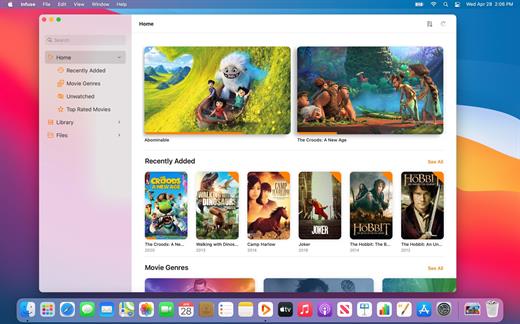
Play more video types

A powerful video player that plays just about anything, including the standard MP4, M4V and MOV – plus MKV, AVI, WMV, MTS, ISO, VIDEO_TS, FLV, OGM, OGV, ASF, 3GP, DVR-MS, WebM, and WTV. Includes fully certified Dolby® Digital Plus (AC3/E-AC3), DTS® and DTS-HD® audio.

Stream from other devices

Browse and play videos stored on your Mac, PC, NAS, Wi-Fi hard drive, apps like Plex, Emby, and Jellyfin, or from cloud services like Dropbox, Google Drive, OneDrive, Box, pCloud, Yandex.Disk, and Mega.nz – no syncing required!

Trakt 2-way sync

Connect with Trakt to sync watched history, submit ratings and post comments.

Optimized subtitles powered by opensubtitles

Bring your own subtitles, or download them on the fly (for free) in virtually any language.

The basics:

  • Silky-smooth video player (plays full 4K w/ HDR & Dolby Vision)
  • Stream from a Mac, PC, NAS or Wi-Fi enabled hard drive
  • Connect with Plex, Emby, Jellyfin, Kodi (XBMC), WMC and other media servers
  • Beautiful layout with quick access to video info
  • Artwork and metadata added automatically
  • Picture-in-Picture
  • Spatial audio
Supported formats:

  • Video: 3GP, AVI, ASF, BDMV, DIVX, DVDMEDIA, DVR-MS, FLV, ISO, M4V, MKV, MOV, MP4, M2TS, MTS, OGM, OGV, TP, TS, VIDEO_TS, WEBM, WMV, WTV
  • Audio: AAC, AC3/E-AC3, DOLBY TRUEHD, DTS, DTS-HD MA, FLAC, MP3, OGG, PCM, WMA
  • Subtitles: DVB, DVDSUB, MICRODVD, MPL2, PGS, SMI, SSA/ASS, SRT, SUB, TIMED TEXT, TMP, TXT, VOBSUB, VTT, XSUB
Player features:

  • Multiple audio tracks
  • Chapters
  • Gesture controls
  • 8 video zoom options
  • Continuous playback
  • Deinterlacing
Extras:

  • Library organization
  • Folders
  • One-click subtitle downloads from OpenSubtitles
  • Scrobble plays to Trakt
  • Download videos from networked devices
  • Drag and drop uploads via web browser
  • Get extra onboard storage by adding USB drives
Get more with infuse pro!

  • Play even more video formats
  • Enjoy Dolby® Digital Plus (AC3/E-AC3), DTS® and DTS-HD® mobile surround sound
  • Stream a wide variety of video types over AirPlay and Google Cast
  • Access videos stored in cloud services like Dropbox, Google Drive, Box, OneDrive, pCloud, Yandex.Disk, and Mega.nz
  • Sync libraries, settings, watched history, and playback progress between devices
What’s New

Version 8.3.9:


  • Release notes were unavailable when this listing was updated.
Compatibility

macOS 11.0 or later.
Apple Silicon or Intel Core processor


Release Name: Infuse Pro 8.3.9 fix
Size: 77.2 MB
Links: HOMEPAGE – NFO – Torrent Search

Download: RAPiDGATOR

10 Comments
Mar 22

Window Manager 2.0.0

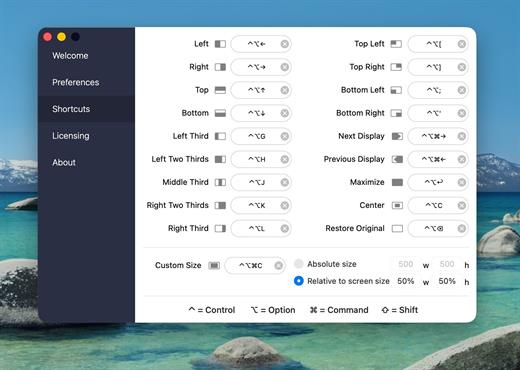
Window Manager is the perfect utility for managing the positions and sizes of your windows. The app allows you to quickly rearrange windows on your Mac using a range of preset options via its customizable shortcuts, a menubar dropdown and by dragging windows into various hotspots around the edges of your screen.

Multi-tasking Made Easy

With Window Manager, you can neatly align windows and make better use of your screen space. Easily arrange multiple windows on your screen at once for side by side comparison and avoid having to continuously switch between apps.

Powerful & Intuitive Resizing

Drag windows into corners for quarters, to the sides for halves, top for maximise and the bottom for thirds and two thirds. Control your windows in the way that works best for you; with hotspots, shortcuts and dropdown menu controls.

Tons of Preset Positions & Sizes

Choose from a range of window arrangements, from maximise, halves, quarters and thirds. Window Manager also supports a user defined custom size and can be used with Mac’s that are hooked up to multiple external displays.

What’s New

Version 2.0.0:


  • Release notes were unavailable when this listing was updated.
Compatibility

macOS 11.5 or later


Release Name: Window Manager 2.0.0
Size: 8.4 MB
Links: HOMEPAGE – NFO – Torrent Search

Download: RAPiDGATOR

5 Comments
Mar 22

Memory Booster 2.0.1

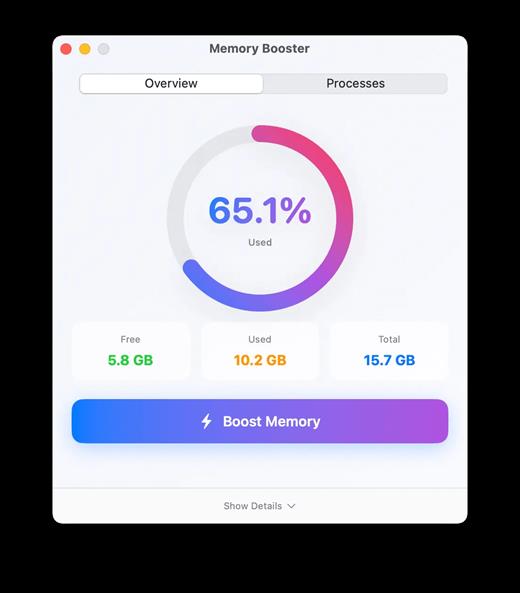
Boost Your Mac’s Memory. Effortlessly. Monitor, optimize, and track memory usage with intelligent insights.
Keep your Mac running at peak performance.

What’s New

Version 2.0.1:


  • Release notes were unavailable when this listing was updated.
Compatibility

macOS 13.5 or later


Release Name: Memory Booster 2.0.1
Size: 5.4 MB
Links: HOMEPAGE – NFO – Torrent Search

Download: RAPiDGATOR

12 Comments
Mar 22

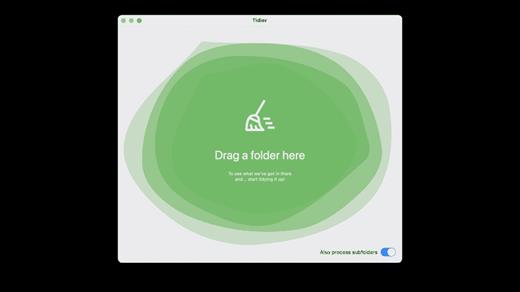
Tidier 1.6.3

Type-aware file management .That makes sense. Browse through your files an intuitive way, or export them back to disk: all neatly-organized!

Features

Easy to use: Elegant, simple and practical: Just drag’n’drop a folder and everything will be taken care of! Everything in order: Tired of having to look for specific types of files, only to realize they were hidden somewhere in vast tree folders? Problem solved! Lightning fast: Tidier is optimized for speed and top-notch performance, so that you don’t have to worry about anything!

What’s New

Version 1.6.3:


  • Release notes were unavailable when this listing was updated.
Compatibility

macOS 12.0 or later


Release Name: Tidier 1.6.3
Size: 5.4 MB
Links: HOMEPAGE – NFO – Torrent Search

Download: RAPiDGATOR
9 Comments
Mar 22

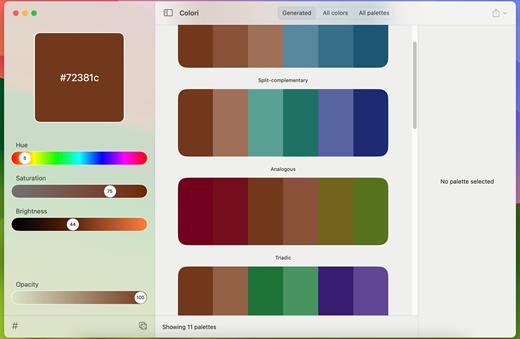
Colori 1.7.3

Generate a color palette from one color, organize your palettes, preview, and export

Beautiful color schemesright at your fingertips.

Features


  • Easy to use: Simple, practical and ultra-easy to use: Pick a color as a starting point and start experimenting: it had never been that easy!
  • Colors everywhere!: Lots and lots of colors + 100’s generated or ready-made palettes to choose from and make your next design project stand out!
  • Lots of options: Work elegantly and lightning-fast from your Mac. Do you want to export your palettes for use e.g. with web design and CSS/LESS/SASS? Done!
What’s New

Version 1.7.3:


  • Release notes were unavailable when this listing was updated.
Compatibility

macOS 12.0 or later


Release Name: Colori 1.7.3
Size: 5.6 MB
Links: HOMEPAGE – NFO – Torrent Search

Download: RAPiDGATOR

12 Comments
Mar 22

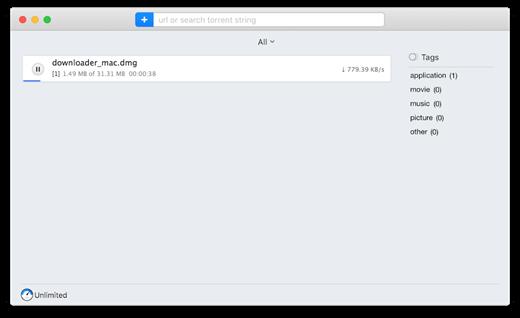
Folx Pro 5.33

Folx combines two functionalities – of download manager and torrent client. It makes downloading extremely easy: just open the page with the file to be downloaded, click the link in your browser, and Folx will start the download for you. Its auto-resume option comes handy when the downloading gets interrupted. You can also assign a tag or a few to the downloaded content for accurate and easy search through the downloaded files.

There are many basic features included in the free trial. However, the Pro version brings such handy features as splitting the downloads in up to 20 threads which speeds up the download process; scheduling the download tasks according to your convenience; smart speed adjustment option (download speed will be adjusted automatically whenever you need to use Internet traffic to run other applications), iTunes integration, searching the web for torrents directly from Folx and password manager.

What’s New

Version 5.33:


  • Improved: compatibility with macOS 11
  • Fixed: an issue with CPU load when using the Folx extension for Chrome and Firefox
  • Fixed: an issue with the Folx extension work when opening multiple windows in Chrome
  • Note: for the fixed issues to come into force, you need to update Folx extensions.
Compatibility

macOS 10.9 or later
Apple Silicon or Intel Core processor


Release Name: Folx Pro 5.33
Size: 30.4 MB
Links: HOMEPAGE – NFO – Torrent Search

Download: RAPiDGATOR

13 Comments