Please REGISTER or RENEW your account on RAPiDGATOR.net and support us by doing through all RAPiDGATOR working download links on main posts...
Mar 18

Adobe Substance 3D Painter 12.0.1

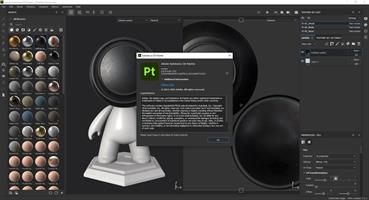
Description: Substance Painter is a brand new 3D Painting app with never before seen features and workflow improvements to make the creation of textures for 3D assets easier than ever. It is acknowledged as the most innovative and user-friendly 3D Painter out there.

Power to the artists
- Substance Painter gives you all the tools you need to texture your 3D assets.

What You See Is What You Get
- The PBR real-time viewport lets you work on asset look development.
- Create in Substance Painter and get real-time feedback in UE4 and Unity thanks to the live link.

Augmented Artistry
- Unleash your creativity with powerful tools and a non-destructive workflow.

Smart Materials
- Tear and wear, scratches and dust instantly appear where they're supposed to.

Smart Masks
- Apply the same mask preset on any type of object and have it adapt automatically.

Integrated 8K Bakers
- Baking is where it all starts. Bake high quality maps in an instant directly within Substance Painter.

Bring VFX to the Top
- Support for Linux, 8K export, color management, UDIM management and Scripting API make integrating Substance Painter into VFX workflows easier than ever.

Open to the world
- Get 1:1 engine exports and share directly to portfolio sites with dedicated formats.

System Requirements:
Minimum:
- OS: Windows 10 64-bit Version 1909
- RAM: 16 GB
- VRAM 4 GB

Release Name: Adobe Substance 3D Painter 12.0.1
Size: 2.5 GB
Links: HOMEPAGE – NFO – Torrent Search

Download: RAPiDGATOR

6 Comments
Mar 18

reaConverter Pro 8.0.206

Description: Easily process full batches of files and folders. reaConverter combines powerful automation with intuitive tools to streamline image conversion and eliminate repetitive editing.

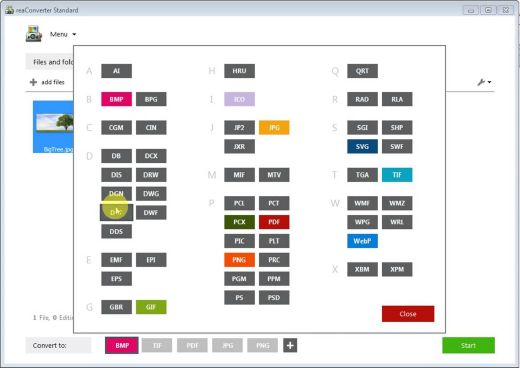
700+ File Formats
reaConverter delivers high-efficiency batch conversion for an extensive range of file formats.

Efficient Conversion
A powerful file conversion toolkit with advanced processing features — giving you precise, granular control over every output.

Image Editing
reaConverter simplifies batch image editing — apply touch-ups, transformations, and effects to unlimited images simultaneously.

Automation
Professional-grade automation features for high-volume file conversion and batch processing.

Development
Integrate reaConverter's functionality into scripts, applications, or websites using its command-line tool or DLL.

Release Name: reaConverter Pro 8.0.206
Size: 397.2 MB
Links: HOMEPAGE – NFO – Torrent Search

Download: RAPiDGATOR

10 Comments
Mar 18

Aiarty Image Enhancer 3.10

Description: A generative AI-powered image enhancement software that deblurs, denoises, restores, and upscales images, generating realistic details for superior clarity and sharpness using new and advanced AI models.

Make Blurry Images Clearer
Enhance blurry, grainy, pixelated, or soft images intelligently, while AI works its magic to generate crisp and lifelike details - idea for restoring clarity to AI-generated images and heavily compressed photos.

Remove Noise from Photos
Employ deep learning algorithms to denoise and reconstruct photos. Tackle various noise types obtained during acquisition or post production. Effectively improve clarity, sharpness, and overall visual quality.

Enlarge Images to 4K/8K/32K without Losing Quality
Upscale AI-generated images and real photos by 2x, 4x, or 8x to achieve stunning 4K, 8K, or 32K resolution.

Not Only Preserve But Also Generate
A specially trained AI model for preserving and generating image details. Adept at generating details for skin, hair, textures, lines, and the like. The lower the quality of the image is, the greater the potential for improvement.

Revive Faces with Exceptional Clarity and Realistic Details
Our AI Face Restoration enhances faces to achieve optimal clarity while preserving lifelike details.

Fix Distorted AI Face
Correct and enhance distorted AI-generated face images to achieve clear and accurate facial features.

Enhance Group Photos
Improve the clarity of faces in group shots, bring detail to eyes, skin, and hair; fix blurry or out-of-focus images.

Release Name: Aiarty Image Enhancer 3.10
Size: 336.2 MB
Links: HOMEPAGE – NFO – Torrent Search

Download: RAPiDGATOR

10 Comments
Mar 18

Schoolhouse Test Professional Enterprise 6.1.174

Description: Test Maker Software for Teachers: Printable Tests Fast. Create printable tests, quizzes, and exams fast with easy-to-use professional test maker software designed for teachers and trainers.
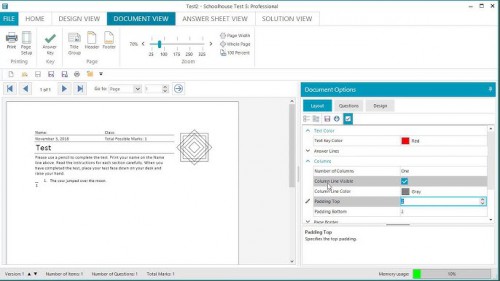
Professional Printed Tests Fast
Making and printing a high-quality paper-and-pencil test, quiz, or exam, has never been easier. A time-consuming chore becomes a whole lot quicker and the result considerably more professional. Some of our customers have even hinted that creating tests has actually become an enjoyable process.

A Test Maker as Easy as 123
Schoolhouse Test is a very intuitive test maker with an easy learning curve. Right from your first use of the program it will be readily apparent what steps you need to take to create a test ready to administer. It simply works the way you expect it should work.

Simply
select a question type,
enter the question and possible answers,
repeat for the number of desired questions,
and it's ready to print.

Answer sheets
Automatically create an answer sheet for students to record their answers on and save the actual test document for future use. Saves paper and photocopier costs. The answer sheet also makes for easy marking. In fact, place an answer sheet on top of the answer key on a lighted surface (such as an overhead projector) and complete your marking in flash.

Question Bank
Here's a novel idea. A test maker that lets you make new tests from old. Simply open previously saved tests in the question bank (basic and pro editions) and select questions from each test to create a completely new test. Questions can be selected manually or by using automated selection options to randomly select a specific number or percent of questions.

Randomization
Reuse and recycle your tests with automated randomization. With just a single click you can randomize the choice elements in any multi-choice type question (multiple-choice, checklist, matching, etc.). And with the Pro edition test maker you can randomize the questions (all, selected, or groups) so that they are in a different order. Same set of questions but now an all new assessment.

Full Customization
The test document is automatically generated ensuring the format and numbering are consistent throughout. But you determine the look and feel with a test maker that provides more than 100 design and layout options. Make desired adjustments to alignment, spacing, styles, formats, columns, fonts, colors and more.

Multiple Choice
It only takes a few quick steps to generate a multiple-choice test ready for printing. Simply enter the text for the questions and possible answers and select the correct choices. The test document and answer sheet are automatically generated for you. And numerous options exist to modify the layout to your exact requirements.

Multiple-Choice Alternatives
Make tests that bring enhanced versatility to your assessment with these alternatives to the multiple-choice question while retaining ease of administration and scoring. Checklist is a list of items to be included or not included in the list. True/false is the standard option to multiple choice. Statements is an extended true/false alternative. And matching is a list of terms to be matched with the correct definitions.

Fill-in-the-Blanks
A fill-in-the-blanks question is a great way to assess contextual reading comprehension. Simply type or paste a text selection. Double-click on individual words to replace them with numbered lines. Or select phrases and click the Select button to replace them with numbered lines. The removed words are added to an optional word bank.

List and Order Questions
When you want students to provide a list of names, places, events, or other data, make tests using the List and List with Prompts question formats. List type questions can accomodate up to 26 items.
The Order question type requires students to put a list of items in the correct order. In design mode, simply enter items in the correct order and press the Randomize button to automatically scramble the list.

Table Questions
The table question is the ideal format to evaluate knowledge of data that is normally presented in a table format. Add the number of required columns and rows and add headings. Fill the table cells with your data. And then simply click to select the cells that will require filling.

Release Name: Schoolhouse Test Professional Enterprise 6.1.174
Size: 58.9 MB
Links: HOMEPAGE – NFO – Torrent Search

Download: RAPiDGATOR

10 Comments
Mar 18

lire 3.3.9

Love RSS feeds? So do we!!

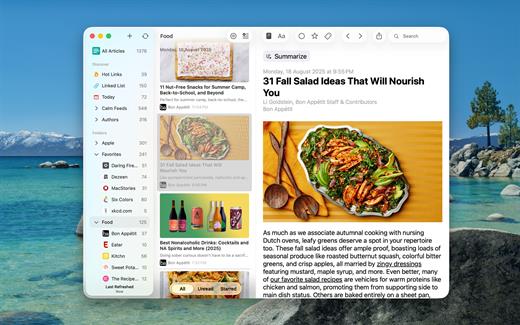
RSS feeds are a great way to follow updates on your favorite website. However, some sites set up their feeds to only show a portion of each entry, you know, to get you to click through to their actual website. We find that really annoying, and we’re sure you do too.

Which is why, unlike other RSS feed readers, that either push you into a browser (in-app or otherwise), or depend on third party text parsing services and require you to be online to fetch the full text of one article at a time (which makes it no different from having to click/tap through to a website), in lire, you get your favorite RSS feeds as they should’ve been. You don’t need to click through to any website (though, you do still have the option to, if you really wanted). It takes your favorite partial feeds, does it’s magic, and converts them in to full feeds, so you don’t have to click/tap on those annoying ‘Read more’ or ‘Continue reading’ links.

Once they’re cached, you don’t even need to be connected to read your full-text feeds.

Use as a standalone feed reader, or,sync with any of the several services: Feedly, Feedbin, FeedHQ, The Old Reader, Inoreader, BazQux Reader, Newsblur, Feed Wrangler, FreshRSS, Miniflux, Nextcloud News, Tiny Tiny RSS.

What’s New

Version 3.3.9:

FIXED


  • A a bug the prevented Cut/Copy/Paste from working in certain text fields.
  • Other minor bug fixes.
Compatibility

macOS 11.0 or later.


Release Name: lire 3.3.9
Size: 26.7 MB
Links: HOMEPAGE – NFO – Torrent Search

Download: RAPiDGATOR

8 Comments
Mar 18

PDF Squeezer 4.7.0

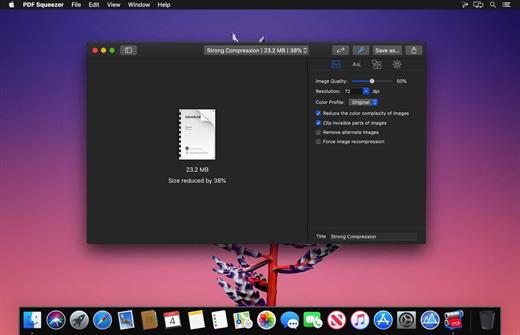
PDF Squeezer is an easy-to-use PDF compression tool.

It reduces the size of large PDF documents by compressing images and removing irrelevant information. This will help you obtain important savings in bandwidth costs, digital storage costs and network transmission times.

Features


  • Simply drag and drop your file into the application window
  • Choose from predefined compression filters or create your own
  • Compress all files in a folder and its subfolders
  • Batch compress multiple files
  • Finder, Safari and Preview ad-on available via the share menu
  • Support for password protected PDFs
  • Automatic compression and save with ‘One-Click-Compression’
What’s New

Version 4.7.0:


  • Release notes were unavailable when this listing was updated.
Compatibility

macOS 10.13.0 or later


Release Name: PDF Squeezer 4.7.0
Size: 48.7 MB
Links: HOMEPAGE – NFO – Torrent Search

Download: RAPiDGATOR
9 Comments
Mar 18

Octavo 1.0.1

Ever tried to print a booklet but don’t know what order to put the pages in? Or spent an afternoon fighting with your printer only to waste half a ream of paper? We’ve been there. That’s why we built Octavo.

Octavo: Imposition & Booklet Printing for Mac

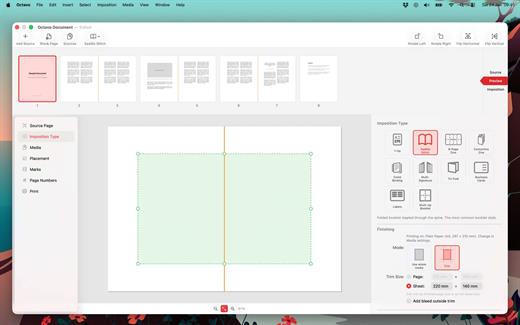
Octavo takes your PDF and arranges the pages so they come out right when you fold, staple, or bind them. It handles the fiddly maths so you don’t have to.

What Can Octavo Do?

Drop in a PDF or some images and Octavo gives you a complete workflow:


  • Print booklets: Octavo calculates the page order for duplex printing, adds fold and staple marks, and exports printer-ready sheets.
  • Clean up messy PDFs: Rotate, flip, straighten, adjust perspective, and crop — all with visual on-canvas editors.
  • Manage your margins: Position content with inside/outside margins so nothing gets clipped by binding. Multiple scaling modes with per-page fine-tuning.
Imposition Styles

  • Saddle-Stitch Booklet: The classic folded-and-stapled booklet.
  • Multi-Signature: For thicker books — divide pages into folded, gathered signatures.
  • Comb / Hole Punch Binding: Hole patterns, binding edge, and margins for punched or bound documents.
  • Tri-Fold Brochure: C-fold and Z-fold layouts for leaflets and pamphlets.
  • 1-Up: Single or double-sided output with full placement control.
  • Business Cards and Labels: Grid layout with configurable rows, columns, and gaps.
  • 8-Page Mini Zine: Fold and cut a single sheet into an eight-page booklet. Great for zine fairs or just for fun.
  • Concertina Zine: An accordion-fold strip from a single sheet.
Clean Up Your Source PDF

  • Rotate in 90° increments, flip horizontal or vertical.
  • Straighten crooked scans with the angle slider.
  • Correct perspective distortion with draggable corner handles.
  • Set your crop margins with a visual editor.
  • Adjust image filters: threshold, levels, and more.
  • Set bleed on source pages for edge-to-edge printing.
Placement & Margins

  • Set top, bottom, inside, and outside margins with draggable handles.
  • Scale to fit (per page or consistent), or set a manual scale.
  • Position content towards an edge or corner, accounting for facing pages.
  • Per-page overrides — link or unlink pages for individual adjustments.
  • Bleed settings for content extending beyond the margins.
  • Preview in both reader spreads and imposed sheets.
Marks & Page Numbers

  • Fold marks, staple guides, crop marks, and cut lines.
  • Hole punch guides for comb binding.
  • Customise mark weight, colour, and style.
  • Page numbers: Arabic, Roman, or alphabetic, with prefix/suffix, font, colour, and background shape.
  • Skip covers and blanks, or exclude individual pages.
Media & Paper Management

  • Create named media types with paper size, weight, and stock type.
  • Assign a printer and tray to each media type.
  • Assign media to individual pages — card stock for covers, lightweight paper for interiors.
  • Automatic blank sheet insertion to keep media aligned.
Print & Export

  • Export to PDF: a reader preview, or the fully imposed output.
  • Print directly with per-media printer and tray selection.
  • Automatic duplex detection and enforcement.
  • Manual duplex workflow for printers without auto-duplex.
  • Full access to printer-specific options.
Built for Mac

  • Full undo/redo. Save projects as documents, no ‘cloud lock-in’.
  • Drag-and-drop page reordering. Import PDFs and images.
  • Supports Dark Mode.
  • Makes Liquid Glass look good.
Ready to make something? Download Octavo and start folding.

What’s New

Version 1.0.1:


  • Release notes were unavailable when this listing was updated.
Compatibility

macOS 15.6 or later.


Release Name: Octavo 1.0.1
Size: 11.3 MB
Links: HOMEPAGE – NFO – Torrent Search

Download: RAPiDGATOR
8 Comments
Mar 18

iBarcoder 3.17.7

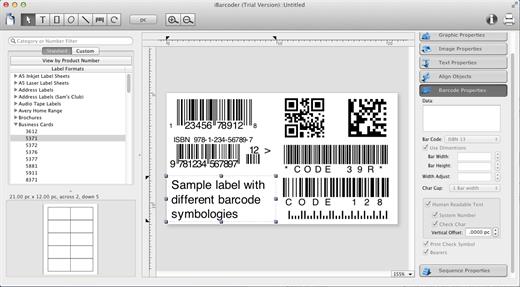
iBarcoder allows you to design and print your own barcoded labels, stickers, and tags. Create barcode graphics for retail packages, books, stickers, and more. Mac QR code and Datamatrix generator. Add text boxes, image boxes, rectangles, ovals and lines to your labels. Type in the necessary text, insert the desired images, to create the professional barcode labels for commercial use. Create sequential barcodes for catalogs and retail operations. Specify the sequence in which barcodes are printed or exported.

Smart, Intuitive Barcode Software


  • Create professional barcoded labels with a few mouse clicks
  • Live preview feature
  • Modify your Mac barcodes by changing types, sizes, and other attributes intrinsic to a certain barcode type. Advanced tools make customizing your barcode easy
  • Print barcodes directly to your printer using standard Avery formats provided
  • Create and save your own custom label formats
  • Export barcodes as a high-resolution image files, or vector graphics:

    • PDF (vector)
    • EPS (vector)
    • BMP
    • TIFF
    • JPEG
    • PNG
    • PNTG
    • Photoshop
    • …and more…!
  • Make the desired font and color settings
  • Copy, then paste finished graphics right to Adobe Illustrator, InDesign, Photoshop, or other software from Mac clipboard
Supports the following barcode types:

  • Postnet
  • Japanpost customer barcode
  • FIM Codes
  • Horizontal bars
  • UPC A
  • UPCE
  • EAN 13
  • EAN 8
  • ISBN
  • ISSN
  • Code 128
  • Codabar
  • ITF14
  • Code 39
  • Code 11
  • Code 93
  • MSI
  • Interleaved 2 of 5
  • Datamatrix
  • Intelligent Mail Barcode
  • Pharmacode
  • QR Code
What’s New

Version 3.17.7:


  • Release notes were unavailable when this listing was updated.
Compatibility

macOS 10.10 or later


Release Name: iBarcoder 3.17.7
Size: 16.6 MB
Links: HOMEPAGE – NFO – Torrent Search

Download: RAPiDGATOR
8 Comments
Mar 18

Battery Indicator 2.20.0

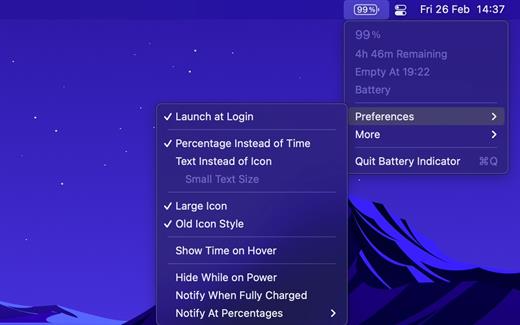
Shows the remaining battery time and percentage in the menu bar.

The app has a setting to hide the menu bar icon when the power plug is connected, which can be useful if you only care about the battery time/percentage when on battery.

You can hide the system battery indicator by dragging its icon out of the menu bar while pressing the Command key. You can also reorder menu bar icons by dragging them around while pressing the Command key. That means you can place this app exactly where the system battery indicator used to live.

There’s also a preference to notify when the battery is fully charged or at certain percentages.

It also comes with support for Shortcuts (on macOS 12).

Requires a MacBook, MacBook Pro, or MacBook Air.

What’s New

Version 2.20.0:


  • Bug fixes
Compatibility

macOS 11.5 or later
Apple Silicon or Intel Core processor


Release Name: Battery Indicator 2.20.0
Size: 8.6 MB
Links: HOMEPAGE – NFO – Torrent Search

Download: RAPiDGATOR
8 Comments
Mar 18

Camtasia 2025.2.6

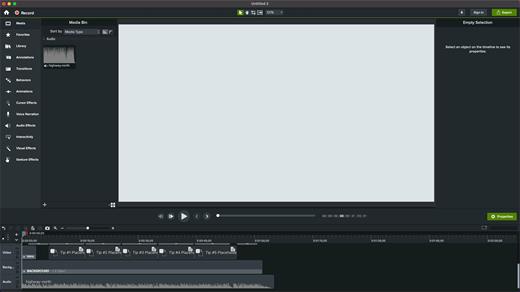
Camtasia for remarkable screencasts made easy. Create eye-catching training, presentation, and demo videos…the easy way. Camtasia screen-recording software is streamlined, intuitive, and makes you look like a pro.

Easily record onscreen activity, Keynote slides, camera video, microphone, or system audio – all with sparkling clarity. Record in front of a live audience or at your desk. Edit to perfection. Turn it into a stunning, HD-quality video at the perfect size to share on popular video sites, Apple devices, your website, blog, or anywhere you like. Make them wonder how you did it.

What’s New

Version 2025.2.6:


  • Release notes were unavailable when this listing was updated.
Compatibility

macOS 13.0 or later
Apple Silicon or Intel Core processor


Release Name: Camtasia 2025.2.6
Size: 443.8 MB
Links: HOMEPAGE – NFO – Torrent Search

Download: RAPiDGATOR
10 Comments