Please REGISTER or RENEW your account on RAPiDGATOR.net and support us by doing through all RAPiDGATOR working download links on main posts...
Mar 18

Paste Queue 1.6.5

Paste Queue is a great time-saver for copying and pasting multiple items between locations. Just copy all needed items first. Then paste them one by one or all at once — no need to switch back and forth between your source and destination.
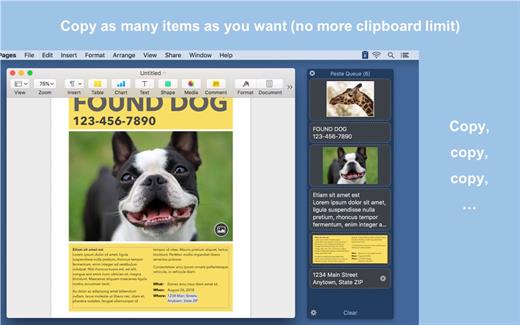
For example, you can copy a name, phone number, and address, one by one with a keyboard shortcut, and then paste them all at once (or one by one) in the same order into a form, with another shortcut. It’s like an extended clipboard, where you can copy and paste as many items as you wish each time, in sequential (or reverse) order!

Paste Queue also lets you paste items in a custom order, paste rich text as plain text, rearrange copied items, delete them, etc. If you copy and paste often, it is a right app for you. It’ll make your copy and paste routines simple, fun, and fast!

KEY FEATURES:


  • Supports text, HTML, code, images, files, hyperlinks, PDFs, and app-proprietary data
  • Works across different apps and windows
  • Can hold unlimited number of items before pasting them
  • Customizable keyboard shortcut for copying items into the queue
  • Can use regular copy commands to copy items into the queue (when the app window is open)
  • Option to not record duplicated items into the queue
  • Customizable keyboard shortcuts for pasting items one by one, in first-in-first-out (sequential) or last-in-first-out order
  • Can paste items in any order by clicking them
  • Can drag and drop items to destinations
  • Can reorder items before pasting them
  • Customizable keyboard shortcut for pasting all items at once
  • Can insert text that separates multiple items pasted together
  • Can paste multiple items into consecutive fields/cells in a form/spreadsheet in one shot
  • Can paste rich text as plain text
  • Optional copy and paste sound effects
  • Quick access to the queue via the app’s menu-bar icon
  • Can open the app window with a keyboard shortcut
  • Can delete all copied items or selected ones
What’s New

Version 1.6.5:


  • Fixed an issue where the app could fail to launch
Compatibility

macOS 10.10 or later.


Release Name: Paste Queue 1.6.5
Size: 6.8 MB
Links: HOMEPAGE – NFO – Torrent Search

Download: RAPiDGATOR

8 Comments
Mar 18

TG Pro (Temperature Gauge Pro) 2.101

TG Pro (Temperature Gauge Pro) is a must-have utility for every Mac user with five awesome features:


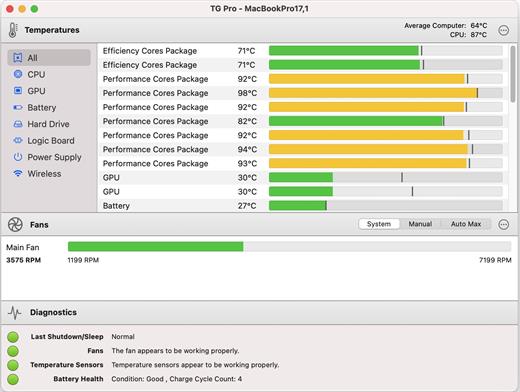
  • Check up on your Mac by viewing the current and maximum recorded temperatures for every sensor. Choose between Celsius or Fahrenheit.
  • Tune the fan speeds so that your Mac can run cooler with the manual fan control. Or have the fans spin at maximum speed with Auto Boost when a specific temperature is hit.
  • Use the status icon to quickly check all temperatures, fans and even control the speeds directly from the menu.
  • Discover faulty fans and temperature sensors with the built-in diagnostics.
  • Remotely monitor servers by having emails sent instead of local notifications.

Temperature Gauge Pro will also show a notification through the Notification Center or Growl when a temperature is hit or Auto Boost is enabled. Also, log all information to a CSV for graphing in an external app.

Supports all Macs, including the new Mac Pro 2013 model as well as all MacBook Pros (including Retina), iMacs, TG Pro natively supports both Intel and Apple silicon Macs, from 2008 all the way up to the latest models. This includes MacBook Pro (13, 14, 15 and 16 inch), iMac (21.5, 24 and 27 inch), iMac Pro, Mac Pro, MacBook, MacBook Air, and Mac mini.

What’s New

Version 2.101:


  • Release notes were unavailable when this listing was updated.
Compatibility

macOS 11.0.0 or later
Apple Silicon or Intel Core processor


Release Name: TG Pro (Temperature Gauge Pro) 2.101
Size: 15 MB
Links: HOMEPAGE – NFO – Torrent Search

Download: RAPiDGATOR
9 Comments
Mar 18

Image Stack 1.0.1

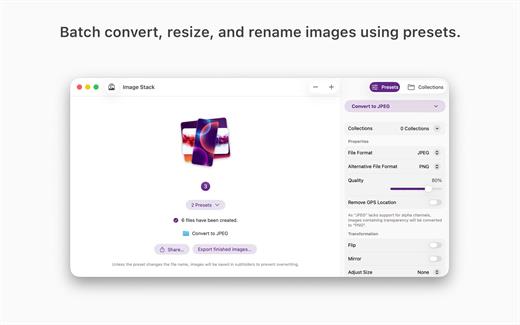
Batch convert, resize, rename. Image Stack converts images using presets to change formats, resize, rename, and more. Whether you’re processing a single image or a stack of thousands, Image Stack keeps your workflow fast, consistent, and effortless.

Designed for clarity and speed, Image Stack focuses on one simple idea: get images in, apply your presets, and get ready-to-use results out—just a few clicks, no unnecessary steps.

What’s New

Version 1.0.1:


  • Release notes were unavailable when this listing was updated.
Compatibility

macOS 15.0 or later


Release Name: Image Stack 1.0.1
Size: 14 MB
Links: HOMEPAGE – NFO – Torrent Search

Download: RAPiDGATOR
7 Comments
Mar 18

Microsoft Office 2024 v16.107

Note: If it doesn’t work, uninstall the old version of Office completely and reinstall it. For uninstallation method, please use Google search.

What’s New

Version 16.107:


  • Release notes were unavailable when this listing was updated.
Compatibility

macOS 12.0 or later


Release Name: Microsoft Office 2024 v16.107
Size: 3 GB
Links: HOMEPAGE – NFO – Torrent Search

Download: RAPiDGATOR
7 Comments
Mar 18

OmniOutliner Pro 6.0.4

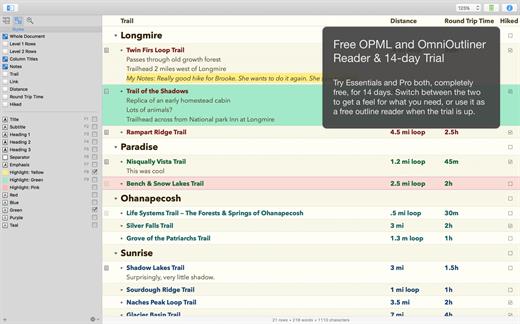
OmniOutliner Pro is a flexible program for creating, collecting, and organizing information. Give your creativity a kick start by using an application that’s actually designed to help you think. It’s like having an extra brain – one that doesn’t keep losing the car keys.

You can use OmniOutliner’s document structure to create hierarchies of main headings and subpoints that can be expanded and collapsed, which are immensely useful when it comes to brainstorming new ideas, drilling out specifics, and lining up steps needed to get everything done. But you aren’t limited to outlines – you’ve got multiple columns, smart checkboxes, customizable popup lists, and an über-innovative styles system at your disposal.

OmniOutliner Professional includes in-depth outlining features like folded editing, clipping service support, audio recording, a new sections drawer, and saved templates. With OmniOutliner Professional, you can actively hide and display the information in your outlines – or quickly jump from one place to another – so you can save time and be more productive by focusing on exactly what you want to see. The new Names Styles feature in OmniOutliner Professional gives you even more options for fast and powerful editing. Download the Pro version today and try it for yourself!

What’s New

Version 6.0.4:


  • Release notes were unavailable when this listing was updated.
Compatibility

macOS 15.0 or later.


Release Name: OmniOutliner Pro 6.0.4
Size: 38.7 MB
Links: HOMEPAGE – NFO – Torrent Search

Download: RAPiDGATOR

9 Comments
Mar 18

Amadeus Pro 2.8.14 (2680)

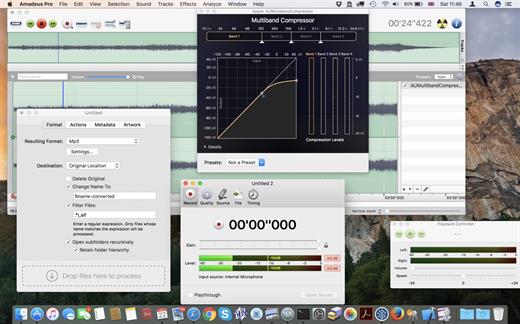
Amadeus Pro lets you use your Mac for any audio-related task, such as live audio recording, digitizing tapes and records, converting between a variety of sound formats, etc. Thanks to its outstanding direct-to-disk abilities and waveform caching, edits on arbitrarily large sounds (even beyond the usual 2GB limit) are performed at lightning speed. The handling of large sounds is furthermore facilitated by the extensive support of markers. Its outstanding sound repairing and denoising abilities make Amadeus Pro particularly suitable for transferring vinyl records on CD.

Features


  • Simple and elegant OS X-like user interface
  • Multitrack editing an recording.
  • Batch processing and conversion.
  • Sound denoising and repairing.
  • Supports a variety of sound formats, including AIFF, Multichannel Wave, MP3, MP4, Ogg Vorbis, FLAC, SoundDesigner II, QuickTime, Apple CAF, etc.
  • Support for VST and Audio Unit plug-ins.
  • A “favourite actions” palette allows to have your most commonly used effects only a mouse click away.
  • A wide range of powerful audio analysis tools.
  • Audio CDs with CD-TEXT data can be burned directly from within Amadeus Pro.
What’s New

Version 2.8.14:


  • Bug fixes
Compatibility

macOS 10.9 or later


Release Name: Amadeus Pro 2.8.14 (2680)
Size: 18.3 MB
Links: HOMEPAGE – NFO – Torrent Search

Download: RAPiDGATOR
9 Comments
Mar 18

Keka 1.6.1

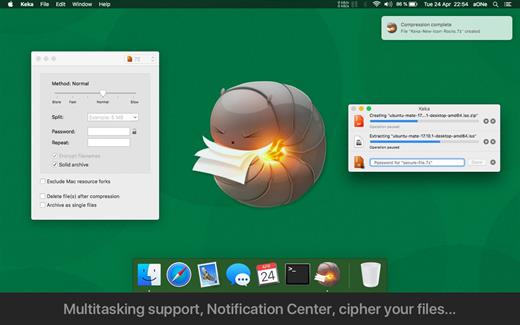
Keka is a file archiver for OS X. It is available for free, but donations are requested to further the project. Similar to making a donation, you can also purchase Keka on the Mac App Store for $1.99 USD.

Supported compression formats:


  • 7z
  • Zip
  • Tar
  • Gzip
  • Bzip2
Supported extraction formats:

  • RAR
  • 7z
  • Lzma
  • Zip
  • Tar
  • Gzip
  • Bzip2
  • ISO
  • EXE
  • CAB,
  • PAX
  • ACE
What’s New

Version 1.6.1:


  • New option to silently ignore extra trailing data (Thanks to @systemcrash) #1521
  • New option to make Advanced and Preferences windows resizable (Thanks to @Undefined-User) #1539
  • Enhanced positioning of the Advanced window, specially when using more than one
  • Fixed extraction auto-renaming starting with number 3 (Thanks to @OnesuchDev) #1537
  • Easily enable/disable the Finder Extension on macOS 15.2 or newer #1464
  • Fixed exclusion of some Mac resource forks (Thanks to @jajajaneeneenee) #488 #1236 #1548
  • Slightly reduced the size of Keka
  • LBZIP2 no more included (PBZIP2 was already used by default)
  • Japanese translation updated (Thanks to @tedSw) #1541
  • Simplified Chinese translation updated (Thanks to @maxsky) #1542
  • Traditional Chinese translation updated (Thanks to @pan93412) #1543
  • Italian translation updated (Thanks to @VinBoiSoft from https://vinboisoft.altervista.org) #1546
  • French translation updated (Thanks to @Marc66) #1547
  • Czech translation updated (Thanks to @ferben) #1551
Compatibility

macOS 10.10 or later.
Apple Silicon or Intel Core processor


Release Name: Keka 1.6.1
Size: 35.5 MB
Links: HOMEPAGE – NFO – Torrent Search

Download: RAPiDGATOR

9 Comments
Mar 18

Pianoteq Pro 9.1.2

Description: Pianoteq 9: vivid, expressive, customizable. Pianoteq is an award-winning virtual piano and instrument suite. Using physical modelling, it captures the wonderful tone of the instruments, while offering limitless customization.

What's new in Pianoteq 9?

Enhanced soundboard model
An improved model of the soundboard vibration enhances stereo and spatial perception.

New Triple Harp
An Italian Triple Harp from the baroque era has joined the Harp pack. Its characterful sound is perfect for accompaniment as well as solo pieces.

Expanded sound palette
New darker, cinematic “Sombre” presets for all grand pianos. Felt presets for historical pianos. Refreshed Binaural presets for most instruments.

New interface features
Mix up to 8 microphones to stereo or multichannel, and move them around the instrument more easily.

Release Name: Pianoteq Pro 9.1.2
Size: 133.6 MB
Links: HOMEPAGE – NFO – Torrent Search

Download: RAPiDGATOR
7 Comments
Mar 18

MobiKin Assistant for Android 5.1.16

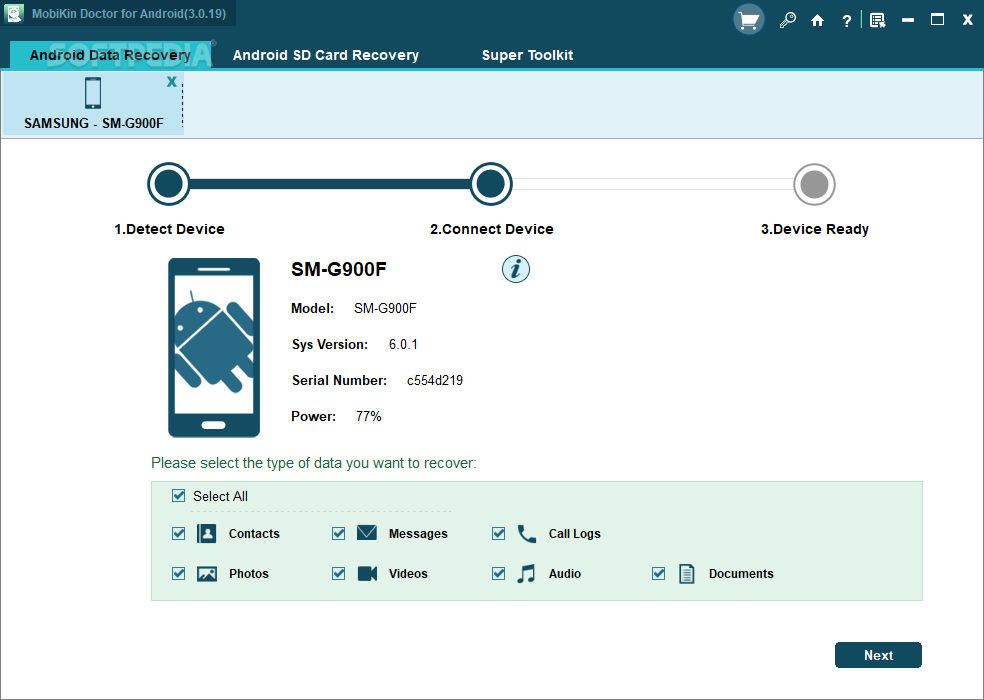
Description: One user friendly tool that simplifies Android device management, enabling efficient data transfer, backup, and restore, making it an essential tool for seamless and secure Android device operations.

Effortlessly Manage Various Media Files
With a burgeoning media library on your phone, MobiKin Assistant for Android stands out as the ideal iTunes substitute, offering flexible management options for your media collection.
Easily export songs and videos from your Android device to computer.
Seamlessly import file or folder of videos or music from computer.
Streamline your Android device by de-duplicating or deleting songs and videos to create more space.

Efficiently Arrange Photos or Photo Albums on Your Computer
Photos hold wonderful memories of our past lives, but an excess of photos can slow down your smartphone. Proper photo management becomes essential.
Transfer camera roll and photo library from Android devices to your computer.
Import pictures from your computer to Android devices.
Easily add, delete, or rearrange Android device albums on your computer, allowing you to move pictures freely between albums.

Securely Manage Android Contacts and SMS
Sending messages and making phone calls are fundamental functions of a mobile phone. Therefore, it's crucial to find a simple way to create, edit, delete, backup, and restore our personal information, including contacts, messages, and call history.
Back up contacts, messages, and call history in readable formats like CSV, HTML, XML, etc., and restore them to any phone whenever needed.
Import vCard and Outlook files to your Android phone.
Synchronize Android contacts with Outlook.
Create/edit contacts, delete unwanted personal information on your computer.
Receive and send SMS on your computer.

Expertly Handle Apps and All Files
MobiKin Assistant for Android effortlessly manages nearly all types of files on your phone. It allows you to swiftly batch install, uninstall, and back up multiple apps. Easily navigate through files by category and quickly locate desired items through keyword searches. Experience the most comprehensive and user-friendly content management ever.

Back Up & Restore Android Data with 1 Click
Tired of accidentally losing files from your Android phone? Put an end to this predicament with MobiKin Assistant for Android. This tool allows you to effortlessly back up all data from your Android device to your computer with just one click, and you can restore the backup files whenever needed.
Back up various data, including contacts, call history, SMS, photos, videos, music, apps, books, etc., from Android to computer. Restore them to Android effortlessly with a single click.
Media files are backed up with 100% quality preservation.
Conveniently save your Android backup files wherever you prefer on your computer or external storage.

Release Name: MobiKin Assistant for Android 5.1.16
Size: 27.1 MB
Links: HOMEPAGE – NFO – Torrent Search

Download: RAPiDGATOR

10 Comments