Please REGISTER or RENEW your account on RAPiDGATOR.net and support us by doing through all RAPiDGATOR working download links on main posts...
Mar 17

proDAD ReSpeedr 2.0.211.1
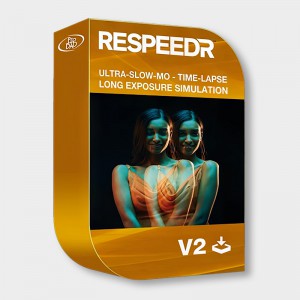
Description: ReSpeedr V2: Perfect Super Slow Motion, Time-Lapse, and Afterglow Effects! Explore a captivating world with ReSpeedr, where your videos transform into breathtaking spectacles of time. Infuse your footage with variable speed changes between super slow motion and time-lapse, along with afterglow effects, adding an extra mystical touch.
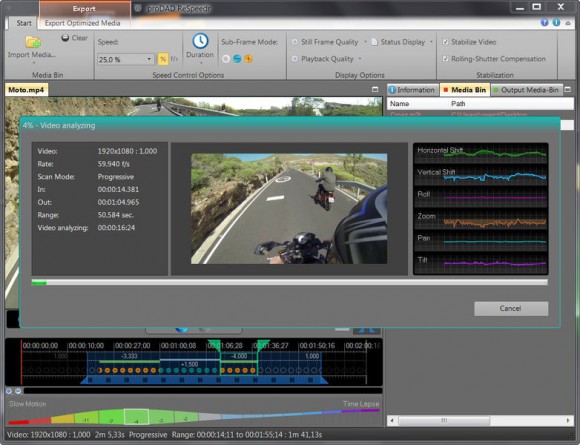
These creative options open new dimensions for the mood and atmosphere of your scenes. Furthermore, ReSpeedr enables the perfecting of 3D video material through captivating slow-motion or time-lapse sequences. With NVIDIA technology support, your videos are processed super-fast, giving you more time for creative expression. Rediscover the boundaries of videography with ReSpeedr and bring your visions to impressive reality, whether in action scenes, nature captures, or technical processes.

Features
- Super slow-motion with thousands of images per second
- Time-lapse for quick bridging of slow movements
- Keyframes for combining super slow-motion and time-lapse, including dynamic transition phases
- After-exposure effects to combine with super slow-motion and time-lapse
- New user interface for even more convenience
- Quick video stabilization with Mercalli V6 technology
- 3D video support
- Export now also in YUV 422 and 444, in 8, 10, and 12 Bit
- Export profiles can be created for individual requirements
- Spherical videos with 180° and 360°, incl. binocular formats
- Editing of portrait formats
- Accelerated computation compared to V1
- Thanks to NVIDIA technology, significantly accelerated export

System Requirements
- Windows Vista, 7, 8, 8.1, 10, 11 (64-bit)
- 2GB main memory, recommended: i7 CPU, 6GB main memory.

Release Name: proDAD ReSpeedr 2.0.211.1
Size: 243.7 MB
Links: HOMEPAGE – NFO – Torrent Search

Download: RAPiDGATOR

8 Comments
Mar 17

proDAD Hide 2.0.219.1

Description: How often in the past have you been upset about ruined recordings because a person has been walking through your picture or other disturbing objects have gotten in the view. With Hide you render the disturbing object invisible which helps you saving unrepeatable moments and precious memories.

Hide is an ideal tool equally suited for professional and holiday shooters, for YouTubers as well as sophisticated cinematographers. Hide is a true problem remover whenever something gets into your frame that might either distract the viewer or simply does not belong there. Most of the time those glitches become evident during editing - when there is no chance anymore for a second take.

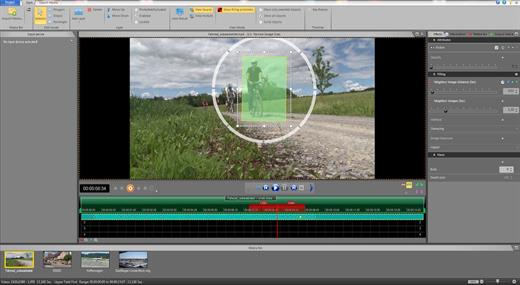
Hide can truly do magic. First you mark the unwanted object by applying the intelligent automatic tracking mode. After an analyzing process Hide will substitute the object by its original background – all done automatically within the shortest time without any manual effort. For this process Hide will need some seconds of footage before and after the object to be removed has gotten out of view.

Features
Compared to conventional error-prone clone stamping or laborious and time-consuming replacement methods in editing software, Hide offers a significantly better result in a fraction of the time, thanks to its innovative technology. If desired, the workflow can be further accelerated by connecting USB pedals. While using the pedals, you can dynamically control the tracking direction and speed, while operating the mouse and keyboard for optimal tracking results.

The high-quality results achieved with Hide will impress both you and your viewers.
- Clear timeline for a quick workflow
- Ability to trim clips if needed
- Convenient object marking
- Manual & automatic object tracking
- Comprehensive keyframe support
- Support for additional input devices (such as USB pedals)
- Preview window for effect control before file export
- Option for direct YouTube upload upon export
- Compatible with any framerate (24p/25p/30p/50p/60p and more)
- Supports resolutions up to and including 8K

System Requirements
- Windows Vista, 7, 8, 8.1, 10, 11 (64-bit)
- 2GB main memory, recommended: i7 CPU, 6GB main memory.

Release Name: proDAD Hide 2.0.219.1
Size: 196.3 MB
Links: HOMEPAGE – NFO – Torrent Search

Download: RAPiDGATOR
8 Comments
Mar 17

proDAD Disguise 2.0.219.1

Description: Whether you produce films professionally or shoot videos as an enthusiast: It is such a joy to accompany the most beautiful moments from your vacation, special people at work or even the growing up of your children with your own camera. But as soon as you show a video via the Internet - whether private or business - your videos become public. Videos on the Internet can break up friendships, and under certain circumstances you may even be threatened with lawsuits.

With proDAD Disguise you protect yourself and the people in your videos. proDAD Disguise is the ideal solution for pixelating faces and objects quickly and conveniently. In a video editing program, this is often a tedious process, and the result is rarely good. With Disguise, you can do the pixelation effortlessly in no time with just a few mouse clicks.

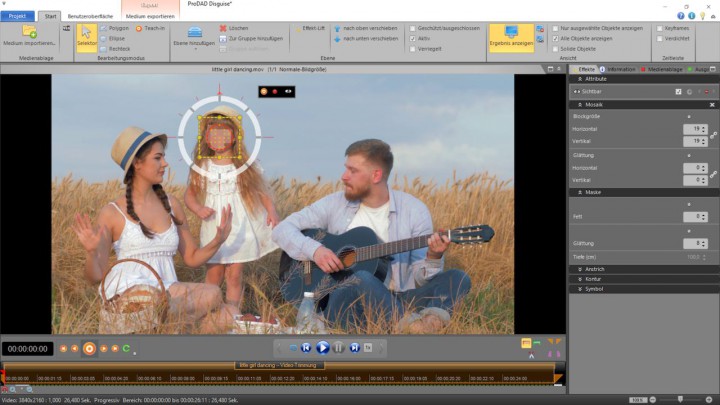
Load your shot into Disguise, choose a suitable mask shape and align it to the face. You can choose the size of the mosaic and additionally blur the mosaic and the mask outlines if you wish. Start tracking and the mask will automatically follow the face. Then save the file. You will get an excellent result that fully preserves the character of the original shot.

Sometimes it is only when you look at the image after shooting that you realize that confidential details have gotten into the frame that must not be made public. With Disguise you can hide such details easily and quickly. You can also easily remove unwanted advertisements and trademarks, thus preventing the trademark owner from possibly acting against the publication of your video.

By the way, you can also use Disguise to visually highlight certain areas of the image, thus targeting the attention of your viewers. With Disguise, you protect the people in your videos. And you protect yourself, comfortably and quickly.

Features
- Suitable for faces and objects
- Different mask shapes & polygon
- Multiple masks in one scene at the same time
- Customizable mosaic
- Individually designable color areas
- Also suitable for highlighting image areas
- Fast and reliable tracker
- Supports keyframes
- Supports exclusion layers

What's new in V2
- Completely new user interface
- Optimized tracking
- Extended export options
- Undo/Redo, Work history
- Improved keyframe handling
- Multi-monitor editing

System Requirements
- Windows Vista, 7, 8, 8.1, 10, 11 (64-bit)
- 2GB main memory, recommended: i7 CPU, 6GB main memory.

Release Name: proDAD Disguise 2.0.219.1
Size: 212 MB
Links: HOMEPAGE – NFO – Torrent Search

Download: RAPiDGATOR

10 Comments
Mar 17

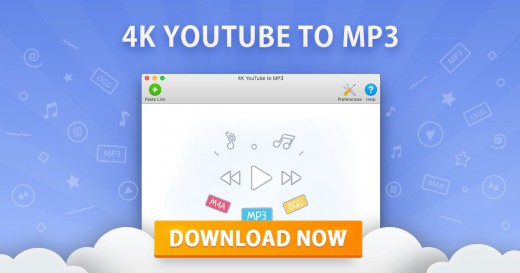
4K YouTube to MP3 26.0.8

Description: Explore 4K YouTube to MP3. Save audio quickly and easily. Just paste the link into the application or search what you want to download in the built-in browser. Enjoy listening to music, audiobooks, podcasts and other audio content offline on all desktop and mobile devices.

Download YouTube Playlists and Channels
Save audio faster by grabbing multiple files in one go. Convert full YouTube playlists and even channels to MP3, M4A and OGG. Paste several links to single videos at once.

Save Audio from All Popular Websites
Download tracks from YouTube, SoundCloud, Bilibili, Niconico, Facebook, Vimeo, Twitch, and many other services.

YouTube Premium Download
Get access to higher-quality YouTube audio. Download tracks, playlists and channels in up to 256kbps. The feature is exclusively available to YouTube Premium members.

Download Speed Control
Increase the download performance with an in-app intensity regulator. Adjust the speed to the possibilities of your Internet connection. Safely download content even when your connection is slow.

Audiobooks Download
Download podcasts and audiobooks from YouTube. Play them on the go through your car stereo or on your iPod, iPad, iPhone, Samsung and other mobile devices.

Built-In Music Player
Convert video links to audio tracks and listen to them right then and there. Use the in-app player to enjoy music, no other applications are required.

Easy Proxy Setup
Change your IP address through the in-app proxy to access and download audio from YouTube and other sites restricted by your Internet service provider or workplace IT administrator.

Smart File Organization
Save playlists and channels into automatically created subfolders. Obtain audio tags based on the track name. Get .m3u files for downloaded playlists to quickly play them.

Private YouTube Playlists Download
Get native YouTube playlists saved to your computer. Download your ‘Watch Later’, ‘Liked videos’ and ‘My Mix’ playlists for permanent offline access.

Instant Search via Built-In Browser
Find the audio you want to download without leaving the application. Use the integrated browser to search for content on different sites and download it on the spot.

Mobile Audio Download
Download audio tracks, playlists and channels to your phone with the Android downloader app. Save content in a variety of formats from multiple sites, just like with the desktop version.

File Export and Import
Secure your downloads database. Export it as a JSON file before major software and hardware reinstallations. Restore all your audio downloads by importing the file.

Private Audio Download
Save private songs, audio tracks and playlists you’ve got access to. Download private audio from Facebook, Soundcloud, Bilibili, and many other sites.

Release Name: 4K YouTube to MP3 26.0.8
Size: 235.6 MB
Links: HOMEPAGE – NFO – Torrent Search

Download: RAPiDGATOR
6 Comments
Mar 17

Lyric Video Creator Professional 6.7.0

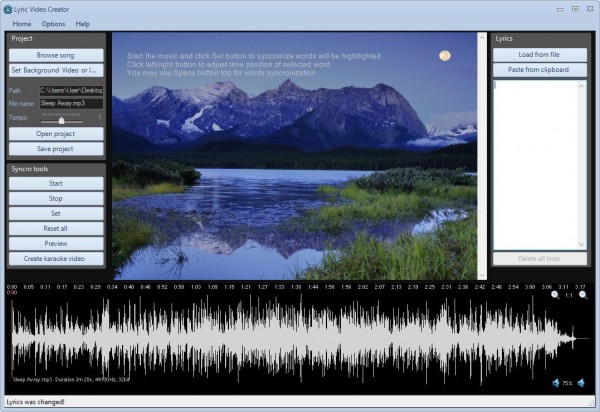
Description: Lyric Video Creator is a program designed to create video presentations with background music and scrolling text/lyrics. It is also suitable for creating karaoke videos that are very popular online (eg on Youtube) or used by professionals for entertainment at parties and events of all kinds.

Clean and easy-to-use GUI
The interface resembles a classic multimedia player, but with the creation, option integrated. At first sight, you can see the preview screen where all the videos or images are loaded. Speaking of karaoke, on the far right side is the "Lyric" grid, from there you can load the text files and overlap them with the videos. The left side lest you choose your background effect and allows you to test and observe the audio and video capabilities of your project. The audio is supported by the waveform located at the bottom of the screen.

Create music videos with timed lyrics
After you have determined the video and the text, you should proceed to align and edit the timing values. The settings are stacked in a single window, which is a great time saver as there are no other tabs with extra settings to look for. The first category of settings is "Encoding," and gives you the possibility to set the video quality, FPS, and encoders. After that, you can edit the font, by picking a color for every state of the given text. Then you have "General," which lets you set the delay and choose the text's encoding format. Pick the lyric rows and alignments, and you are ready to go.

Quick export of an edited file.
After all the settings are settled, give it a test run and then use the "Save Project" button to create the file. You can either export it as AVI or as MP4.

Lyrics on video background
- The best software to create video presentations or video karaoke songs
- Add Text to custom backgrounds (images or videos) with background music!

Customized Background
Add a “video” background or a static image.

Background Music
Import your favorite songs or convert your MP3 to Video Karaoke.

Sliding Text
Sliding Text on one or more lines, and aligned as you want.

Syncronization
Synconize text with the music and create your “Lyric Video”.

System Requirements
Windows 11/10 (32&64 bit), Windows 8/7/Vista & XP

Supported Languages
English, Italian, Portuguese, French, Spanish

Release Name: Lyric Video Creator Professional 6.7.0
Size: 83.5 MB
Links: HOMEPAGE – NFO – Torrent Search

Download: RAPiDGATOR

8 Comments
Mar 17

ExtraMAME 26.3

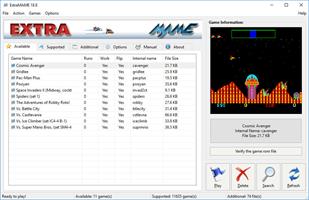
Description: Introducing ExtraMAME, a compact and user-friendly MS Windows GUI wrapper for MAME, the Multiple Arcade Machine Emulator authored by Nicola Salmoria and the MAME team. ExtraMAME allows you to play thousands of classic arcade games on your PC without the need for complex configurations. It’s compatible with all MAME games and supports well-known gaming platforms such as 3DO, Atari, MSX, Namco, Naomi, Neo-Geo, Nintendo, Sega, Taito, and more.

Q. What is ExtraMAME?
A. ExtraMAME is a compact MS Windows compatible GUI wrapper for M.A.M.E., the Multiple Arcade Machine Emulator. It allows you to play thousands of classic arcade games on your computer.

Q. What makes ExtraMAME better than other GUI wrappers for M.A.M.E.?
A. ExtraMAME is compact, easy to use, and doesn’t require you to deal with complex configurations. It’s compatible with all M.A.M.E games.

Release Name: ExtraMAME 26.3
Size: 167.8 MB
Links: HOMEPAGE – NFO – Torrent Search

Download: RAPiDGATOR
7 Comments
Mar 17

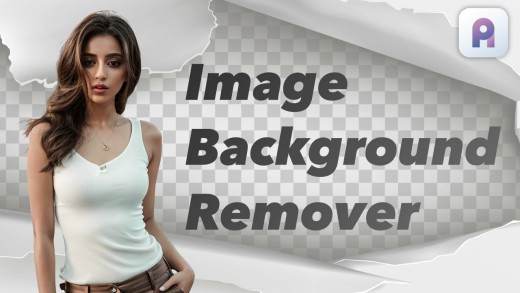
AI Image Background Remover Pro 1.1.1

Description: Effortlessly remove image backgrounds with pixel-perfect precision using AI Image Background Remover Pro. Designed for e-commerce sellers, graphic designers, photographers, and social media managers, this powerful desktop tool gives you complete control over your creative workflow.

Unlike online tools, AI Image Background Remover Pro runs 100% offline on your computer, ensuring your images and projects remain completely private and secure. There are no uploads, no data collection, and no subscriptions.

Advanced AI Engine
Leverage the power of cutting-edge AI to intelligently detect foreground subjects and erase backgrounds cleanly, handling complex details like hair, fur, and semi-transparent objects with ease.

Unmatched Model Variety
Choose from 17 specialized AI models built directly into the app. Whether you're working on portraits, products, animals, illustrations, or high-resolution photography, there's a model fine-tuned for your specific needs.

Powerful Bulk Processing
Save hours of manual work by processing entire folders of images at once. Simply select your input and output directories, choose a model, and let the app do the rest.

Bring Your Own Models
Power users can import their own custom .onnx models via the intuitive Model Manager, giving you unlimited flexibility.

Simple and Intuitive Interface
A clean, straightforward user interface makes the process easy for both beginners and professionals. No steep learning curve required.

Take control of your image editing, protect your privacy, and achieve professional-quality results every time with AI Image Background Remover Pro.

100% Offline & Private
Your images are never uploaded. All processing happens locally on your machine.

17 Specialized AI Models Included
Choose the perfect model for portraits, products, anime, high-resolution images, and more.

Powerful Bulk Folder Processing
Automate your workflow by removing backgrounds from hundreds of images in a single batch.

Import Your Own Custom Models
Advanced users can add and manage their own compatible .onnx AI models.

Precision Edge & Detail Retention
The AI is trained to handle fine details like hair, fur, and complex edges for a clean, professional cutout.

Simple & Intuitive Interface
Get started in seconds with a user-friendly design for both single image and bulk tasks.

No Subscriptions, No Watermarks
A one-time purchase for a powerful, professional-grade tool with unrestricted use.

System Requirements
- OS: Windows 10 version 17763.0 or higher
- Memory: 8 GB (Minimum), 16 GB (Recommended)

* Internet connection is required only for launching the program.

Microsoft Store - Full Version

Release Name: AI Image Background Remover Pro 1.1.1
Size: 2.3 GB
Links: HOMEPAGE – NFO – Torrent Search

Download: RAPiDGATOR

6 Comments
Mar 17

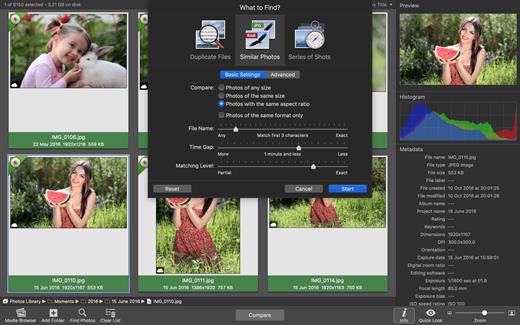
PhotoSweeper X 5.5.0

PhotoSweeper is a fast, precise & super efficient tool to eliminate similar or duplicate photos even in huge photo collections. It works with photos from iPhoto, Aperture and Adobe Lightroom libraries as well as photos from your hard drives and external storages.

PhotoSweeper will help you if:


  • You take a series of shots of the same scene trying to get the perfect one.
  • You edit photos with software like Photoshop, Pixelmator etc., and make backups just in case.
  • You have photos scattered on external hard drives and local disks, in iPhoto, Aperture or Lightroom libraries.
  • You have a mess in your photo collection or just want to free disk space by removing junk photos.
Features:

  • Easy search of photos – Just drag and drop folders from your Mac to allow PhotoSweeper to find all photos inside. Add more photos from your iPhoto, Aperture or Lightroom library via the Media Browser window.
  • Flexible comparison settings – Powerful multi-settings to easily find duplicates, similar photos, series of shots. The app finds duplicate photos, even those edited in external programs such Photoshop, regardless of image size or format.
  • High speed and quality – PhotoSweeper was developed as a tool for extremely fast comparison of a huge number of photos. Cutting-edge technologies and unique algorithms make searching duplicates incredibly fast and gives excellent comparison results.
  • Efficiency – You can regroup the results without re-comparing photos by changing matching level with a slider. Using caches makes the next comparison much faster.
  • Marking duplicates automatically – Mark photos you want to get rid of manually, or use the “Auto Mark” feature to mark duplicates automatically based on the list of rules you can adjust to your needs in the Preferences.
  • Comfortable viewing results – PhotoSweeper provides 3 modes for reviewing results: “One by One”, “Face-to-Face” – one or two large photos with an opportunity to mark a photo with just a click, “All in One” – all groups of duplicates in one list.
  • Great photo browsing – PhotoSweeper also serves as an up-to-date photo browser with a built-in search of photos by metadata, Quick Look preview, the “Info” panel with a detailed photo description, including histogram and image metadata (EXIF, IPTC etc.)
What’s New

Version 5.5.0:


  • Release notes were unavailable when this listing was updated.
Compatibility

macOS 10.12.2 or later.


Release Name: PhotoSweeper X 5.5.0
Size: 55.9 MB
Links: HOMEPAGE – NFO – Torrent Search

Download: RAPiDGATOR
7 Comments
Mar 17

Affinity 3.1.0

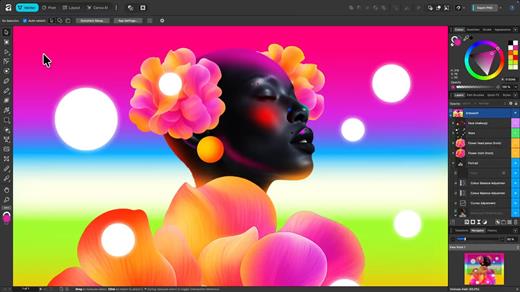
An app that adapts to you, not the other way around. Affinity comes with built-in Vector, Pixel, and Layout studios, but you’re not locked in. Rearrange panels and mix and match your favorite tools to build custom studios. You can save multiple setups, switch between them in a click, and even share with others or download theirs.

It’s customization that flexes to your workflow.

Powerful tools. Easy to learn.

Learn by doing with step-by-step lessons, templates, and real-world examples.

Enrich your designs with tailored content

Make your designs stand out with world-class photos, graphics, videos, audio, fonts, charts, and more. Explore our vast content libraries featuring top brands like Disney, Artlist, and pocstock.

Design with others

Canva makes collaboration easy. Tag teammates in comments and assign tasks on Docs, Presentations, Whiteboards, and more. Canva empowers businesses of all sizes to stay organized and reach your goals faster.

Design and print in one place

Turn your memories into photo albums, your designs into T-shirts, and your branding into business cards, flyers or invites. Get all your printing done right here with free delivery to your doorstep.

Plans that get down to business

Empower your whole team or business to design together with one of our workplace plans

AI-powered efficiency

Leverage AI to create on-brand copy, templates and video-editing.

Bring your brand in house

Set up Brand Kits and templates for your team to design with.

Beautiful approval flows

Easily control individual permissions, assign tasks and share your work.

What’s New

Version 3.1.0:


  • Release notes were unavailable when this listing was updated.
Compatibility

macOS 10.15 or later


Release Name: Affinity 3.1.0
Size: 950.7 MB
Links: HOMEPAGE – NFO – Torrent Search

Download: RAPiDGATOR
8 Comments
Mar 17

Tagr 5.14.0

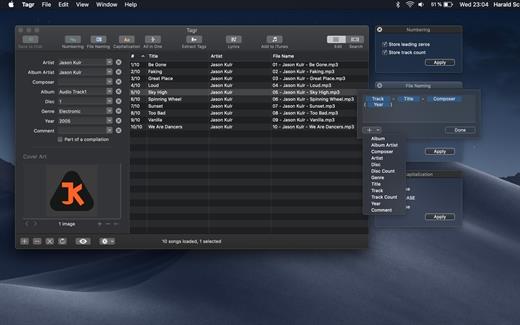
Tagr is an application that helps you organize your music collection.

With Tagr you can easily edit information such as a song’s artist, title, or album cover. Tagr also allows you to control the way your files are named, numbered, and capitalized. There is no more need for having other tools dictate that for you!

Features:


  • Edit meta data of individual MP3, M4A/M4B, FLAC, and AIFF files, or
  • Edit a list of files in bulk
  • Supported tags: track number/count, title, artist, album artist, composer, album, disc number/count, genre, year, comment, compilation, lyrics
  • MP3 ID3 versions: v1, v2.3, and v2.4
  • Embed cover art into your songs
  • Apply uppercase, lowercase, and title case capitalization schemes
  • Automatically generate track numbers
  • Choose from predefined file naming schemes or define your own
  • Extract tags from the file name or title using predefined or custom patterns
  • Search discogs.com for album information and copy it to your songs
  • Listen to songs through QuickLook
  • Customize Tagr to your needs
What’s New

Version 5.14.0:


  • Release notes were unavailable when this listing was updated.
Compatibility

macOS 10.10 or later


Release Name: Tagr 5.14.0
Size: 10.3 MB
Links: HOMEPAGE – NFO – Torrent Search

Download: RAPiDGATOR
6 Comments