Please REGISTER or RENEW your account on RAPiDGATOR.net and support us by doing through all RAPiDGATOR working download links on main posts...
Dec 9

TubeMate Downloader 6.0.11

Windows TubeMate is a smart application that lets you snag any clip you want from the main video hosting sites and convert them while downloading or after that. If you need a simple and efficient video downloading tool, you can give it a try.

Online video downloader
TubeMate can download videos from YouTube, Facebook, Instagram, Dailymotion, and thousands of other video sites.

HD video downloader
TubeMate can download UHD 8K, 5K, 4K, QHD 2K, HD 1080p and 720p videos from YouTube.

YouTube to MP3 converter
TubeMate allows you to download only audio stream from YouTube, and save it as MP3. You don't need to download the entire video file.

Playlist downloader
TubeMate enables you to download entire or part of a playlist with just a few clicks.

Download accelerator
TubeMate features a multi-thread download acceleration engine that increases your download speeds by up to 500% or even more.

Download multiple videos at a time
TubeMate supports simultaneous downloads. It allows you to download more than one video at the same time.

Pause and resume downloads
You can pause and resume your downloads at any time.

Support drag-and-drop
You may directly drag and drop video link from your browser to the drop box or app window to start a download. You don't even need to copy and paste video URL.

Preview video/audio while downloading
While downloading, you can click the 'Preview' button to view incomplete file and make sure the content is you want.

Video and audio converter
TubeMate can convert your disk video/audio files between MP4, FLV, AVI, WMV, MOV, MP3, AAC, and any other formats for any device.

Video optimizer
TubeMate automatically optimizes downloaded videos for popular mobile devices, so you can watch downloaded videos smoothly on your iPhone, iPad, Android phone, and other devices.

Video to MP3 converter
TubeMate allows you to extract audio stream from video and save it as MP3, WAV, AC3, or other audio format.

Ready-made presets
TubeMate provides ready-made presets for all video and audio formats. You can also customize your own video/audio formats.

iTunes compatible
Optionally, TubeMate can add downloaded video/music to your iTunes library automatically, so you can easily synchronize your videos and music to your iPhone, iPad, iPod.

Media player
TubeMate contains an easy-to-use media player for playing files that Windows Media Player cannot play.

Release Name: TubeMate Downloader 6.0.11
Size: 145.4 MB
Links: HOMEPAGE – NFO – Torrent Search

Download: RAPiDGATOR

8 Comments
Dec 9

Ableton Live Suite 12.3.1

Description: Live is fast, fluid and flexible software for music creation and performance. It comes with effects, instruments, sounds and all kinds of creative features—everything you need to make any kind of music.
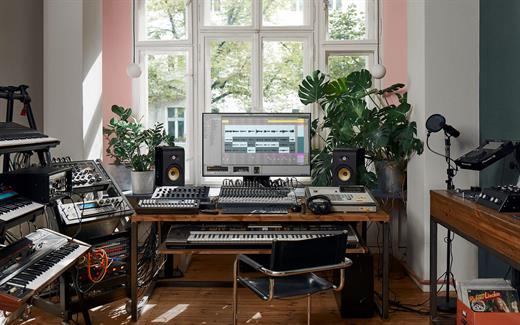
Create in a traditional linear arrangement, or improvise without the constraints of a timeline in Live’s Session View. Move freely between musical elements and play with ideas, without stopping the music and without breaking your flow.

New features and updates in Live 12
Play freely with ideas
MIDI Transformations
Create a variety of simple or complex variations to your MIDI clips: add ornaments and articulations, draw acceleration and deceleration curves, connect successive notes and chords, or simulate the strum of a guitar.

MIDI Generators
Conjure up melodies, chords and rhythms with new MIDI Generators. Give your chosen Generator custom constraints, watch it create playful and original patterns, and then turn the ideas it produces into your own.

Max for Live MIDI Tools
Max now facilitates even greater experimentation, letting you create new MIDI Transformations and Generators – either based on existing ones, or your own creations.

MIDI Editing Improvements
Arrange the order of a selection of notes by pitch, velocity or duration. Stretch, split, chop or join notes in new ways; shape the velocity of notes; transpose them into a scale; or add intervals chromatically or in key.

Keys and Scales
Set the selected clip’s scale in Live’s Control Bar to see its notes in any clip you create. Then edit the clip using scale highlighting as a guide, use the clip scale to transform and generate musical ideas, or sync the scale of MIDI devices and instruments to the clip being played. Any changes in Live will be reflected in Push, and vice versa.

Expanded probability
Assign a single probability rule to a group of notes so that the entire group of notes is played whenever the trigger is fired. Or select a chord and tell Live to randomly play one note from it whenever the probability trigger is fired.

Embrace and explore tunings
Follow your preferred tuning systems or try different ones more easily. Work outside the 12-tone equal temperament system, and access tunings with Live’s devices as well as any MPE-capable plugin.

Surprise yourself with the sounds you create
Meld
A bi-timbral, MPE-capable instrument designed for deep sound shaping that lets you create a wide array of textural and experimental tones with its two easy-to-use macro oscillators.

Granulator III
The latest iteration of Robert Henke’s granular instrument now has MPE capability, giving you expressive control over parameters like note bend, vibrato and glissando. Plus, you can now capture audio in real time and start manipulating it immediately.

Roar
Create everything from subtle and precise mastering-grade warmth to wild and unpredictable sound degradation with Live’s new coloring and saturation effect. Roar’s three saturation stages can be used in series, parallel, or even in mid/side and multiband configurations – and it comes equipped with a feedback generator and an extensive modulation matrix.

New Modulation Behavior
Modulation destinations are no longer taken over by the modulation source. This means you can still adjust the parameter being modulated, even after assigning an LFO or other modulation source to it, opening up faster workflows, more possibilities for performance and continuous real-time control of parameters.

New Packs
Lost and Found – A collection of sounds fashioned from unusual materials, percussive trinkets, unique foley recordings and expressive objects to infuse your productions with character and authenticity. Dig deep and create layers of decorative, expressive instruments, playful Drum Racks and rich sound effects.

Performance Pack – A set of innovative devices from Iftah that push the boundaries of performing with Live. Capture snapshots of your sets and deploy them later, control multiple parameters with layered macros and curves, extend performances with looping in Arrangement View and pre-arrange the structure of a performance before you have even recorded it.

Work more intuitively
Stacked Detail Views
View your devices and the Clip Editor, or automation and device parameters, at the same time – so you can work without the distraction of switching between views.

View styling
Live 12’s cleaner, more minimal look removes visual complexity and keeps the focus on your music.

Mixer in Arrangement
Live’s Mixer, previously available only in Session View, can now be used in Arrangement View. Toggle it on or off with Mixer View Control located in the bottom right corner or via the View menu, and configure it independently of the Arrangement Mixer.

Mixer improvements
Live’s Mixer also comes with visual improvements that make it more accurate for detailed mixing decisions, and easier to read and control.

Browser Tagging and Filtered Searches
Search for your sounds in the Browser without the constraints of Live's built-in categorization. That means when you search for bass sounds, you'll see all the bass sounds in your Ableton library, whether they're samples or instrument presets.

Live 12's sound content is also tagged using a new system that acts as a more flexible alternative or addition to Collections in the sidebar. Sounds now come with sensible labels to make them easier to find – but if you need more detail, or just want to use your own method of labeling, you can also add your own.

Aside from Live 12's built-in tags, you can create your own custom categories in the sidebar for easy access to all your favorite sounds and devices in the way that makes the most sense to your workflow.

Sound Similarity Search
Start with a sample and tell Live’s browser to find comparable sounds and instrument presets, with the help of a neural network.

Or swap all the samples in your Drum Rack for similar ones to quickly try out new percussive textures – like a drum machine with seemingly-infinite kits.

Browser History
Retrace your steps, and see and hear the sounds or categories you've previously searched for: Live's Browser now lets you backtrack through your search history as you would with a web browser.

Accessibility and navigation improvements
Control core workflows in Live 12 using assistive technologies like screen readers, and use new keyboard shortcuts to navigate to nearly every part of Live.

New Themes
Choose new themes and adjust them with cool, neutral or warm tones and even a high contrast mode.

Release Name: Ableton Live Suite 12.3.1
Size: 4 GB
Links: HOMEPAGE – NFO – Torrent Search

Download: RAPiDGATOR

2 Comments
Dec 9

JWIZARD Cleaner 1.10.4

Description: There’s no secret behind it – keeping your PC and OS free of clutter, temporary files and accumulated junk can go a long way in terms of maintaining it running smoothly and in a performant manner. This is where apps such as JWIZARD Cleaner can prove to be useful.

Delete unnecessary system junk
System junk on Windows accumulates due to various processes: installing and uninstalling programs, temporary system files, updates, etc.
JWiZARD Cleaner scans your computer and detects all types of system junk.
The software allows you to delete unused files easily, clear the system cache, optimize the registry, and perform other actions to improve Windows performance.

Clear your browsing data. speed up the loading of web pages.
An excessive amount of saved data, such as cache, browsing history, and cookies, can slow down your browser, cause errors, and lead to crashes. Regularly clearing your browser data is an effective way to optimize its performance and enhance security while browsing the internet.

Organize your computer
No time for manual cleaning your computer? JWiZARD Cleaner will help you easily and quickly clean up your computer and get things in order. Delete downloaded files, email attachments, trash bin contents, and free up disk space.

Release Name: JWIZARD Cleaner 1.10.4
Size: 18.7 MB
Links: HOMEPAGE – NFO – Torrent Search

Download: RAPiDGATOR

7 Comments
Dec 9

Adobe Substance 3D Painter 11.1.1

Description: Substance Painter is a brand new 3D Painting app with never before seen features and workflow improvements to make the creation of textures for 3D assets easier than ever. It is acknowledged as the most innovative and user-friendly 3D Painter out there.

Power to the artists
- Substance Painter gives you all the tools you need to texture your 3D assets.

What You See Is What You Get
- The PBR real-time viewport lets you work on asset look development.
- Create in Substance Painter and get real-time feedback in UE4 and Unity thanks to the live link.

Augmented Artistry
- Unleash your creativity with powerful tools and a non-destructive workflow.

Smart Materials
- Tear and wear, scratches and dust instantly appear where they're supposed to.

Smart Masks
- Apply the same mask preset on any type of object and have it adapt automatically.

Integrated 8K Bakers
- Baking is where it all starts. Bake high quality maps in an instant directly within Substance Painter.

Bring VFX to the Top
- Support for Linux, 8K export, color management, UDIM management and Scripting API make integrating Substance Painter into VFX workflows easier than ever.

Open to the world
- Get 1:1 engine exports and share directly to portfolio sites with dedicated formats.

System Requirements:
Minimum:
- OS: Windows 10 64-bit Version 1909
- RAM: 16 GB
- VRAM 4 GB

Release Name: Adobe Substance 3D Painter 11.1.1
Size: 2.5 GB
Links: HOMEPAGE – NFO – Torrent Search

Download: RAPiDGATOR

6 Comments
Dec 9

Ashampoo Burning Studio 27.0

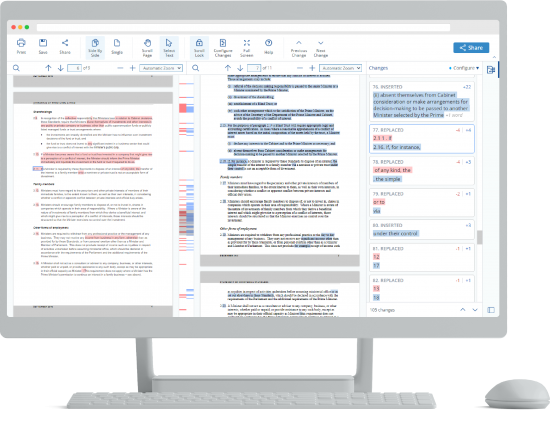
Description: The new Ashampoo Burning Studio 27 is the most comfortable way to burn your data securely and copy CD, DVD and Blu-ray discs without effort. Rip audio discs and back up your music or create your own music compilations with suitable cover art! Additional top-of-the-line multimedia features also let you create your own movies and slideshows, and even allow you to burn them to disc along with nifty animated menus.

Say goodbye to data loss, back up your files instantly, and write important data to any disc type with powerful compression and password protection. And the new convenience features for audiobooks, audioplays, and podcasts guarantee high-quality entertainment!

Benefits at a glance
Professional-grade ripping with sample rates up to 48 kHz (e.g., WAV)
New AAC audio format support for ripping
Optional disc ejection after ripping
Improved CD database for more accurate results across all modules
Intelligent audiobook detection, even for multi-part files
New interface design with light and dark skins
Enhanced stability and security for reliable results every time
Extensive audiobook module
Best-of feature for quick source switching
More project versatility with intermediate buffering
Enhanced cover search
Greatly improved car radio support
Burn, copy and backup data with unbeatable ease of use
Create, cut and burn high-quality movies
Your photo memories as gorgeous slideshows
Create and burn audio discs complete with covers
Modern H.265 decoder for stunning video quality
Smart backup plans for reliable data backups
Perfectly arranged tracks in the best format for your car radio

High-end quality music
The reworked ripping module now delivers even better results. With higher sample rates up to 48 kHz, you’ll create studio-grade audio files that meet professional standards. The new AAC format adds greater flexibility and compatibility with modern players and smartphones. And for even smoother workflows, the drive can now automatically eject the disc after each ripping process–perfect when digitizing multiple CDs in a row.

Smarter music and audiobook detection
The improved CD database ensures much more accurate title and album detection. This benefits every module that relies on CD information–from ripping to cover design. The audiobook module has also been enhanced: Multi-part audiobooks with incomplete or conflicting metadata are now automatically recognized and correctly grouped. That means no more manual sorting–just perfectly structured chapters right away.

New design, same clarity
Ashampoo Burning Studio 27 boasts a revamped interface that is modern, clean, and available in both light and dark themes. It can automatically adjust to your Windows settings for smooth integration. Behind the scenes, various optimizations enhance stability and security, ensuring full compatibility with the latest hardware, disc types, and Windows versions. The outcome: flawless burns, copies, and backups every time.

We’re committed to our users!
Traditional disc burning may have become less common, but for many loyal users, it remains an essential medium for storage and archiving. That's why we continue to invest in development and incorporate customer feedback with every new version. Our goal is to ensure that Burning Studio remains technically up to date, supporting all modern formats, standards, and devices. When you choose Ashampoo, you can always count on quality, maintenance, and long-term support.

Backup your music discs and store your songs directly on your PC!
Need to extract audio from your music CDs? The clever disc ripping feature in Ashampoo Burning Studio extracts audio from music disc in a matter of minutes! Artist and genre are automatically recognized, there's no need for manual input. Turn audio CDs into high-quality audio files with meaningful file names and select from a variety of different formats! Naturally, you can then turn your files into music discs, along with equalizer and volume adjustments for an even better sound experience, and add your own cover designs. Sounds good? It is!

More audiobook goodness
Audiobooks, podcasts, and audioplays continue to be popular, and we'll help you make the most of them. Many audioplays are split up into dozens of smaller files, e.g. for easier marketing on Spotify. But who wants to skip through hundreds of files every time the player forgets the last playback position? With Burning Studio, you decide the length of your audio files, so listening becomes a fun and smooth experience again!

Ready for H.265–HEVC ready!
Codecs are the lifeblood of multimedia projects—and Ashampoo Burning Studio ships with a new star: H.265 (also called HEVC). This codec offers the same quality but 50% higher data compression rates compared to its predecessor! Take advantage of modern encoders and process your H.265 footage, e.g. shot with a digital camera, cellphone or action cam, effortlessly!

Disc ripping has always been super-comfortable and easy with Burning Studio. The program recognizes CD contents automatically and retrieves suitable metadata and cover artwork automatically for you. Burning Studio has seen a complete overhaul of this technology for better speed and exact matches, from covers, to artists, title names and more. It's the fastest and most convenient ripping feature of any Burning Studio yet!

The best plan for secure backups
Do you save your files in the cloud? Why not keep your files at home and burn them to CD, DVD or Blu-ray? The handy backup plans in Burning Studio do the heavy lifting for you. It's so easy to back up important data locally and the program can even remind you when the next backup is due! Managing backups is equally straightforward with one-click archive recovery and updates. It couldn't be any easier! And don't worry if your files don't fit on a single disc. Our disc spanning technology takes care of that and automatically spreads your archives across multiple volumes, along with compression and password protection for added security!

The sound for your music and audiobooks in your car
When you're burning discs for your car radio, picking the right format is crucial or you'll lose the song order or end up with a non-playable disc. The new Burning Studio puts and end to this nightmare! With now over 1800 presets and profiles for all common car radios, your discs will work the way you expect them to on any device. The program also supports multi-disc CD player emulators and both equalizer functionality and normalization. Song or audiobook, Burning Studio offers the best listening experience for your tracks on the go–and in the correct order!

The fast route to finished movie projects
Ashampoo® Burning Studio offers a short path to success for every project. When time is of the essence, it takes just a few clicks to combine images and videos with suitable music to create movies. No need for long-winded menu navigation and no additional manual work required. If needed, you can manually adjust image transitions and display durations for that extra bit of individuality - otherwise it's one more click and you're done!

The proper format for any movie!
Creating and burning movies with your PC is one of Ashampoo® Burning Studio's strong suits! To make movies compatible with retail players, they have to be converted into a suitable format. Burning Studio has got you covered with MPEG4, H.265 and AAC along with sound formats like MP3, WMA, OGG and more. Burn everything, from simple cellphone recordings to ambitious amateur movies, securely and in style with Burning Studio!

Recover data from surface-damaged discs–thanks to scratch protection
The proven scratch protection technology ensures your data stays safe. Scratches can render disc surfaces unreadable and files irrecoverable. Ashampoo Burning Studio takes the terror out of scratches by spreading multiple copies of your data across the disc along with an emergency recovery tool! This way, you can still recover your indispensable files and precious memories should a disc ever become scratched.

Process Disc images like ISO or CUE/BIN without effort
Working with disk images like ISO, CUE/BIN or our own ASHDISC is commonplace for professionals. Ashampoo® Burning Studio provides hassle-free support for all of these formats. Create, copy, burn and browse disk images with ease and enjoy the built-in preview for images. Naturally, creating disk images is fuss-free and anything but time-consuming.

Create perfect covers and artwork for any disc
Creating covers and inlays has always been a strong point of Burning Studio. The intuitive start menu sets you off in the right direction and has you select your favorite images right away. After that, it's step-by-step to the finished cover. To save time and effort, the import feature helps you analyze your disc and will automatically download the required metadata from the internet and create a suitable track list for you, if needed. Whether you need to quickly whip out a cover or design your own from the ground up, you won't be disappointed!

Release Name: Ashampoo Burning Studio 27.0
Size: 198.9 MB
Links: HOMEPAGE – NFO – Torrent Search

Download: RAPiDGATOR
7 Comments
Dec 9

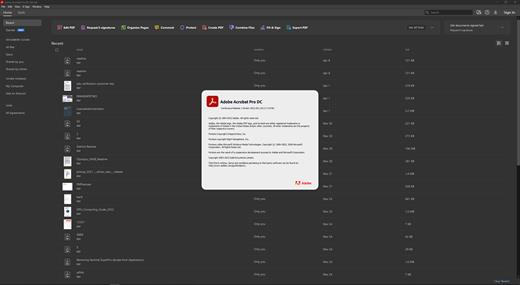
Adobe Acrobat Pro DC 2025.001.20997

Description: Adobe Acrobat Pro DC is the leading PDF converter and much more. Adobe Acrobat Pro DC software lets you deliver professional PDF communications. It's packed with smart tools that give you even more power to communicate. Create and edit PDF files with rich media included, share information more securely, and gather feedback more efficiently.

Adobe Acrobat Pro DC software is the advanced way for business professionals to create, combine, control, and deliver more secure, high-quality Adobe PDF documents for easy, more secure distribution, collaboration, and data collection.

Assemble electronic or paper files into reliable PDF documents that are easy to share with others using free Adobe Reader. You can assemble even Web sites, engineering drawings, and e-mail.

With Adobe Acrobat Pro DC you can manage document reviews, synthesizing feedback from multiple reviewers while preserving document format and integrity. Extend commenting capabilities to anyone using Adobe Reader. Windows users can design intelligent Adobe PDF forms that include business logic, such as calculations and data validations, to help increase the accuracy of data collection while reducing the costs of manual data entry.

Use Adobe Acrobat Pro DC to create high-impact PDF communications, collaborate more easily, and streamline reviews. Adobe Acrobat Dynamic PDF helps you get more done - easier, faster, better.

Edit PDF files
With Adobe Acrobat Pro DC, you can make minor edits to text and images right in your PDF file without requiring the original document or graphic. Edit text in a PDF. Fix a typo, change a font, or add a paragraph to your PDF as easily as you do in other applications using a new point-and-click interface. Edit images in a PDF. Resize, replace, and adjust images in your PDF with no need to track down the original file or graphic.

Export from PDF files
Reduce the time you spend retyping information stuck in PDF files. Convert PDF files to editable Microsoft Office documents. And save fonts, formatting, and effort.
Convert PDF files to Word. Save your PDF as a Microsoft Word document and take your fonts, formatting, and layouts with you. Convert PDF files to Excel. Turn your PDF or just part of it into an editable Excel spreadsheet you can use for data analysis right away. Convert PDF files to PowerPoint. Get a head start on new projects by saving a PDF file as a fully editable PowerPoint presentation.

Create PDF files
Stop worrying about whether the files you send will look right on other people's screens. Turn documents into PDF files anyone can reliably view with free Adobe Reader.
Convert Word, Excel, or PowerPoint to PDF. Right from your Office application in Windows, you can create PDFs, start a shared review, restrict PDF edits, and more. Print to PDF. Convert files to PDF from virtually any application that prints simply by selecting Adobe PDF as your printer. Scan to PDF. When you need to turn a paper document or form into a digital file, just scan it to create a searchable PDF file you can edit. Convert HTML pages to PDF. Save web pages as PDF files to archive web content, review the pages offline, or print them more reliably.

Create and analyze forms
Cut the time you spend creating forms, rekeying data, and correcting errors. Distribute forms online, and then collect responses and analyze results in real time.
Create new PDF and web forms. Customize professional templates or design from scratch with the Adobe FormsCentral desktop app included in Adobe Acrobat Pro DC. Collect form responses with FormsCentral. Easily collect responses by moving your PDF or web forms online with the Adobe FormsCentral online service. Convert existing forms to fillable PDFs. Type less, gather more. Quickly convert your paper, Word, or Excel forms to fillable PDF forms. Collect form responses using Adobe Acrobat tools. Compile returned forms into one PDF, or host forms using a network folder or Microsoft SharePoint server.

System Requirements:
Intel® or AMD processor; 1.5GHz or faster processor
Windows 11 (64 bit), Windows 10 (64 bit) version 1809 or later, Windows Server 2016 (64 bit), or Windows Server 2019 (64 bit)
2GB of RAM
4.5GB of available hard-disk space.
1024x768 screen resolution
Video hardware acceleration (optional)

Release Name: Adobe Acrobat Pro DC 2025.001.20997
Size: 1.9 GB
Links: HOMEPAGE – NFO – Torrent Search

Download: RAPiDGATOR

6 Comments
Dec 9

Advanced SystemCare Pro 19.1.0.176

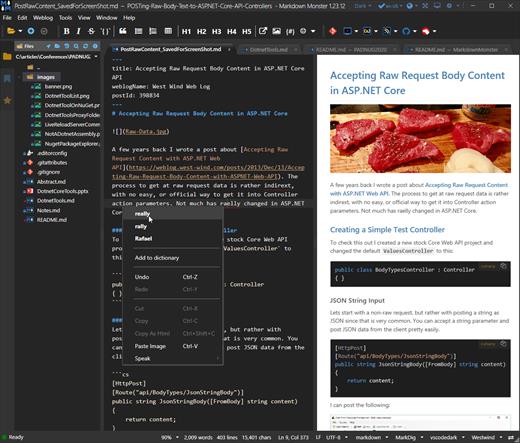
Description: Advanced SystemCare Pro provides an always-on, automated, the all-in-one PC optimization utility. It specializes in ONE-Click solutions to detect, clean, repair, speed up and eventually protect PC. Advanced SystemCare is a PC maintenance program that's incredibly easy to use, the World's Top System Utility for Superior PC Health! With the novel system technology, Advanced SystemCare empowers you to run your computer faster. Ensures more stably and more efficiently than with any other system utilities.

Clean & Optimize PC Performance:
- Basic PC cleaning and optimization
- 1-click to fix disk errors for more stable and efficient PC system
- Smarter AI mode for intelligent scan and premium PC cleaning & optimization
- Deep clean registry to prevent system crash
- Defrag hard drive data to optimize PC performance
- Auto RAM clean to stop unused programs and processes
- Auto care for PC as scheduled
- Monitor system condition in real-time
- 1-click to keep important programs up-to-date

Boost PC Speed:
- Up to 200% quicker PC startup
- Up to 300% Internet speedup with Internet Booster

Ensure PC & Privacy Security:
- Basic PC protection with spyware removal
- Full PC protection for detecting and removing deepest infections
- Capture intruders automatically with FaceID
- Block malicious links and suspicious senders in web emails
- Premium surfing protection with automatically clear tracking data
- Disguise digital fingerprint to keep online behaviour private
- Keep your personal data away from untrusted programs
- Proactively detect and block security holes in real-time
- Detect and enable both antivirus & firewall for dual protection

Release Name: Advanced SystemCare Pro 19.1.0.176
Size: 75.8 MB
Links: HOMEPAGE – NFO – Torrent Search

Download: RAPiDGATOR
8 Comments
Dec 9

StartAllBack 3.9.20.5345

Introducing StartAllBack: Windows 11 from better timeline, Embrace, enhance, unsweep classic UI from under the rug.

Restore and improve taskbar
Show labels on task icons
Adjust icon size and margins
Move taskbar to top, left or right edges
Drag and drop stuff onto taskbar
Center task icons but keep Start button on the left
Split into segments, use dynamic translucency
Separate corner icons with Windows 7/10 UI

Restore and improve File Explorer UI
Ribbon and Command Bar revamped with translucent effects
Details pane on bottom
Old search box (the one which works)
Dark mode support for more dialogs

Restore and improve context menus
All new look with rounded acrylic menus
Fast and responsive taskbar menus
New fonts, better touch support

Restore and improve start menu
Launch apps and go to system places in one click
Navigate dropdown menus like a boss
Enjoy fast and reliable search

Finally, lightweight styling and UI consistency
Enjoy Windows 7, Windows 10 and third-party taskbar and start menu styles
Fix UI inconsistencies in Win32 apps
Don't be blue: recolor UI in all windows apps
Negative resource usage: fewer RAM used, fewer processes started

Release Name: StartAllBack 3.9.20.5345
Size: 2.1 MB
Links: HOMEPAGE – NFO – Torrent Search

Download: RAPiDGATOR
6 Comments
Dec 9

Final Cut Pro Suite 2025 v4

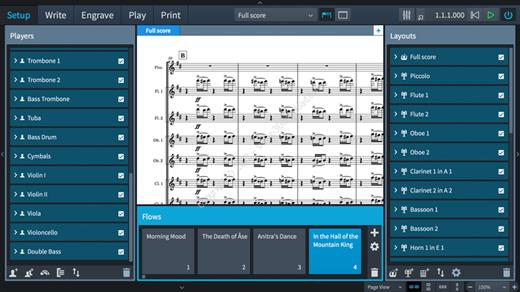
Motion is designed for video editors, Motion 5 lets you customize Final Cut Pro titles, transitions, and effects. Or create your own dazzling animations in 2D or 3D space, with real-time feedback as you work.

What’s New

Version 2025 v4:


  • Release notes were unavailable when this listing was updated.
Compatibility

macOS 11.5.1 or later


Release Name: Final Cut Pro Suite 2025 v4
Size: 8.3 GB
Links: HOMEPAGE – NFO – Torrent Search

Download: RAPiDGATOR
2 Comments