Please REGISTER or RENEW your account on RAPiDGATOR.net and support us by doing through all RAPiDGATOR working download links on main posts...
Apr 7

Adobe Illustrator 2025 v29.8.6

Description: The industry-standard vector graphics software is used by millions of designers and artists to create everything from gorgeous web and mobile graphics to logos, icons, book illustrations, product packaging, and billboards.

Iconic work at any size.
Get all the drawing tools you need to turn simple shapes and colors into sophisticated logos, icons, and graphics. Illustrator artwork is vector-based design software, so it can scale down for mobile screens and up to billboard size . and always look crisp and beautiful.

Gorgeous typography that says it all.
Incorporate a company name into a logo, create a flyer, or mock up a website design with the best type tools out there. Add effects, manage styles, and edit individual characters to create typographic designs that perfectly express your messages.

Draw attention everywhere.
Create freehand drawings, or trace and recolor graphics to turn them into works of art. Use your illustrations anywhere, including printed pieces, presentations, websites, blogs, and social media.

Pro power comes standard.
Illustrator launches, saves, and renders effects faster than ever before. Reuse your vector graphics and quickly access unlimited fonts. Work seamlessly with other Creative Cloud apps like Photoshop, InDesign, XD, and Premiere Pro. Your graphics, styles, and text are stored in the cloud, so they.re always up to date and at your fingertips.

Release Name: Adobe Illustrator 2025 v29.8.6
Size: 3.1 GB
Links: HOMEPAGE – NFO – Torrent Search

Download: RAPiDGATOR

5 Comments
Apr 7

Directory Opus 13.22.2 Beta

Description: Are you frustrated by the limitations of Windows Explorer? Directory Opus is a complete replacement for Explorer, with far more functionality than any other file manager available today.

You're in control.
Not just a simple file manager; Directory Opus lets you make your computer yours.
With a flexible user interface and unbelievable configurability, you can tailor Opus to streamline your workflow.
Dual panes, dual trees, multiple tabs.
Filter, sort, group your folders. Label and rate your files.
Queued file copies. Powerful batch renaming. Full archive support.
Find your files. Locate duplicates. Synchronize backups.
Assign tags and descriptions. Convert images. Edit metadata.
Fully multi-threaded, native 64 bit high performance code.
Whatever you want to do - Opus can probably do it. And if it's not built-in, you can take advantage of the unrivalled configurability to extend Opus using external tools.

What makes Opus unique?

Built for speed
Opus is written in native C++ multi-threaded code; compiled for the latest 64 bit CPUs, with high performance our number one design principle.

Fully configurable
Change the colors. Change the fonts. Change the toolbars and menus. Set up hotkeys. Opus adapts to how you want to use it.

Makes file management a breeze
Powerful searching, sorting, grouping, labelling and tagging features let you take control of your files like never before.

Endlessly extensible
Work with third-party tools as easily as with the built-in features. A full scripting interface, including scriptable dialogs, means your imagination is really the only limit.

Replace Windows Explorer and don't look back
Our unique Explorer Replacement mode provides a full replacement for Windows Explorer.
Single or dual pane file display and folder trees
Tabbed interface let you keep multiple folders open and switch quickly between them
Integrated viewer, metadata editor and utility panel
Built-in tools including synchronize and duplicate file finder
Leverage indexed search engines like Windows Search and Everything

High performance file management features
Copy, move, rename, duplicate, archive, view, backup and delete your files with ease
Queue multiple file copies for improved performance
Batch renaming including easy-to-use keyboard macros
Support for FTP and archive formats like Zip, 7Zip and RAR
Quickly filter, sort, group and search your folders
Color-code your files, assign status icons, star ratings, tags and descriptions
View images, documents and more. Image marking lets you sort your photos quickly and easily
Calculate folder sizes and print or export folder listings

Unrivalled configurability
Why let the programmers decide for you? You can tailor Opus to look how you want it to look, and to work how you want it to work.
Choose from light mode, dark mode, or design your own theme
Over 600 configurable colors and fonts
All toolbars and menus can be edited, plus you can add your own
Floating toolbars can act as program launchers
Configure your own hotkeys that work everywhere or just in Opus
Full scripting interface lets you design your own dialogs and add your own commands

Release Name: Directory Opus 13.22.2 Beta
Size: 29.4 MB
Links: HOMEPAGE – NFO – Torrent Search

Download: RAPiDGATOR

8 Comments
Apr 7

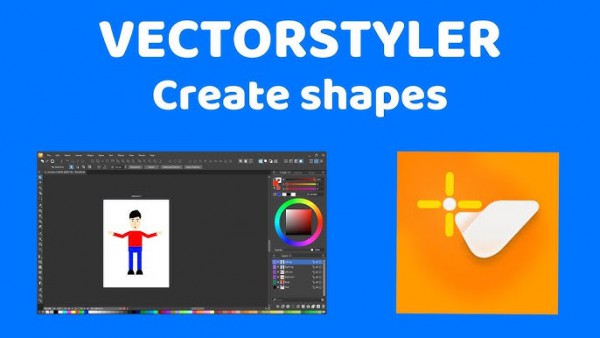
VectorStyler 1.3.012

Description: VectorStyler brings every advanced vector and illustration tool together — in one complete, independent package, with no subscriptions and no compromises. Packed with powerful, unique tools you won’t find anywhere else — VectorStyler redefines what’s possible in vector illustration.

Customizable User Experience
Customize all aspects of the user interface and workflow, including shortcuts, menus, toolboxes and toolbars. Create and save your own workspace profiles.

Native Illustrator Import
Open, import or paste artwork from Adobe Illustrator using the native Illustrator file format support, retaining all high-level editable attributes.

Extended Compatibility
Import artwork and export to various common file formats like AI, PDF, SVG, DWG, DXF, PSD, PNG and TIFF. Import and export PSD files while retaining layer hierarchy and keeping editable vectors.

Powerful Snapping Options
Use advanced snapping options for precision, including rotated grids and guidelines, collision and tangent to shape snapping. Turn any object shape into a guideline.

Real Vector Brushes
Paint with and use real vector brushes on any shape or outline. Brushes can be of artistic, pattern, scatter or bristle type. Create new brush styles or presets from any group or layer.

Select Objects by Attribute
Select objects by style or other attributes. Select objects with a similar style or attribute as the selected objects.

Magic Wand Tool
Use the magic wand selection mode and the Magic Wand panel to select objects similar to the pointed object. Select similar shapes by area or length.

Color Palettes
Work with document and global color palettes easily. Open multiple color palettes from external formats. Manage palettes seamlessly.

Advanced Halftones
Create complex vector halftones on layers or images. Work multiple halftones on one object using the Appearance panel

Align Object on Path
Create non-destructive object alignment on path. Align and distribute multiple objects on a path

Vector Drop Shadow
Create vector drop shadow effects on objects or groups. Adjust the drop shadow options using the Drop Shadow panel.

Parametric Shapes
Draw with a large collection of parametric shapes. Adjust shape properties using the Shape panel. Use the Node tool to edit parametric shapes.

System Requirements
- VectorStyler is (also) a native Windows (Intel) application, and requires a PC with Windows 10 installed to run. A minimum of 8GB of system memory is recommended. More memory helps when creating complex designs or illustrations.
- Only Windows 10 or newer versions are supported. An Intel Core i5 or i7 processor with 4 cores and hyper-threading is recommended as VectorStyler makes extensive use of multiple threads. GPU acceleration can be enabled in the Settings / Performance by selecting OpenCL (any GPU supported by Windows), or the NVIDIA mode for Nvidia GPUs.

Release Name: VectorStyler 1.3.012
Size: 79.6 MB
Links: HOMEPAGE – NFO – Torrent Search

Download: RAPiDGATOR

9 Comments
Apr 7

Fast Screen Recorder 2.1.0.19

Description: Record your daily routine screen activity like your online Video Meetings, Video Classes, Self Tutorials and more. Why choose Fast Screen Recorder? Fast Screen Recorder is software to record your computer screen activities like your important video conference, video tutorials, educational activity. If you are a gamer then you can record all moments of your game where you are playing after that you can share with your friends.
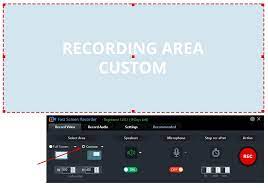
Fast Screen Recorder Features:
Fast Screen Recorder is a pack of solutions for screen recording. With the Fast Screen Recorder application, you can record any moment on your screen. Fast Screen Recorder helps record your online conferences, meetings, tutorials, gaming moment, and more. You can record only audio, video, and both also with or without mic voice.

Record Any Screen Area
Select the screen area which you want to record. If you want to record the full screen of your pc then select the Full-Screen option button or if you need any specific area of the screen then you choose Custom area.

Record Video with Microphone
Fast Screen Recorder provides an option to on/off your microphone before start recording. So you can create videos with your voice. This is very helpful to record tutorials and presentations.

Record only Audio
With the Fast Screen Recorder, you can also record mp3 files with system audio and microphone. From this feature, you can record music, songs, lectures, etc.

Set Auto Stop Recording
Fast Screen Recorder can auto stop recording. With this feature not required to sit every time when recording running. If you know your recording will stop after some time then you set and start recording. Your recording will auto stop the defined time.

Record Screen without Watermark
With the Fast Screen Recorder registered version you can record your computer screen videos without a watermark.

Unlimited Screen Recording
Fast Screen Recorder registered version not have any limit of video length and number of video recording.

Auto Video Optimization
Fast Screen Recorder manages memory so, the recorded video size is optimized without quality loss.

Play After Record
After recording video or audio from Fast Screen Recorder you will receive an option to play your recorded video.

Disable Record Mouse Activity
If you do not want to record your mouse movement activity then you need to disable the option in the fast screen recorder settings.

Stop Countdown before Recording
When you record a video from Fast Screen Recorder then the countdown is running every time. If you do not need a countdown on recording then disable the option from settings.

Change Shortcut Keys
If you need to change the shortcut key of your screen recording software then you can change settings with the new keys combination. If you want to reset settings then click on “Reset to Default”.

Capture Full Screenshot
With the Full Screen capture screenshots, You can capture screenshots with taskbar or without taskbar.

Capture Window Screenshot
You can capture screenshot of active window or select window with your mouse hover.

Capture Custom Screenshot
With this tool you can capture any part of your screen. With the mouse you can select screen area for capture.

Release Name: Fast Screen Recorder 2.1.0.19
Size: 22.4 MB
Links: HOMEPAGE – NFO – Torrent Search

Download: RAPiDGATOR

8 Comments
Apr 7

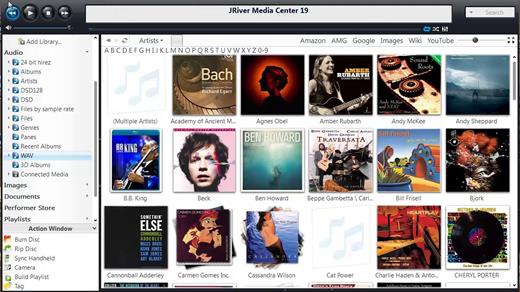
JRiver Media Center 35.0.67

Description: Supports more cell phones, MP3 players, DLNA, and other devices. Powers an HTPC to entertain your family. Even different playback in multiple zones. And it can record high definition TV, and provide a replacement for cable TV. It has a Theater View interface, controllable by a Media Center Remote, an iPad, iPhone, Android, a Windows netbook or Touchscreen. MC is a DirectShow player. Obsessive taggers will be delighted with cover art and metadata options. And MC backs up your work so you can sleep at night.

JRiver Media Center has a streamlined user interface designed to make it even easier to organize, find and play your digital files, and to connect to hardware devices. Make a CD of music for your car. Record your favorite shows and watch them on your TV. More than one soundcard? Play different music simultaneously in different rooms. MC’s Media Server can even stream your music to your PC at work!

Audio:
* Native support of DirectShow DSP filters
* Audiophile – WASAPI exclusive output using high-end USB DACs
* Audiophile – Added ability to play files from memory instead of disk
* Audiophile – Support for high end USB DAC’s with WASAPI
* Headphone DSP makes listening more natural and comfortable.
* /SoundcardSwitch command for the launcher (MC14.exe), allows soundcard selection on Vista and W7
* 3D album view adjusts text size to display more tracks when necessary
* 3D album view allows playing, adding, shuffling, and adding as next to play

Images:
* Image Preview allows zoom from a thumbnail to rotate, delete, compare, edit, and more
* Image thumbnail frames (optional)
* Photoshop PSD file support
* Single command copy / send to an editor like Photoshop, and stack new image with original

Video:
* Video tagging using sidecar files
* Chapter Support for MKV and MP4
* Chapters added to On Screen Display
* Info Panel displays metadata

Television:
* Added new “watched” column to metadata
* EPG can automatically retrieve XMLTV data
* Automatic correlation of XML channel names and MC channel names
* Info Panel displays metadata, including TV program art
* TV program art from YADB

Theater View:
* Watch Hulu and YouTube from Theater View
* Customizable nested views in Theater View
* Customizable File Info panel to display metadata
* Speed and quality enhancements
* Custom backgrounds
* Touch screen support
* On screen clock

Remotes and Servers:
* Wiki articles: Remotes and Servers
* Remote Relay using IR transceivers for controlling a set top box or receiver
* Remote Setup Wizard
* Media Center Remote learning and blasting
* Media Center can connect to another Media Center to act as a remote (TRemote)
* New HID remote control plug-in — supports shortcuts with keyboard, mouse, & gamepad
* Remote control with REST based Web Service Interface in Library Server
* Library Server supports read and write to allow for shared, multi-user database access
* DLNA added to the UPnP Server
* Library Server clients can write changes back to server
* Library Server connections allow playback on server as Playing Now zones

Release Name: JRiver Media Center 35.0.67
Size: 47.6 MB
Links: HOMEPAGE – NFO – Torrent Search

Download: RAPiDGATOR

8 Comments
Apr 7

Advanced PC Cleanup 3.31.31.10041

Description: Cleaning your PC has become easier with Advanced PC Cleanup. Get rid of redundant apps and files from your computer in a few clicks. Safeguards your computer from potential malware threats and removes the personal information saved online. Disable startup items and uninstall unwanted apps to enhance PC speed.


Advanced PC Cleanup main functions
Advanced PC Cleanup shows the current state of your Windows PC in one scan. This includes all junk & temporary files along with the areas needed to be taken care of. It shows storage space you can free up. Scan for malware and saved information to secure your identity and system at the same time.

1.Scan PC for all clutter
Scan will show how much storage space can be recovered from deleting all the unused files & old downloads. Clear up the personal information saved on the web browser.

2.One-click solution
Fix all issues such as PC cleanup and boost performance in one click. Remove malware, adware to save system from any potential threats to data.

Amazing Features
PC Cleaner
Deletes temporary files and clears trash from Recycle Bin on your PC.

System Manager
Manage the list of startup programs and improve the speed of your PC.

PC Security
Make sure your computer is safe from online threats & malware attacks.

System Optimizer
Clean up all the junk from your computer to improve the performance.

Release Name: Advanced PC Cleanup 3.31.31.10041
Size: 18.6 MB
Links: HOMEPAGE – NFO – Torrent Search

Download: RAPiDGATOR

7 Comments
Apr 7

Inside Barlinnie S02 1080p iP WEB-DL H264-BTN

This series explores the lives of current prisoners and staff as well as delving into a dark history of hangings, riots and escapes that have shaped the prison for over a century.

Links: HOMEPAGEiMDB

Inside.Barlinnie.S02.720p.WEB.H264-JFF
MKV | AAC | 2EP [1.8 GB]
NFO - SubtitlesTorrentNiTROFLARERAPiDGATOR
Single File RAR: RAPiDGATOR Backup

Inside.Barlinnie.S02.1080p.IP.WEB-DL.AAC2.0.H.264-BTN.
MKV | AAC | 2EP [3.5 GB]
NFOSubtitlesTorrentNiTROFLARERAPiDGATOR
Single File RAR: RAPiDGATOR Backup

Inside.Barlinnie.S02.WEB.H264-RBB [P2P]
MP4 | AAC | 2EP [969.2 MB]
NFOSubtitlesTorrentNiTROFLARERAPiDGATOR
Single File RAR: RAPiDGATOR Backup

19 Comments
Apr 7

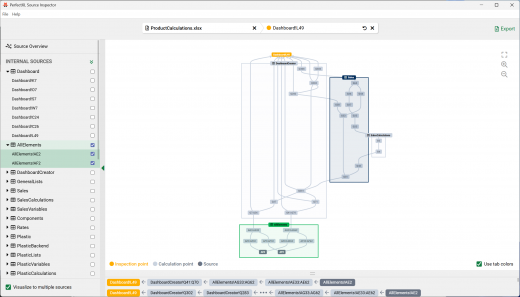
PerfectXL Source Inspector 1.0.1

Description: PerfectXL Source Inspector - Excel Source Detection Tool. PerfectXL Products - You need to be in control. Your Excel models deserve the best tools available. It’s your decision to make Excel Perfect! Take the next step with PerfectXL. Many went before.

Why PerfectXL?
Take the next step with PerfectXL. Many went before.

We are your trusted Excel partner
Whether you check, manage or create Excel files yourself: the need for insight and certainty is universal. From risk detection to automatic compare reports, we’ve got you covered when it comes to spreadsheet reliability and efficiency. Discover how PerfectXL can help you.

Insurance & Pension Funds
Choose reliable spreadsheets

Audit, Tax & Advisory
Check Excel files quickly and efficiently.

Reviewers & Control teams
Start every Excel model with a head start.

Excel & Finance Professionals
Get a grip on Excel, even while building.

System Requirements
Windows 7, 8.1, 10, 11 (64-bit)

Release Name: PerfectXL Source Inspector 1.0.1
Size: 170.7 MB
Links: HOMEPAGE – NFO – Torrent Search

Download: RAPiDGATOR
9 Comments
Apr 7

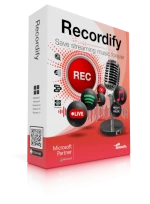
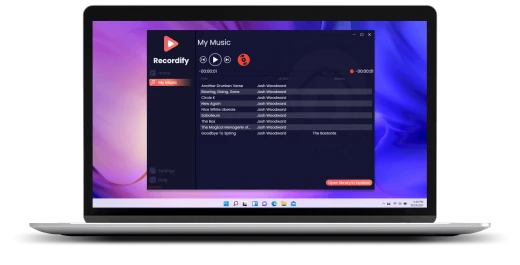
Abelssoft Recordify 2026 v11.01

Description: The Windows program Recordify is able to record everything that comes out of the PC speakers. Thus, it is no problem to record music tracks from streaming services such as Spotify or Amazon Music in order to save them permanently as MP3 files. Audio plays from online media libraries or sound files from YouTube videos can also be recorded.

Download music
Whether it's a single song, or an entire playlist, Recordify can permanently record and download all songs.

RECognition© technique
Simply run through a playlist while Recordify recognizes each song, names the ID3 tags, and saves them individually.

Save songs to hard disk
Download your favorite songs directly to your hard drive and conveniently copy them back and forth.

Many file formats
The recorded music can be saved as MP3, WAV or high-quality FLAC file.

Integrated music player
With the built-in music player, you can play your music directly in Recordify without being connected to the Internet.

Usable with many providers
With Recordify you can easily record and store music from Spotify, Apple Music or even Amazon.

High quality
The music quality depends on the source. Recordify supports high quality audio up to 320 kbps.

Downloaded music in the library
Your downloaded music files are automatically stored in the library. There you can access them at any time and play them even without internet access.

Music library with ID3 tags
Recordify cuts the individual songs from the stream and tries to collect the ID3 tags to match. In the end, you get perfect music files that can be transferred to your own collection as MP3. As with the owner of a cassette recorder, the PC user automatically pays a flat copyright fee, which is already added to the hardware costs, to legalize this type of recording and make it financially viable for musicians. The music tracks are saved to the hard disk by Recordify in MP3, WAV or FLAC formats.

Record music from streaming services
Recordify is particularly well prepared for recording streaming services. Like a radio, they play one music track after another. With the difference that the user can determine his own program. The problem with this is that an Internet connection is always required, because the music tracks are not stored on the hard drive in the streaming process. Many users therefore ask themselves: How can the music be downloaded and permanently stored? Recordify was developed precisely for this purpose. It works like a cassette recorder - only much more modern.

Cassette recorder for the PC
Recordify is a cassette recorder for the Windows PC. Everything that is played on the computer can also be recorded. With a mouse click, the user starts the recording function - and also cancels it again. This stereo mix recording function can be used to record and save the music track of YouTube videos. However, audio plays from an online media library can also be recorded.

Endless audio books for your Toniebox
Tonieboxes are small music players that are specially designed for the needs of children. When a Tonifigure is placed on the Toniebox, the box plays a radio play or music from that figure. Should you be in possession of a creative tonie that can be played on yourself, Recordify is an unimaginable help. Because the tool lets you record audio books, music and more with Recordify. Afterwards, your creative toonie can easily be recorded with it. This way, you can also listen to audio plays and music with the Toniebox, for which there are no purchasable figures yet. And it's also free of charge.

Release Name: Abelssoft Recordify 2026 v11.01
Size: 40.7 MB
Links: HOMEPAGE – NFO – Torrent Search

Download: RAPiDGATOR

7 Comments
Apr 7

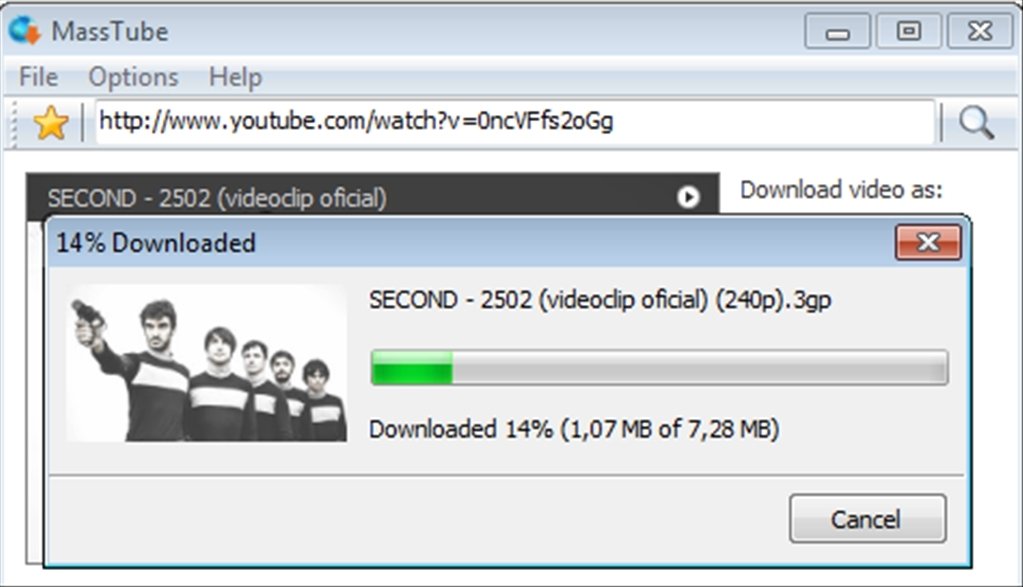
MassTube 2026 v21.5.5.198 Ultra

Description: MassTube is a simple, but powerful application to quicky download videos from YouTube.

Key features:
- download VEVO and others.
- download in Ultra HD 4K 2160p, Full HD 1080p, HD 720p and in other popular video resolutions.
- download in MP3, FLAC, OGG and in other popular audio formats.
- compatible with Windows 11, 10, 8.1, 8 and 7.
- much more! :)

Release Name: MassTube 2026 v21.5.5.198 Ultra
Size: 85.5 MB
Links: HOMEPAGE – NFO – Torrent Search

Download: RAPiDGATOR

9 Comments