Please REGISTER or RENEW your account on RAPiDGATOR.net and support us by doing through all RAPiDGATOR working download links on main posts...
Apr 8

Vellum 4.1.1

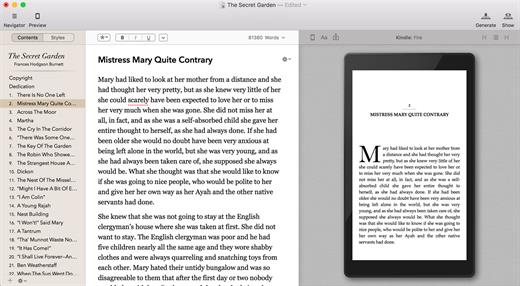
Vellum is an eBook-generating tool that lets you easily create an eBook from a text manuscript or from scratch within the application. Choose the appropriate style from several options, view instant previews of the finished product, and easily generate and regenerate eBooks with a single click to avoid disaster upon finding mistakes.

What’s New

Version 4.1.1:


  • Release notes were unavailable when this listing was updated.
Compatibility

macOS 10.15 or later


Release Name: Vellum 4.1.1
Size: 106.7 MB
Links: HOMEPAGE – NFO – Torrent Search

Download: RAPiDGATOR

6 Comments
Apr 8

A Better Finder Attributes 7.44

A Better Finder Attributes 7 allows you to change JPEG & RAW shooting dates, JPEG EXIF meta-data tags, file creation & modification dates, file flags and deal with invisible files.
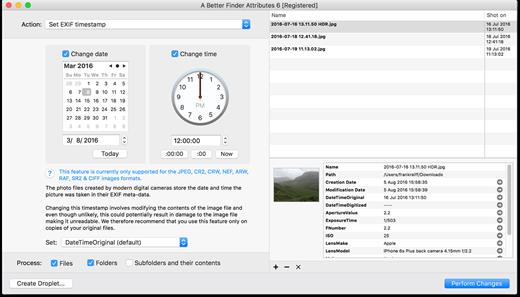
Correct EXIF Digital Photo Shooting Timestamps

A Better Finder Attributes 7 allows you to manipulate JPEG, CR2, NEF, ARF, RAF, SR2, CRW & CIFF EXIF timestamps at will by setting them to specific times or batch adjusting them by adding and removing time (useful for correcting the timestamps of images taken with a digital camera with a incorrectly set clock and to compensate for timezone changes).

Correct Finder Sorting for Digital Photos

A Better Finder Attributes 7 also allows you to synchronize the file creation and modification dates with the shooting dates of JPEG EXIF as well as a wide variety of RAW formats, so that files sort properly in the Finder and other systems.

Change, Add & Remove JPEG EXIF Meta-Data

A Better Finder Attributes 7 allows the most commonly used JPEG EXIF meta-data tags, such as copyright & owner information, camera & lens specifactions, some exposure information and much else besides to be directly manipulated.

You can strip JPEG EXIF information from a file altogether, strip GPS and IPTC location data or edit individual tags.

Total File Creation & Modification Date Control

A Better Finder Attributes 7 gives you total control over file creation and modification dates, setting them to specific times and dates, adding or removing time or simply removing them altogether.

Setting Mac File Flags

A Better Finder Attributes 7 supports setting all common Mac file system flags. You can set whether or not file extensions appear in the Finder, batch lock or unlock files, set or remove legacy creation & type codes, remove invisible files, restart the Finder in a special mode that shows invisible files, batch set Finder labels and force Finder updates.

Showing & Deleting Invisible Files

A Better Finder Attributes 7 can delete invisible files, such as .DS_Store, that can lead to problems when delivering files to non-Mac systems and play havoc with Unix tools such as version control and archiving tools.

On top of this A Better Finder Attributes has a special “Show Invisible Files” feature hidden in the “Tools” menu that switches the Finder to a special mode in which invisible files become visible

Other Noteworthy Features


  • Batch operation
  • Create Droplets for automated processing
  • Drag-and-drop into the file list or onto the application icon
  • Select files in the Finder and activate A Better Finder Attributes 5 via the Finder context menu or via a hot key
  • Automatically deals with file date consistency rules
  • Separate processing for files and folders, batch processing of sub-folders
  • Additionally, A Better Finder Attributes 5 gives you control over:
  • Whether or not file extensions appear in the Finder
  • Batch locking or unlocking of files
  • Setting or removing legacy creator and type codes
  • Removing invisible files
  • Seeing invisible files in the Finder
  • Batch setting of Finder labels
  • Forcing the Finder to update its information about files and folders
What’s New

Version 7.44:


  • Release notes were unavailable when this listing was updated.
Compatibility

macOS 10.11 or later


Release Name: A Better Finder Attributes 7.44
Size: 15 MB
Links: HOMEPAGE – NFO – Torrent Search

Download: RAPiDGATOR

5 Comments
Apr 8

Advanced Renamer 4.20

Advanced Renamer for Mac is a powerful batch file renaming tool designed to help users rename, organize, copy, and move large numbers of files and folders quickly and efficiently. The software supports macOS and is built for users who need more control than simple manual renaming, whether for photos, videos, music files, documents, or general file management.

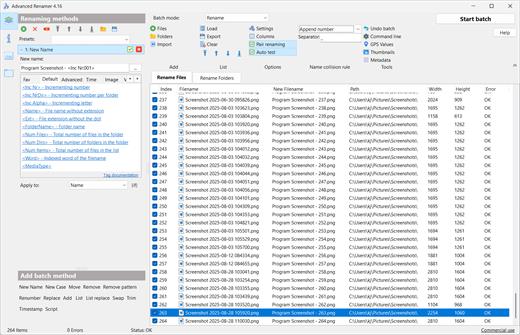
With real-time preview and full batch undo, Advanced Renamer makes large renaming jobs safer and easier. Users can combine multiple renaming methods in a single task, including adding or removing text, replacing characters, changing case, renumbering files, trimming names, modifying timestamps, and even using JavaScript for more advanced automation.

One of the software’s biggest strengths is its metadata support. Advanced Renamer can extract information from image, audio, and video files, including EXIF, XMP, IPTC, and ID3 tags, then use that data to build meaningful file names automatically. It can also work with embedded GPS data to add location details such as city, country, or state to file names, which is especially useful for photographers and video creators.

What’s New

Version 4.20:


  • Release notes were unavailable when this listing was updated.
Compatibility

macOS 11.0 or later


Release Name: Advanced Renamer 4.20
Size: 22.9 MB
Links: HOMEPAGE – NFO – Torrent Search

Download: RAPiDGATOR

3 Comments
Apr 8

Audio Hijack 4.5.7

Audio Hijack (was Audio Hijack Pro) drastically changes the way you use audio on your computer, giving you the freedom to listen to audio when you want and how you want. Record and enhance any audio with Audio Hijack – it’s the cornerstone of your digital audio experience.

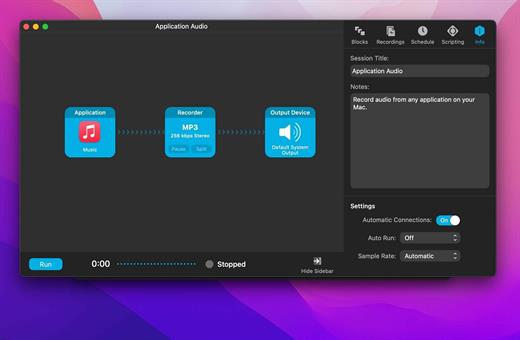
Audio Hijack will allow you to record any application’s audio, from Internet streams to DVD audio and everywhere in between. If your machine can play it, Audio Hijack can record it. And that’s not all – Audio Hijack will also enhance any audio, unsing industry-standard VST and AudioUnit audio effects to make your music sound incredible. Record. Enhance. Enjoy!

More Great Features

Record to All Major Formats
Record to the world’s most popular audio formats, including MP3 and AAC, or save in perfect-fidelity AIFF, WAV, ALAC or FLAC.

Reusable Sessions
Once you’ve configured a Session to your liking, you can re-use it over and over. With one click, you’ll be recording exactly as desired.

Easy File Organization
Find all of your recordings sorted by Session in the Recordings tab, where you can quickly pass files to an audio editor, add them to iTunes, or share them.

Timed Recordings
Use the Schedule tab to set up timed recordings for when you’re not around. Your audio will be waiting for you when you return.

Silence Monitoring
When silence is detected, Audio Hijack can automatically stop recording, split to a new file, or remove audio.

Bulletproof Recording
Bulletproof recording means that even if the power goes out or your computer crashes, you’ll never lose a recording.

A Thoughtful Interface
Audio Hijack’s intuitive audio grid provides a terrific pipeline-style view of exactly how your audio flows, so you can easily understand it.

Gorgeous Audio Effects
The included audio effects are easy to use and easy on the eyes. Their functionality is now accessible to all.

Time Shift Your Audio
Now you can pause, delay, and rewind live audio on your Mac. It’s perfect for transcribing audio and more!

What’s New

Version 4.5.7:


  • Release notes were unavailable when this listing was updated.
Compatibility

macOS 14.6 or later.


Release Name: Audio Hijack 4.5.7
Size: 29.2 MB
Links: HOMEPAGE – NFO – Torrent Search

Download: RAPiDGATOR
6 Comments
Apr 8

Cardhop 2.4.7

Cardhop lets you search, add, edit, and interact with your contacts in a fun and interactive way. Just type what you want and Cardhop will figure it out.

Features


  • Search: Instantly find what you’re looking for by typing the name or details and let Cardhop handle the rest.
  • Add or edit: Add new contacts or edit existing contacts with unparalleled ease and simplicity. Just enter the name of the contact along with their details and then observe the smile on your face.
  • Act: The old way of interacting with your contacts takes multiple steps to accomplish the actions you want. This all changes with Cardhop. After you try Cardhop, you’ll wonder how you ever did it the old way.
What’s New

Version 2.4.7:


  • Release notes were unavailable when this listing was updated.
Compatibility

macOS 10.13 or later
Apple Silicon or Intel Core processor


Release Name: Cardhop 2.4.7
Size: 31 MB
Links: HOMEPAGE – NFO – Torrent Search

Download: RAPiDGATOR

4 Comments
Apr 8

Tipping Point AU S03E38 WEB H264-NGP

Season 3, Episode 38 –

Links: HOMEPAGE TVM

Tipping.Point.AU.S2026E038.WEBDL.x264-W45Ps
MP4 | AAC | 396MB
NFO - SubtitlesTorrentNiTROFLARERAPiDGATOR
Single File RAR: RAPiDGATOR Backup

Tipping.Point.AU.S03E38.WEB.H.264-NGP
MP4 | AAC | 517MB
NFO – Subtitles – TorrentNiTROFLARERAPiDGATOR
Single File RAR: RAPiDGATOR Backup

Tipping.Point.AU.S2026E038.720p.WEBDL.x264-W45Ps
MKV | AAC | 690MB
NFO - SubtitlesTorrentNiTROFLARERAPiDGATOR
Single File RAR: RAPiDGATOR Backup

9 Comments
Apr 8

OmniFocus Pro 4.8.9

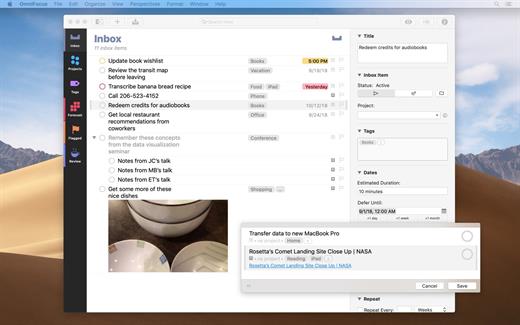
OmniFocus is an organizer app. It uses projects to organize tasks naturally, and then add tags to organize across projects. Easily enter tasks when you’re on the go, and process them when you have time. Tap the Forecast view – which shows both tasks and calendar events – to get a handle on your day. Use the Review perspective to keep your projects and tasks on track.

Use OmniFocus to accomplish more every day. Create projects and tasks, organize them with tags, focus on what you can do right now – and get stuff done. Then let our free syncing system make sure you data is the same on every Mac. (And on OmniFocus for iOS, available separately.) Because your data is encrypted, it’s safe in the cloud.

What’s New

Version 4.8.9:


  • Release notes were unavailable when this listing was updated.
Compatibility

macOS 11.0.0 or later
Apple Silicon or Intel Core processor


Release Name: OmniFocus Pro 4.8.9
Size: 49.6 MB
Links: HOMEPAGE – NFO – Torrent Search

Download: RAPiDGATOR

7 Comments
Apr 8

Bloom 1.5.32

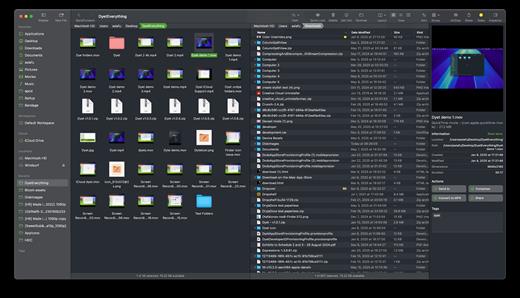
Bloom is a refined file management tool designed to enhance your search and navigation experience on macOS, offering a more intuitive and feature-rich alternative to Finder. With Bloom, you can instantly navigate to any location system-wide using the shortcut ⌘⇧⏎, making file access seamless and efficient .

Key Features


  • Enhanced Search Capabilities: Bloom allows you to search files by keyword within predefined locations, scanning tens of thousands of files in seconds for lightning-fast results. You can also search directly in any folder with ⌘F and refresh results with ⌘R .
  • Portal Mode: A compact window without sidebar or preview, Portal retains core functionalities and can be pinned on top of other windows or collapsed into the screen edge for convenience .
  • Archive Viewing: Browse contents of compressed files without extraction and preview text, images, or PDFs under 10MB by pressing Space or double-clicking .
  • Advanced File Management: Features like auto-resizing columns, advanced rename with regex support, workspace customization, iCloud Drive integration, and tag management elevate your file-browsing experience .
  • Media and Productivity Tools: Convert and optimize images, create various file types easily, paste images from the web, and organize files by kind or date. Additionally, Bloom records every operation for easy reversion and supports starting a terminal directly from a folder .
  • Disk Analysis and Task Management: Use Folder Scan to visualize disk usage through a treemap and manage file operations with a Task Scheduler to track progress .
What’s New

Version 1.5.32:


  • Release notes were unavailable when this listing was updated.
Compatibility

macOS 14.0 or later
Apple Silicon or Intel Core processor


Release Name: Bloom 1.5.32
Size: 15.3 MB
Links: HOMEPAGE – NFO – Torrent Search

Download: RAPiDGATOR
5 Comments
Apr 8

Sketch 2026.1

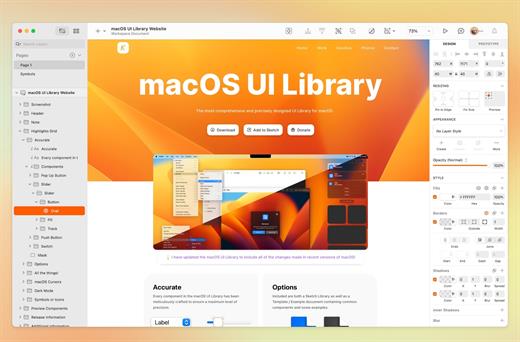
Sketch is a complete design toolkit. With a native Mac app for design and prototyping, and web-based tools to share, get feedback and handoff.

A native macOS app for design and prototyping


  • Powerful tools built for designers, by designers
  • Nestable frames and flexible stack layouts
  • Fast, immersive prototyping to bring your ideas to life
  • Shared Libraries, styles and components to scale your work
  • Full control over color profiles, including P3 support
  • Variable and OpenType font support
  • Offline and local file support
  • Ready for real-time collaboration, or working solo
A flexible web app for feedback, sharing and handoff

  • Store, sync and share documents
  • Document and project permissions
  • Easy Workspace admin
  • Annotate documents with feedback
  • File version history
  • Share Libraries, components and templates
  • Developer handoff tools
  • Test prototypes in any browser
  • View, comment and handoff for free
What’s New

Version 2026.1:


  • Release notes were unavailable when this listing was updated.
Compatibility

macOS 14.0 or later


Release Name: Sketch 2026.1
Size: 111.3 MB
Links: HOMEPAGE – NFO – Torrent Search

Download: RAPiDGATOR

3 Comments
Apr 8

Prompt 3.5.2

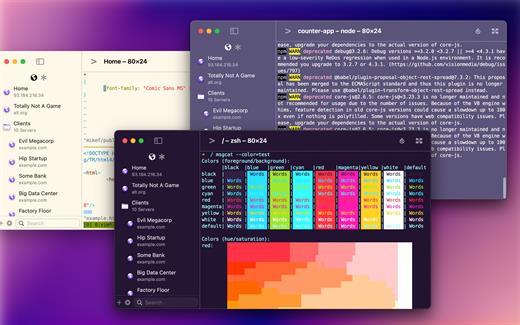
Prompt is the terminal that goes where you do, whether you’re on the road or at your desk. With Panic Sync, your servers are available on your iPhone, iPad, and Mac. With Mosh and Eternal Terminal support, you can stay connected even on the most unstable networks. And with both local terminals and remote connections on the Mac, Prompt is the SSH app that does it all.

Welcome to Prompt 3. For over a decade, Prompt has been the best SSH terminal on iOS and iPadOS, and we’re excited to finally release a much-requested Mac version. But that’s not all. With two new connection types, port forwarding, and a faster terminal, Prompt is better than ever.

Superfast SSH

We retooled the text engine in Prompt 3 to be up to 10x faster, and with improved terminal emulation, you can run nvim inside tmux without breaking a sweat.

Clips

Put your most-used commands and text bits into clips and access them with a single tap via Prompt’s keyboard bar. Clips can be stored globally or per-server.

Secure Enclave

Authenticate with FaceID and TouchID. The keys will stay secure on your device.

Panic Sync

Sync your favorite servers, passwords, private keys, and clips, between Prompt on all of your iOS devices.

Customizable

Make Prompt perfect with new themes, fonts, and a very configurable iOS keyboard.

Jump Hosts and Agent Forwarding

Access corporate servers, even at the beach.

Mosh and Eternal Terminal

Keep your terminal open, even when you get disconnected. Mosh is optimized for high-latency, low-throughput networks. Eternal Terminal is great for when you need to keep your full terminal history on a flaky connection.

Mouse Support

Use your mouse to interact with TUI-based apps that run through the terminal.

What’s New

Version 3.5.2:


  • Release notes were unavailable when this listing was updated.
Compatibility

macOS 13.0 or later.


Release Name: Prompt 3.5.2
Size: 31.1 MB
Links: HOMEPAGE – NFO – Torrent Search

Download: RAPiDGATOR
3 Comments