Please REGISTER or RENEW your account on RAPiDGATOR.net and support us by doing through all RAPiDGATOR working download links on main posts...
Mar 13

Battery Health 3.01

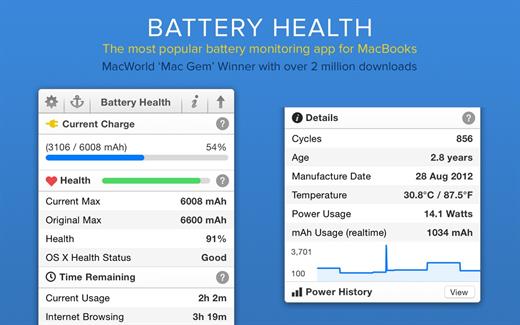
Battery Health is a professional battery monitoring utility for viewing vital statistics about your MacBook’s and iOS device’s battery, such as power level, heath, capacity, temperature, charge cycles and more.

What’s New

Version 3.01:


  • Release notes were unavailable when this listing was updated.
Compatibility

macOS 12 or later


Release Name: Battery Health 3.01
Size: 14.2 MB
Links: HOMEPAGE – NFO – Torrent Search

Download: RAPiDGATOR

9 Comments
Mar 13

World Clock Deluxe 4.20

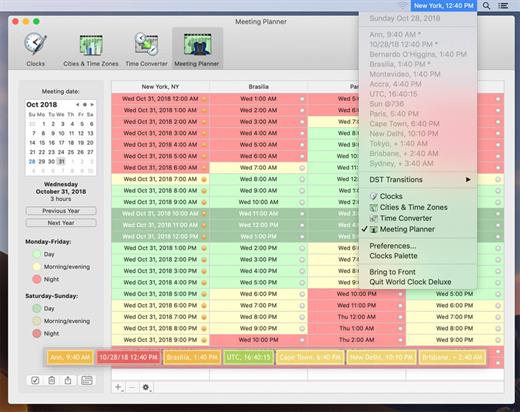
World Clock Deluxe is a reliable and easy-to-use time tool. With World Clock Deluxe you can display multiple clocks in a horizontal or vertical palette, in the menu bar and in the Dock, show Greenwich Mean Time and Coordinated Universal Time, easily identify the best time for conference calls or videoconferences across multiple time zones, quickly calculate time conversions between different cities or time zones, and show the current weather all over the world.

What’s New

Version 4.20:


  • Release notes were unavailable when this listing was updated.
Compatibility

OS X 10.11.0 or later


Release Name: World Clock Deluxe 4.20
Size: 9.5 MB
Links: HOMEPAGE – NFO – Torrent Search

Download: RAPiDGATOR

10 Comments
Mar 13

Default Folder X 6.2.7

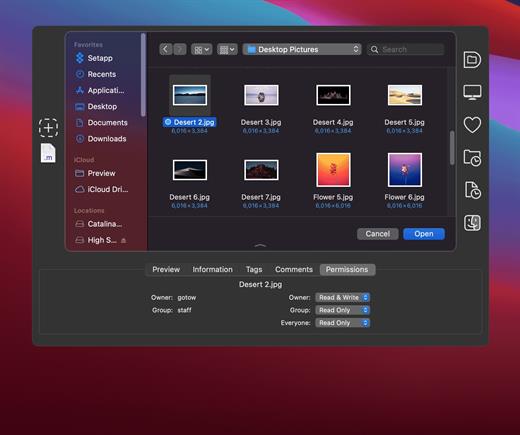
Default Folder X attaches a toolbar to the right side of the Open and Save dialogs in any OS X-native application. The toolbar gives you fast access to various folders and commands. You just click on the buttons to go to your favorite and recently used folders, manage the folders and files shown in the list, and make changes to your settings. It also fixes a number of problems in Open and Save dialogs, “rebounding” to the last selected file, putting the path listing back in the top menu, and correcting bugs in scrolling column views.

Features


  • Directory assistant: You can access the contents of your recent, favorite, and open folders right from Default Folder X’s toolbar.
  • Real time saving: If you’re constantly saving things inside the same folder, Default Folder X can remember that folder for you.
  • Finder management: Default Folder X lets you open up or save to any Finder window with a single click.
  • Instant Recall: To help you quickly return to folders you’ve recently used, Default Folder X remembers them for you.
  • Spotlight on the spot: Default Folder X lets you add Spotlight keywords, OpenMeta tags, and Finder labels on the spot, while you’re still in the Save dialog.
  • Information central: With Default Folder X you get previews below every Open dialog, expanded to fill the available space. Need to see more detail? Click on the image and it zooms up to full size.
  • Workflow without work: Rather than make you learn and set up a new application, Default Folder X blends into OS X.
What’s New

Version 6.2.7:


  • Release notes were unavailable when this listing was updated.
Compatibility

macOS 10.13 or later
Apple Silicon or Intel Core processor


Release Name: Default Folder X 6.2.7
Size: 31.9 MB
Links: HOMEPAGE – NFO – Torrent Search

Download: RAPiDGATOR

8 Comments
Mar 13

Shortcut Bar 2.9.72

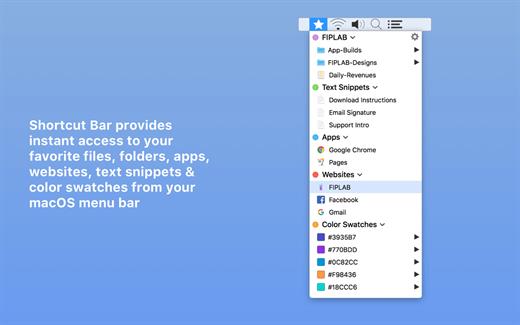
Shortcut Bar is an incredibly handy app that connects you to the files, folders and apps that you need lightning fast access to. The app lives in your menubar and allows you to add in an unlimited number of shortcuts. Whenever you require access to these important files and folders, simply click on the menubar icon and select the item from the dropdown list.

Features


  • Add as many files, folders and apps that you would like instant access to
  • Sort files and folders into Groups with headings, making it easier to find the shortcut you’re looking for
  • Folders and files are presented with their respective icon
  • Choose whether clicking on a shortcut opens it in Finder or opens the item itself
  • Choose whether the app starts at login or not
Benefits

  • Ultra quick access to any file/folder/app that you desire
  • No more shuffling through directories on Finder to locate exactly what you’re looking for and use regularly
  • Save time and improve productivity
What’s New

  • Bug fixes.
Compatibility

macOS 14.6 or later


Release Name: Shortcut Bar 2.9.72
Size: 9.6 MB
Links: HOMEPAGE – NFO – Torrent Search

Download: RAPiDGATOR

10 Comments
Mar 13

Steinberg Dorico Pro 6.2

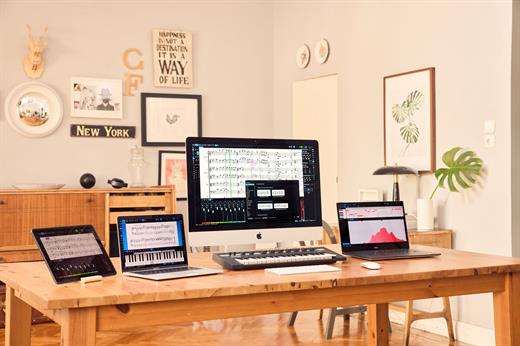
Dorico helps you to write music notation, automatically producing printed results of exceptional quality — and plays it back with breathtaking realism. It is easy enough for anyone to learn, yet has hundreds of advanced notations, features, options and sounds to satisfy even the most demanding professionals.

What you can do with Dorico?

Compose


  • Composing, arranging — or just writing and printing out music — is made much quicker and more efficient with Dorico. Thanks to its intelligent design, it automatically adjusts the notation as you write. With nearly 1,500 sounds included, arrangements can be played back with exceptional realism and, with no workarounds needed for advanced notation, Dorico produces excellent results much more quickly than has been possible before.
Learn

  • With its streamlined, natural user interface, students and those with less experience in scoring can compose and arrange straight into Dorico, making learning the language of music notation much faster and more intuitive. Editing and making changes — such as instrument, time signature or key — are straightforward, with the notation instantly and correctly adapting to include them, reinforcing the learning outcome. For teachers, producing teaching materials and hand-outs that mix music and text is easy, and it’s never been quicker to adapt arrangements for your band, orchestra or other school ensemble.
Publish

  • Dorico is the perfect tool for music engraving, publishing and copying. It automatically lays out pages of balance and beauty, with comprehensive collision avoidance and advanced algorithms that handle almost any musical context with ease. Music made with Dorico has the look of the finest traditionally engraved music, and the software provides tweaking tools to satisfy the most demanding professional. Producing high-quality, crystal-clear scores for selling or performance has never been faster or easier.
Benefits

  • Best automatic engraving of any software
  • Easy note input
  • Intelligently adjusts notation as you write
  • Any number of movements or pieces in a single project
  • Automatic layout of instrumental parts, including unique linked cues
  • Stunning playback — nearly 1,500 sounds included
  • Supports VST 3 virtual instruments and effects processors (30 included)
  • Sequencer-style piano roll MIDI editor
  • DTP page layout
  • Sophisticated chord symbols, unpitched percussion and drum set notation
  • Unbarred music, tuplets across barlines, microtonality, etc. all handled correctly — no workarounds
  • Transfer to and from other programs via MusicXML, MIDI, PDF, etc.
What’s New

Version 6.2:


  • Release notes were unavailable when this listing was updated.
Compatibility

macOS 10.10 or later


Release Name: Steinberg Dorico Pro 6.2
Size: 868.3 MB
Links: HOMEPAGE – NFO – Torrent Search

Download: RAPiDGATOR

9 Comments
Mar 13

Topaz Photo 1.3.3

AI-powered photo editing tool that improves photos pixel by pixel.
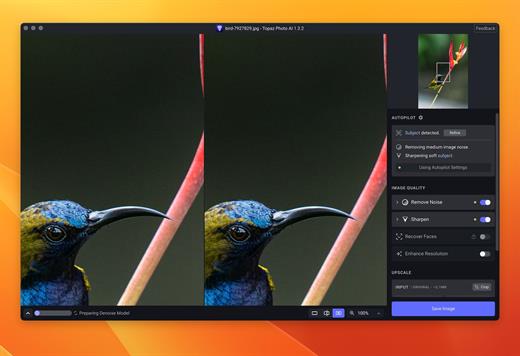
What is Topaz Photo AI? It is a new-generation photo editing tool that uses AI technology to perfect and denoise pictures pixel by pixel. Topaz Photo AI simplifies the editing process for photographers and designers. Its groundbreaking suite offers multiple tools to satisfy both amateurs and confident pros.

Topaz Photo AI allows editors to denoise, sharpen, upscale, preserve text, recover faces, remove objects, correct lighting, and balance color. Professional photo editors will be amazed at how much power Topaz Photo AI gives, and beginners will appreciate how easy and intuitive this tool is.

Topaz Photo AI helps you Sharpen, remove noise, and increase the resolution of your photos with tomorrow’s technology.

Maximize the potential of your photos.

Magically enhance image quality and resolution based on a deep understanding of the contents of your photo.

Enhance Quality

Maximize the visual quality of your images with best-in-the-world noise and blur reduction. Particularly useful in difficult settings with fast-moving subjects, low light, or atypical environments.

Crisp, clear, and noise-free.

It’s a magical feeling to see noise evaporate while sharp detail remains. Topaz Photo AI understands the contents of your image and accurately determines the difference between image detail and noise.

Tack-sharp subjects.

Unlike traditional sharpening, Topaz Photo AI’s Sharpen module naturally reverses root causes of blurriness (camera shake, motion blur, missed focus) to create more natural results. In the absence of blur, sharpness remains – crisp, clear detail that’s free of edge haloes or other artifacts.

Increase Resolution

Join hundreds of thousands of photographers and designers who use Topaz technology to generate real image detail for better printing, cropping, restoration, and more.

Magically add real detail.

Topaz Photo AI “remembers” real detail from millions of similar images, then fills in missing pixels based on that understanding. (It’s like how you can picture a friend’s face without being physically in front of them.) Add real image resolution to your photos for tighter crops or better prints.

Recover faces naturally.

Introduced in 2023, the breakthrough Face Recovery AI offers remarkable detail enhancement for low-resolution or blurry faces.

Intelligently improve lighting.

It’s a magical feeling to see noise evaporate while sharp detail remains. Topaz Photo AI understands the contents of your image and accurately determines the difference between image detail and noise.

Improve efficiency with Autopilot

Specify adjustments based on detected image attributes like subject, faces, noise, and blur levels. Autopilot allows you to mold Photo AI to your workflow and unique photographic style.

Easy workflow

Topaz Photo AI works directly on your Mac or PC. Use the standalone to batch process thousands of images in sequence, or use it as a Photoshop plugin for tight workflow integration. We’ve also partnered with major hardware manufacturers like Nvidia, AMD, and Intel to make Photo AI run as fast as possible for your computer.

What’s New

Version 1.3.3:


  • Release notes were unavailable when this listing was updated.
Compatibility

macOS 10.12 or later


Release Name: Topaz Photo 1.3.3
Size: 1.6 GB
Links: HOMEPAGE – NFO – Torrent Search

Download: RAPiDGATOR

6 Comments
Mar 13

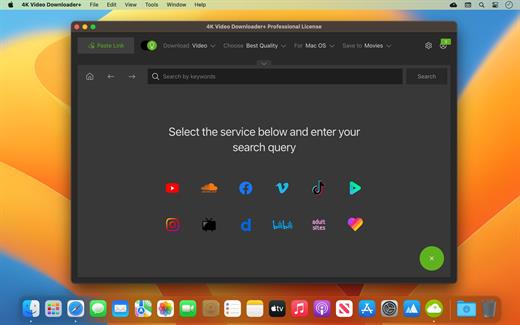
4K Video Downloader Plus Pro 26.0.7

Easy Downloads Management


  • Sort and filter downloads by type, name and date. Import and export all files as a single JSON file. Easily track and control the progress of both individual downloads and entire groups of downloading files.

What’s New

Version 26.0.7:


  • Release notes were unavailable when this listing was updated.
Compatibility

macOS 10.13 or later


Release Name: 4K Video Downloader Plus Pro 26.0.7
Size: 435.6 MB
Links: HOMEPAGE – NFO – Torrent Search

Download: RAPiDGATOR

9 Comments
Mar 13

AlDente Pro 1.37 fix

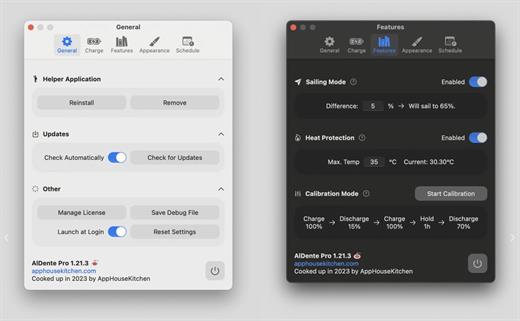
AlDente allows you to limit your MacBook from charging above a certain percentage. This will not only decrease Battery wear but also increase longevity of your Battery.

Features:


  • Charge Limiter allows you to set your maximum charging percentage between 20 and 100 percent. You can either set it by using the slide bar or by typing in the desired percentage in the field above and pressing enter afterwards.
  • Discharge – This feature allows your MacBook to run completely on Battery even if it is plugged in. Therefore, you can actively discharge your MacBook to a more healthy percentage. Unfortunately, while Discharge is activated, clamshell mode is not supported due to technical limitations.
What’s New

All


  • Added the Swedish language.
  • Added the Arabic language.
  • Improved support for the M5 MacBook Pro.
  • Improved the Helper install and uninstall process.
  • Fixed the Apple notifications appearing over the popover on macOS 26.
  • Many more fixes and stability improvements.
Pro

  • Added a new Status widget for the popover.
  • Added graph widgets to the popover.
  • Added notifications in the popover.
  • Added a notification for when the external monitor charging error happens.
  • Added a notification when the MacBook was overcharged on app launch.
  • Added the "Lock Screen when lid closed" setting to the Sleep Behavior.
  • Improved the Sleep Behavior settings, providing more clarity.
  • Improved the license activation process.
  • Improved the Energy Mode widget to make it more intuitive.
  • Improved the change email address process.
  • Moved some Sleep settings to "Show Advanced Settings" section.
  • Fixed invalid email error during activation when the email was inserted with a new line.
  • Fixed menubar items "jumping" when values change.
  • Fixed the interruption of the Calibration Mode when the charging state was changed through the menubar right click.
  • Fixed the freezing bug after frequently changing the charge limit.
  • Fixed a bug when Calibration "Hold for" didn't show the time correctly.
  • Fixed a bug where Energy Mode Apple Shortcuts were not automatically completed.
  • Fixed the charge limit resetting back to normal after the Calibration Mode finishes.
  • Fixed the Calibration time resetting back to normal after the Calibration Mode finishes.
  • Fixed some Tahoe design issues.
  • Fixed resetting the charge limit after the helper was reinstalled.
  • Fixed menu bar icon issues when the helper is uninstalled.
  • Fixed the missing power plug icon in some areas of AlDente for Intel MacBooks.
Compatibility

macOS 11 or later
Apple Silicon or Intel Core processor


Release Name: AlDente Pro 1.37 fix
Size: 10.3 MB
Links: HOMEPAGE – NFO – Torrent Search

Download: RAPiDGATOR

9 Comments
Mar 13

4K YouTube to MP3 Pro 26.0.7

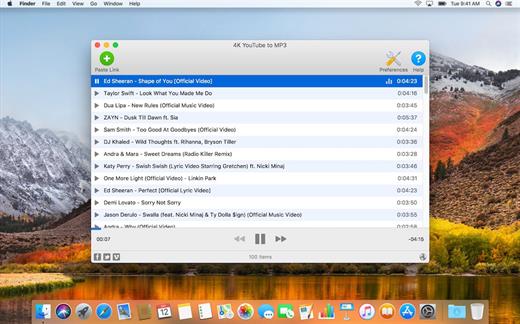
4K YouTube to MP3 was specifically created to extract audio from YouTube, Vimeo or Facebook and save it in MP3, M4A, OGG. No annoying and complicated settings to deal with, just a clean, friendly and functional interface. Downloading is simple and straightforward: just copy the link from your browser and click ‘Paste Url’. Done!

Features


  • Extract audio from YouTube videos and save it in MP3, M4A or OGG in high quality.
  • Download full YouTube playlists or channels and generate m3u files.
  • Transfer downloaded tracks automatically into iTunes and upload them on your iPhone or iPod.
  • Listen music via native built-in music player.
  • Download and extract audio tracks from SoundCloud, Vimeo, Flickr and DailyMotion videos.
  • Download audio books from YouTube.
  • Extract audio tracks even from embedded in HTML page videos.
  • Use 4K YouTube to MP3 on your PC, Mac or Linux, doesn’t matter what OS you prefer.
What’s New

Version 26.0.7:


  • Release notes were unavailable when this listing was updated.
Compatibility

macOS 10.10 or later


Release Name: 4K YouTube to MP3 Pro 26.0.7
Size: 406.4 MB
Links: HOMEPAGE – NFO – Torrent Search

Download: RAPiDGATOR
8 Comments
Mar 13

Capture One Enterprise 16.7.5

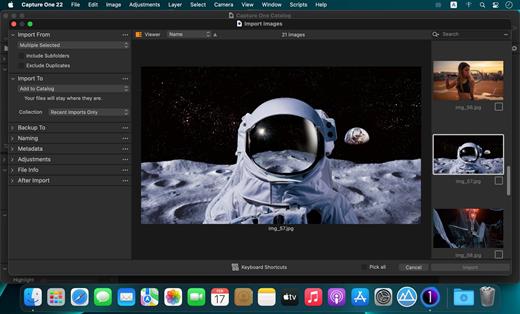
Capture One Enterprise – the photo editing solution for image production studios and e-commerce platforms. Its authentic true-to-life color processing, seamless editing experience, and fastest tethering in the industry gives you total creative control, making it a household name in studios across the world. Based in Copenhagen, Denmark, Capture One empowers photographers with cutting-edge features to keep your photography one step ahead

With an updated processing engine, market-leading performance, and powerful new features, Capture One is the professional choice in imaging software. You get the highly responsive precision tools you need to create stunning images from your camera’s RAW files in a time-saving workflow that can be customized to fit your needs.

What’s New

Version 16.7.5:


  • Release notes were unavailable when this listing was updated.
Compatibility

macOS 10.13 or later
Apple Silicon or Intel Core processor


Release Name: Capture One Enterprise 16.7.5
Size: 1.2 GB
Links: HOMEPAGE – NFO – Torrent Search

Download: RAPiDGATOR

7 Comments